All Articles
Guides

Software for account management in modern B2B revenue teams

Explore software for account management that helps B2B teams improve renewals, expansion, account context visibility, and cross-functional collaboration.

Robert Eng
April 2, 2026

Managing multiple accounts becomes harder as a company grows. Conversations spread across channels, and accessing account context is tricky. But to offer a great customer experience, support, success, and account management all need to be working with the same source of truth.

Software for account management brings all these interactions together so teams can coordinate work and clearly see where things stand with an account. The following guide explains what accounts manager software is and how it can centralize your customer support operations.
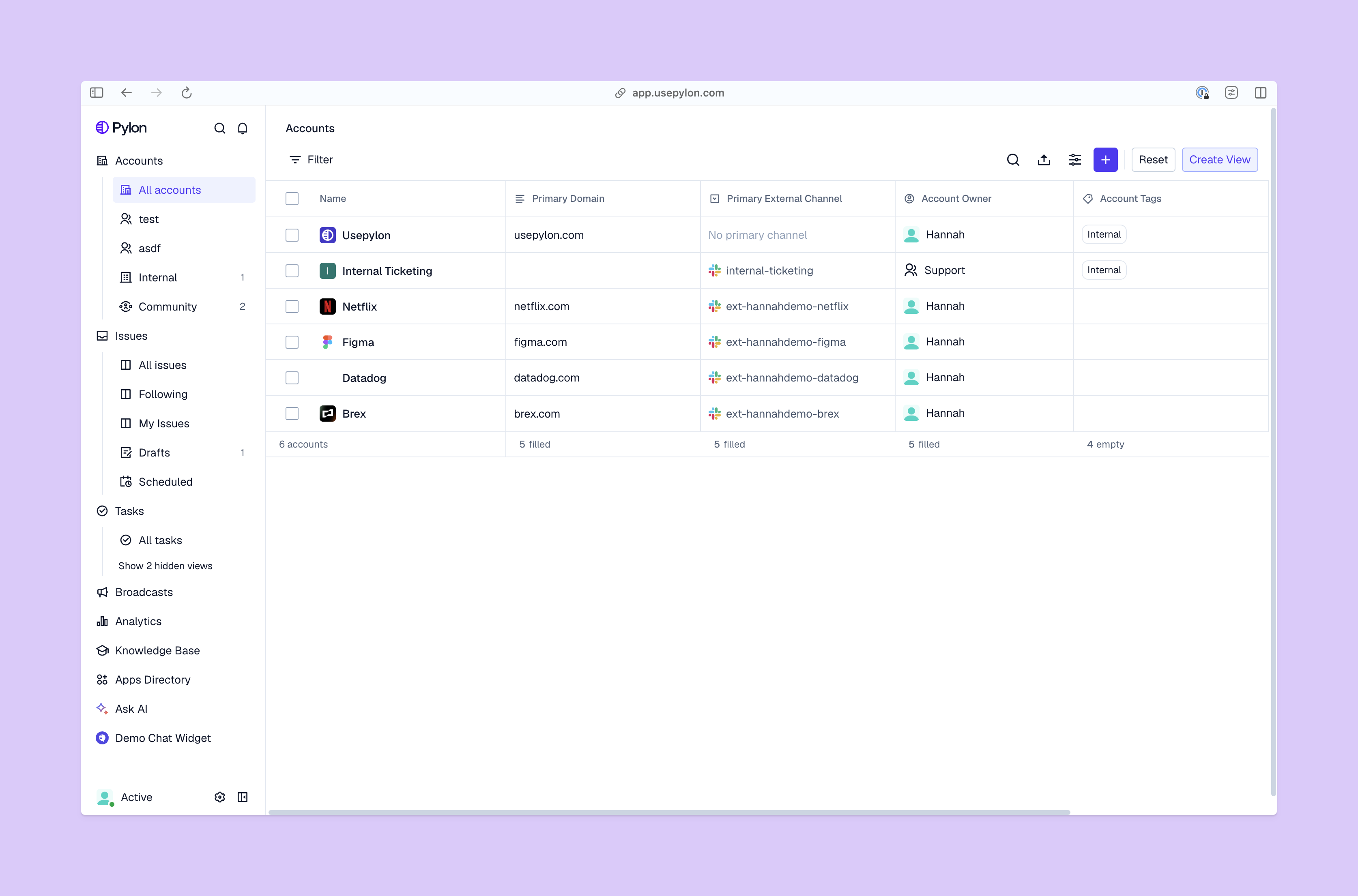
Understanding account management systems

Accounts view from Pylon

Account management systems help teams manage relationships with existing customers. They bring communication records and activity into one place so you can easily follow the lifecycle of each account.

What counts as an account depends on the company. In SaaS software, it usually refers to a company with multiple stakeholders and an ongoing contract. For smaller teams or B2C environments, it may represent a single customer tied to purchases or a subscription.

For many companies, a customer relationship management (CRM) platform is the hub used to manage accounts. While these tools often cater to pre-sales team needs, they also offer a shared account record for post-sales teams; this might include: 

  • Account records and stakeholder contacts
  • Customer conversations and activity history
  • Tasks related to requests and follow-ups
  • Account renewal and expansion opportunities
  • Signs of relationship progress

Modern account management systems differ from other common tools pre and post-sales teams use, like your traditional CRM. For example, sales prospecting platforms focus on finding and closing new customers, while support channels handle incoming requests. Today’s customer account software is more comprehensive than both of these, helping all post-sales teams maintain the relationship with an account after they’ve signed up.

Who uses account management software?

  • Account managers review context and identify expansion opportunities
  • Customer success managers monitor adoption and account health
  • Renewal managers track upcoming contracts and renewals
  • Revenue operations teams maintain account data and reporting
  • Support leaders review issues affecting high-value customers
  • Finance and billing teams reference contracts and payment details
  • Leadership teams monitor account performance and growth

Where account management software works best

  • Companies with long-term customer relationships
  • Companies sustained by recurring revenue or accounts
  • Organizations with multi-product offerings
  • Teams managing customers with multiple stakeholders, like an engineering lead and a finance contact
  • Companies tracking renewals and expansion opportunities

Common account management workflows

  • Onboarding handoffs from sales reps to customer support and success
  • Preparing quarterly business reviews with customers
  • Prepping contracts and renewals
  • Identifying opportunities to expand account features
  • Monitoring accounts for churn risk signals
  • Coordinating internally before conversations with external stakeholders

CRMs for account management vs. dedicated account management systems

B2B teams often use CRMs to manage sales pipelines and close deals, but they also have features post-sales teams can use to manage customer relationships, like centralized account context. That said, modern account management systems offer more dedicated support features for post-sales teams. 

What a CRM typically covers for account management

CRMs like Pipedrive and HubSpot store account records, contacts within each company, and timelines of activity tied to sales and customer conversations. This helps post-sales teams monitor expansion opportunities and review revenue performance per account. 

Where traditional CRMs fall short for ongoing account work

As relationships evolve, traditional CRMs often struggle to track post-sales work because they’re built around deals and pipeline stages. Teams may find it hard to manage renewals or monitor the health of a customer relationship because important information often lives outside the CRM.

When teams add additional account management tools

As your company scales, you might add more pointed customer relationship management tools to offer post-sales teams better support. The best CRMs for account management add capabilities such as lifecycle automation, cross-functional collaboration features, and success planning to help post-sales teams keep customers happy

Combining a CRM with account management software

Many companies adopt a hybrid setup that combines a CRM with specialized account management tools. In this model, the CRM remains the primary system for account data while additional platforms support ongoing customer work. 

Signs it may be time to extend your CRM

Teams tend to begin looking beyond their CRM when account work gets too difficult to manage within existing workflows. Common signals include:

  • Renewals slipping because upcoming contracts are hard to maintain
  • Inconsistent handoffs between customer support and success
  • Limited visibility into the overall health of customer relationships
  • Teams maintaining account notes in spreadsheets or separate tools
  • Trouble coordinating work across several teams

What to look for in modern account management software

Instead of creating a complex toolkit of various platforms to cover everything post-sales teams need, you could adopt a modern account management software designed for support, success, and account management teams. Here’s what you should look for in an all-in-one platform. 
Must-have features

  • A 360-degree customer view helps teams see contacts and activity in one place
  • Account health tracking highlights customers that may need attention
  • Renewal management monitors contracts and upcoming renewal dates
  • Pipeline visibility shows expansion opportunities within existing accounts

Useful features as teams grow

  • Account planning tools help teams outline long-term customer relationship goals and track progress
  • Cross-team collaboration features make it easy for sales, product, support, success, and account teams to update records and work asynchronously 
  • Lifecycle workflow automation can trigger reminders or tasks during moments such as onboarding milestones or expansion reviews
  • Integrations with product analytics and support tools let teams bring product usage and customer feedback into a single account view

The best account management platforms by use case

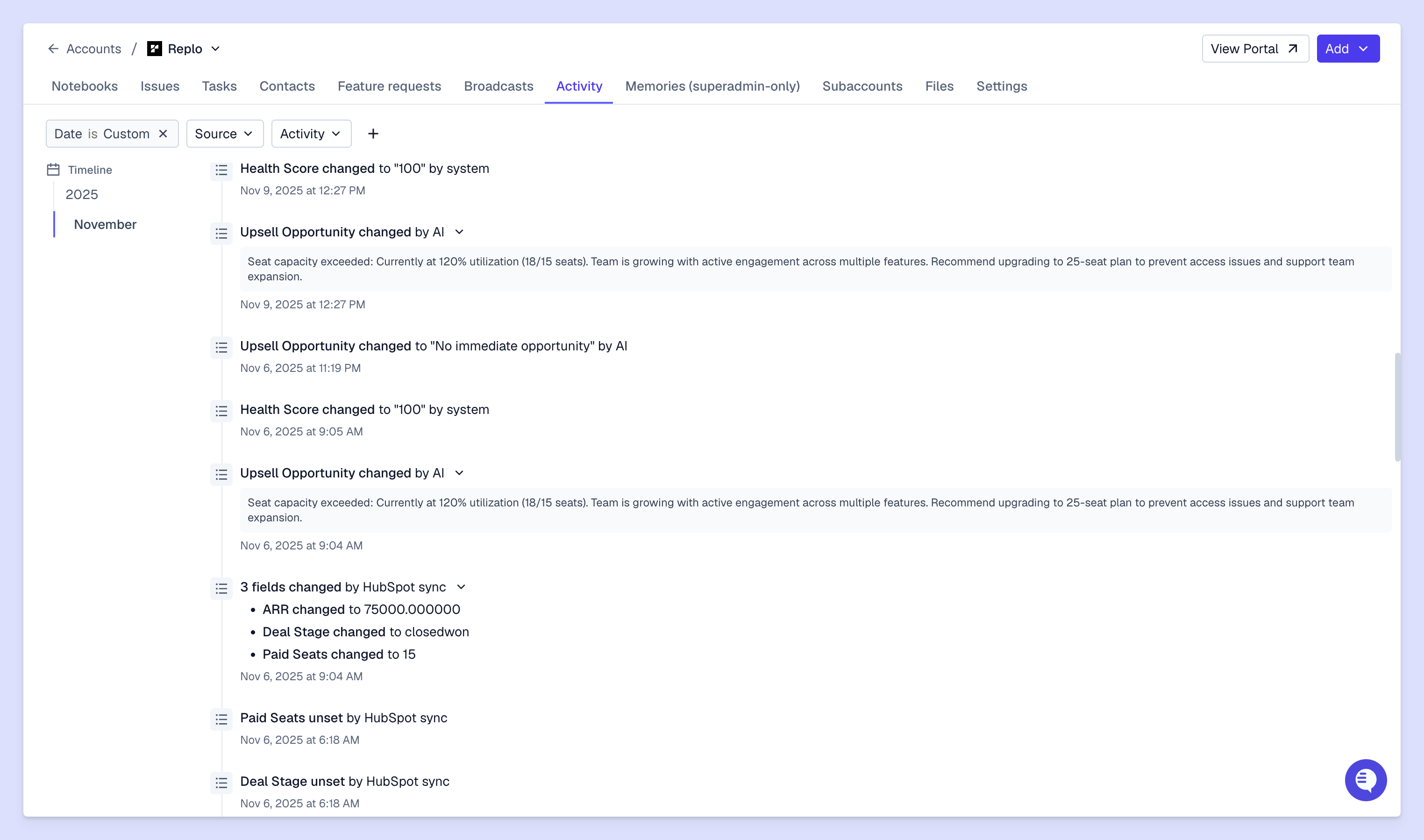
Account activity log view from Pylon

When choosing an account management software, it helps to focus on the capabilities you’ll actually use. Below are common use cases paired with the features that are most important in each. 

Small teams starting with lightweight account tracking

  • CRM configurations that let teams track accounts using custom fields and dashboards
  • Spreadsheets with automation for simple reminders and account lists
  • Customer success tools that add basic health tracking and notes

Sales-led teams managing expansions inside a CRM

  • Account scoring that highlights customers ready for expansion
  • Playbooks that guide sales outreach to existing customers
  • Opportunity linking between the original deal and expansion activity
  • Dashboards that show revenue growth within existing accounts

Customer success or renewal-focused teams

  • Calendars that surface upcoming contracts and renewal timelines
  • Customer health tracking that highlights risk or engagement changes
  • Success plans that organize goals and milestones for important accounts
  • Playbooks that structure quarterly business reviews

Enterprise account management

  • Support for parent and subsidiary account structures
  • Role-based permissions that control access
  • Audit trails for account activity and decisions
  • Configurable workflows that adapt to complex customer relationships
  • Executive-level reporting across strategic accounts

Product-led growth teams

  • Usage-based health signals that reflect how customers interact with the product
  • Product-qualified lead tracking that surfaces expansion opportunities
  • Lifecycle triggers that automate actions when usage patterns change

Multi-team collaboration

  • Shared account timelines that give teams visibility into customer support conversations 
  • Structured handoffs between support, success, and sales
  • Centralized notes that prevent information from becoming siloed

Regulated industries or higher security requirements

  • Role-based permissions that control access to sensitive account data
  • Audit logs that record account activity and updates
  • Data encryption that protects customer information
  • Compliance certifications

Turn account management into a growth engine with Pylon

Modern account management software helps teams organize customer conversations and metrics that might otherwise become fragmented across multiple systems. As teams scale, having clear visibility across accounts becomes increasingly important — it’s the only way to offer personalized, fast support across every touchpoint.

Pylon is the modern B2B support platform that offers true omnichannel support across Slack, Teams, email, chat, ticket forms, and more. Our AI Agents and Assistants automate busywork and reduce response times. Plus, with Account Intelligence that unifies scattered customer signals to calculate health scores and identify churn risk, we're built for customer success at scale. 

Book a demo

FAQ

What tools do account managers use?

B2B account managers use CRM systems, shared inboxes, customer support platforms, and collaboration tools to centralize conversations and monitor account activity.

What are examples of account management?

In B2B, account management includes onboarding customers, conducting QBRs, monitoring account health, managing renewals, and identifying upsell opportunities.

What’s the best software to manage multiple accounts?

The best B2B software to manage multiple accounts centralizes communication, tracks account activity, and integrates with CRM systems to provide a unified customer view.

What’s a good program to keep track of customers?

A strong B2B support platform tracks conversations, tickets, and account context in one place, giving teams a real-time customer 360 view.

Explore more

Team

Tom Zhou, Founding Engineer

Advith Chelikani
August 8, 2023
Guides

Transforming the support journey through omnichannel CX

Dan Guo
March 6, 2026
Industry

Building the Best B2B Knowledge Base: The 2025 Guide to AI-Powered Self-Service

Pylon Team
November 13, 2025
Industry

Knowledge Base Articles: What They Are & How to Make Them Effective

Dan Guo
June 20, 2025
Industry

Building better customer experiences with CX automation platforms

Pylon Team
January 13, 2026
Industry

How to build a proactive customer support strategy that actually works

Pylon Team
January 23, 2026
Guides

SLA Best Practices: How to Set and Manage Customer Expectations

December 5, 2025
Spotlights

Spotlight: Edward Ward @ Delivery Solutions

Marty Kausas
December 5, 2024
Industry

How to Setup a Shared Inbox in Gmail (All Methods)

Franz Heller
July 7, 2025

Explore more

Guides

Customer Success Best Practices: Guide to Improve Long-Term Retention

Dan Guo
December 12, 2025
Blog post
Releases

Product Launch: Community Support

Advith Chelikani
November 16, 2023
Blog post
Industry

How to Choose a B2B Support Platform | Complete Guide for 2025

Pylon Team
October 10, 2025
Blog post
Industry

How AI Is Transforming B2B Customer Support | Complete Guide for 2025

Pylon Team
October 17, 2025
Blog post
Guides

Building Customer Success: Facts, Strategies, and Scaling

Dan Guo
November 7, 2025
Blog post
Industry

How to build relationships with customers for B2B growth

Dan Guo
January 29, 2026
Blog post
Spotlights

Spotlight: Maranda Dziekonski @ Id.me

Marty Kausas
December 17, 2024
Blog post
Industry

Getting started with AI copilots for customer support

Pylon Team
December 29, 2025
Blog post
Industry

Understanding simple issue tracking systems for modern support teams

February 26, 2026
Blog post