As soon as a customer sends a request, the clock starts ticking. While your support team coordinates with product and dev teams to come up with a fix, the customer just wants to hear one thing: The issue is resolved.
Mean time to resolution (MTTR) measures how fast your team solves issues on average, from the first customer message to the final resolution. The “R” in MTTR is versatile, sometimes standing for repair, recovery, or response.
But in this article, we’ll specifically talk about resolution in a B2B customer support context. We’ll define the MTTR metric, then we’ll explore why it matters and how you can reduce it with shared context and agentic AI.
.png)
MTTR is the average time it takes to fully solve customer issues. Unlike first response time, which measures how quickly your team replies to customers, MTTR shows how long it takes to answer questions and fix problems completely.
The mean time to resolution formula is straightforward:
MTTR = total time to resolve all issues ÷ number of issues resolved
For example, let’s say your team resolves one issue in an hour, another in three hours, and a third in eight hours. You’d add up those numbers to get a total of 12 hours, and divide by the number of issues. So your MTTR is 12 ÷ 3, which equals an average 4 hour resolution time.
In a real support context you’ll have much higher volumes, but the principle is the same. Your software should calculate MTTR automatically and display it in your analytics dashboard, along with other customer support KPIs.
A high MTTR is a sign of operational inefficiency, and it’s often caused by fragmented systems and poor communication. In B2B customer support, conversations often happen across multiple channels and involve coordination with different teams. When context is scattered and collaboration is weak, delays often follow.
For example, a B2B SaaS customer could email to ask for help setting up an analytics integration. A different stakeholder from the same organization has already been in contact about a similar issue via Slack. But your support team can’t find important information buried in that Slack thread, so they start from scratch and the issue takes longer to resolve.
Poor handoffs are another common cause of high MTTR. Let’s use the same B2B SaaS scenario, but this time you need to hand the issue off to the dev team to fix the analytics integration. However, that handoff doesn’t specify what’s been done so far, and dev can’t access your support team’s system to see the ticket history. So they waste time hunting for context and end up duplicating work.
Unclear ownership and inefficient triage and escalation workflows can also drive up MTTR. When teams don’t know who’s responsible for next steps, or issues are routed to the wrong teams, resolutions get delayed.
Customers contact support to have their problems solved, and when that process is too slow, they often get frustrated and give low satisfaction ratings. When MTTR is very slow, it can put relationships at risk and increase churn. Worse, it creates a vicious cycle: Slow resolution results in a ticket backlog, which makes times even slower for future tickets.
Because speed is so important to B2B customers, support teams often set specific MTTR targets as part of their key objectives. When you miss those targets and breach customer SLAs, you can incur penalties and put entire relationships at risk.
MTTR is also important as an internal measure of operational reliability. Support team leaders need to track this metric regularly, then respond to changes by improving processes or staffing levels. For example, if responsiveness starts to slip, you could increase headcount to deal with the ticket backlog or use automation to speed up ticket routing.
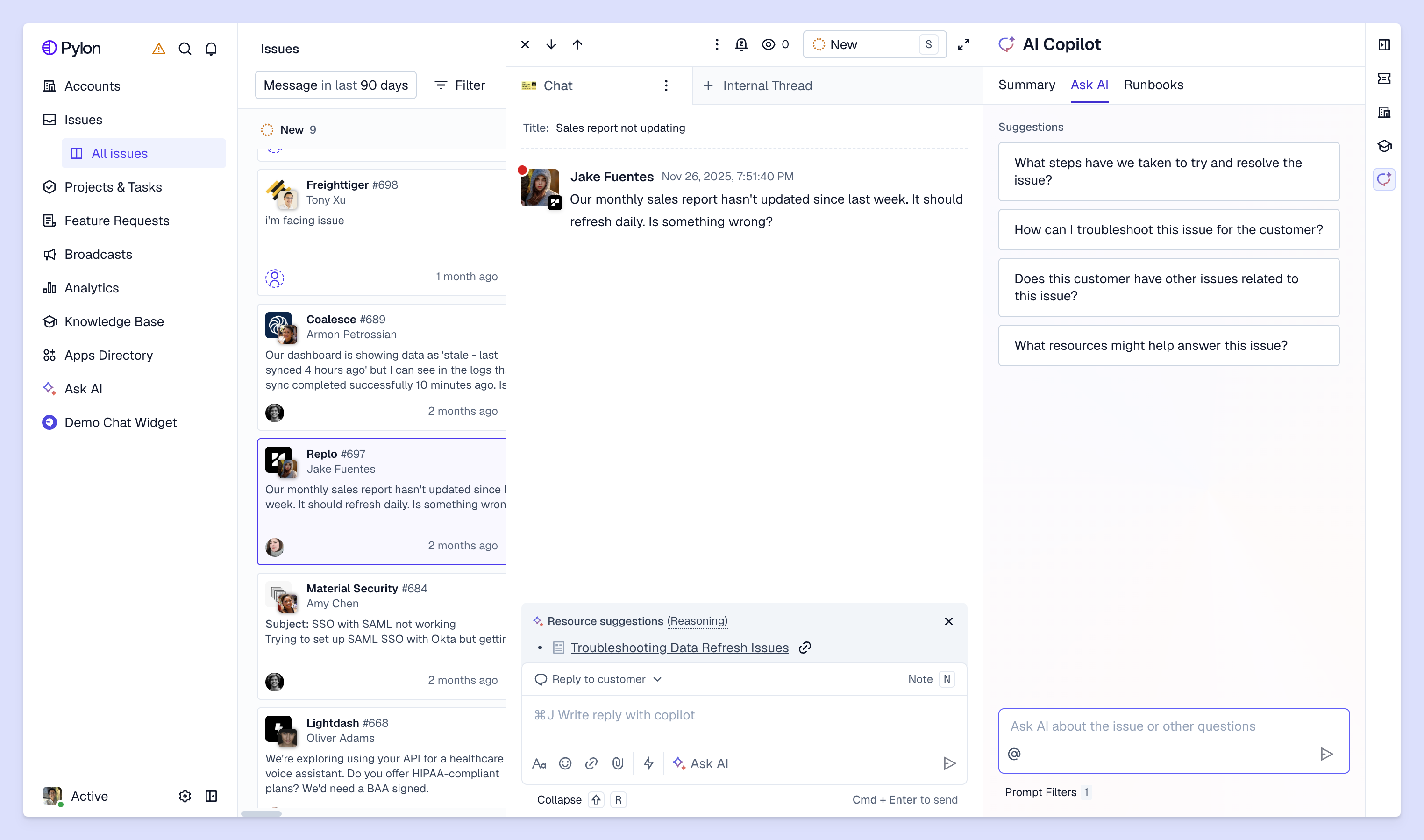
One of the best ways to reduce time to resolution is to use a support platform that brings customer context into a single workspace, instead of leaving it scattered across Slack threads and email chains. When teams can see context easily, they can resolve issues quickly.
Some platforms also use agentic AI to shorten resolution times further. Here’s what’s possible with an agentic support system like Pylon:
If you want to improve MTTR, don’t ask your team to work harder; give them better tools and workflows instead. When everyone working on customer issues can see the full context, including account health data and past conversations, they can resolve tickets quickly. And when you use AI agents to automate workflows and investigate issues, MTTR improves even faster.
Pylon is the Agentic Support Platform built for B2B support teams. It brings conversations across Slack, Teams, email, chat, and other channels into one place, giving AI the context to help resolve customer issues and continuously improve your knowledge base. Pylon can identify missing or outdated documentation, generate new content from real support conversations, and help your team keep knowledge accurate as your product evolves.
MTTR metrics track resolution performance over time. Mean time to resolution measures the average time from ticket creation to closure. Support and IT teams track this number alongside metrics like first response time (FRT) to spot bottlenecks and improve customer experience (CX). IT teams also track mean time to acknowledge (MTTA), mean time to detect (MTTD), mean time to failure (MTTF), and mean time between failures (MTBF).
MTTR is total resolution time divided by total resolved tickets in a given period. For example, 900 hours spent across 300 tickets yields an MTTR of three hours. Teams must consistently decide whether to track external wait time or internal agent work time across all channels and tickets.
In IT, MTTR usually means “mean time to repair”: restoring a system or service as part of an incident response after an outage or downtime. Customer support MTTR uses the same formula, but it measures the total time to resolve a customer issue. While IT MTTR targets system recovery under incident management and SLAs, support MTTR focuses on the overall customer experience.
A structured knowledge base can cut down MTTR in two ways. First, it helps customers answer questions themselves, and second, it gives support teams quick access to the information they need to resolve issues. In agentic AI setups, content quality directly dictates how effectively AI agents help with resolving tickets.
Pylon Workforce Management is available now. See it in action with a live demo.