
All Articles
Industry

How to improve customer support quality: 2026 guide

Learn how to improve customer support quality with key skills, AI tools, and proven strategies that help teams deliver faster, more personalized support.

Dan Guo
January 6, 2026

Customers want fast replies, clear help, and support teams who understand their needs and account context. To improve customer support quality, you have to give your team the tools and info to make all of that happen.

This guide shares some ideas for improving customer service, like skills and platforms for B2B teams to create great experiences as your customer base scales.

What good customer support looks like today

B2B and SaaS customer support work best when your customers get quick, useful answers without having to repeat themselves. The keys to customer service are:

  • Clear communication. Outline each step when you help a customer, and make sure they have every detail they need. If a customer asks how to use a specific product feature, for example, walk them through the basics, explain optional settings, share best practices, and tell them where to find more info.
  • Empathy and awareness. Pay attention to how the customer feels about an issue, and shift your tone and urgency to match.
  • Speed balanced with accuracy. Respond fast, but make sure answers are right the first time. AI-powered customer support can help by automating manual steps without losing accuracy.
  • Customer-first decisions. Look at requests in context with account history or usage data, instead of treating each issue as a standalone ticket. This way your answers match how each customer actually interacts with the product.
  • Consistency. Whether a customer reaches out through Slack, Teams, email, or chat, they should get high-quality support from your team. 

8 important skills for B2B support teams

Macros view from Pylon platform

To show your team how to improve customer service, train them on these core skills.

1. Know where to find information

Strong support starts with knowing where to look for past conversations and account history. Teams that keep documentation and previous interactions in easy-to-access spots spend less time searching for answers and help customers faster.

Or, platforms like Pylon have AI that can summarize customer context — right in your support issues. Teach your team how to prompt AI to get the information they need.

2. Resolve problems fully

Good problem solving means you need to break issues down into actionable steps, and confirm details with the customer instead of guessing. Ask a few clarifying questions at the beginning of a conversation to stop unneeded back-and-forth, and make sure you know exactly what the customer wants before you offer a solution.

3. Rely on customer context

Requests are easier to handle when you look at them in context with customer goals and product usage. This unified view helps your team avoid solutions that only fix part of the problem, and offer help that actually matches the customer’s workflows.

4. Build strong product knowledge

Stay current on product features to keep replies accurate and specific, especially as your product changes. When your team understands common use cases and recent updates, they’re less likely to give generic or out-of-date replies.

5. Use positive language

Focus on what you can do to keep conversations moving forward. Don’t ignore the customer’s feelings, but keep your language positive and guide the interaction toward a solution.

6. Aim for clear communication

Plain language and short paragraphs make steps easier to follow, especially during long conversations or when customers have language barriers. Scannable formatting also helps customers quickly understand what you’re telling them.

7. Collaborate well

Questions that affect more than one account can point to larger issues. Connect with other teams through regular feedback loops, so they can make changes that keep the same problems from repeating.

8. Keep learning

Customer conversations are useful training material. Review interactions and share examples internally to help your team gain valuable experience and improve how they respond over time.

Tools that boost support quality

The skills above are easier to put into practice with the right customer support tools. Look for:
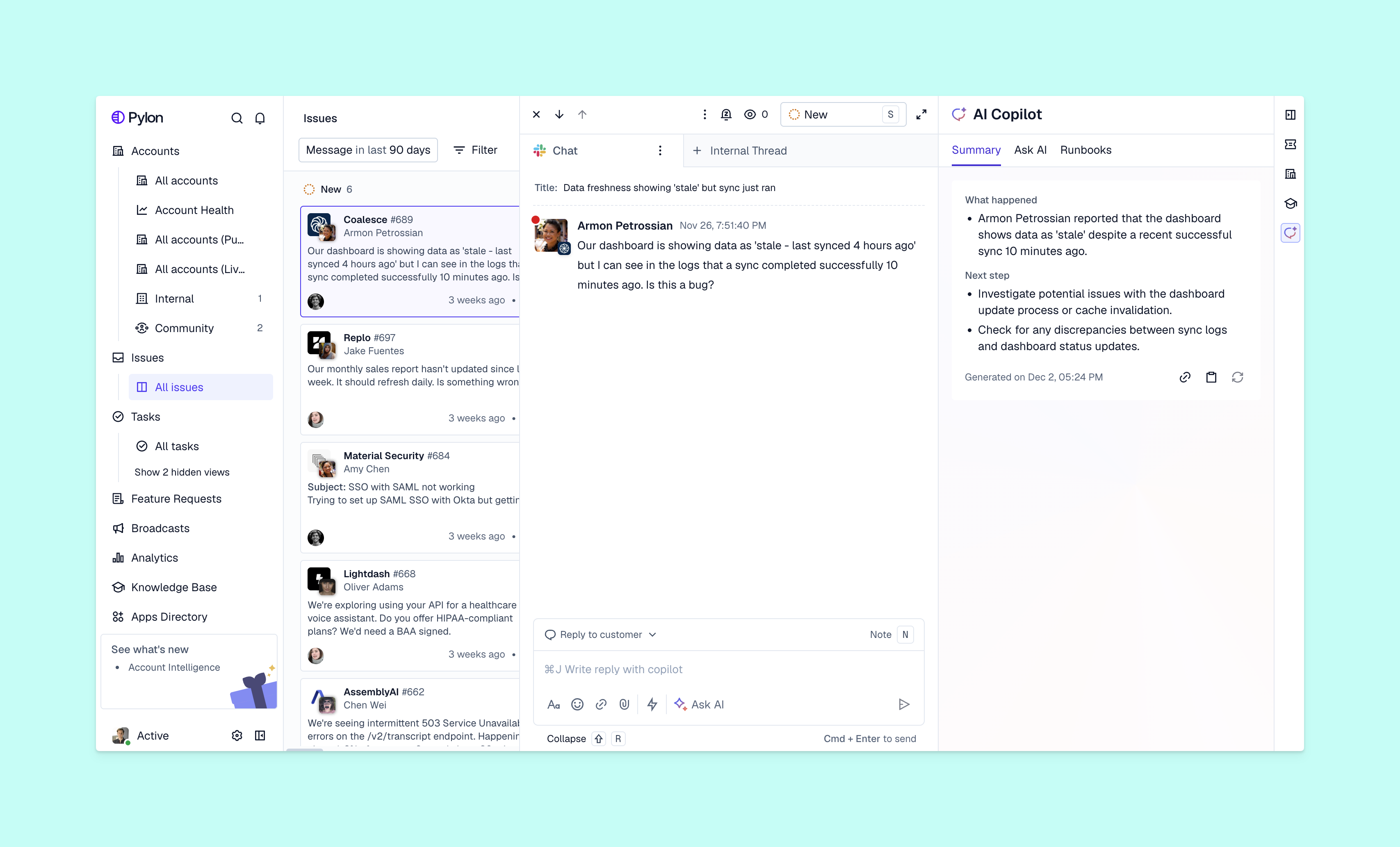
  • AI assistants and automation. AI assistants draft replies and summarize threads, while AI agents automate certain tasks so your team can focus on more complicated issues. 
  • Omnichannel platforms. Bring Slack, Teams, email, chat, and contact forms into one system to keep all customer context easy to access.
  • Self-service options. A detailed knowledge base and clear FAQs help customers solve common issues on their own.
  • Conversation insights. When you review customer support trends across tickets, you can spot gaps in docs or product flows.
  • Real-time visibility. Live updates stop requests from stalling, and show your team the most important issues as soon as possible.
  • Secure data handling. Customers expect you to protect their information, especially in channels used by multiple teams.
  • Clear expectations. Commit to fast (but achievable) response time and clear support guidelines, so customers know what happens when they reach out.

Strategies for customer-centric support

AI issue copilot view from Pylon

Finally, teach your team these strategies for good customer support:

  • Share customer context. All teams should work from the same account views to avoid confusion or mismatched replies.
  • Balance workloads. Route work equitably to manage volume and avoid rushed or inaccurate answers. Platforms with automated assignment or skills-based routing can help. 
  • Encourage teamwork. Connect with the product team to work on feature requests, customer success to identify widespread issues, and engineering to get started on fixes.
  • Ask for feedback. Customer surveys tell your team what works and what needs an update.
  • Personalize support. Treat each customer as an individual, so it’s clear you care about their specific needs.
  • Be proactive. When possible, offer customers support before they have to ask for it. This improves trust and prevents churn.
  • Track performance. Key performance indicators, like customer satisfaction and net promoter scores, show you where your support operations are effective and what needs more attention.

Build high-quality customer support with Pylon

There are lots of methods for improving customer service, but you’ll want to start with team training on useful skills and customer care tips. Then look for tools that reinforce those lessons and make work easier. Pylon brings support interactions and account context together in a complete customer 360-degree view that makes day-to-day support easy.

Pylon is the modern B2B support platform that offers true omnichannel support across Slack, Teams, email, chat, ticket forms, and more. Our AI Agents and Assistants automate busywork and reduce response times. Plus, with Account Intelligence that unifies scattered customer signals to calculate health scores and identify churn risk, we're built for customer success at scale. 

Book a demo

FAQ

What’s the most important factor in customer support quality?

The most important factor is how effectively a team solves customer problems. Speed, empathy, and communication matter, but the core driver of quality is delivering accurate, complete resolutions with minimal effort required from the customer.

How can small teams improve customer support without big budgets?

Small teams can improve support by focusing on process efficiency and self-service tools. Automating repetitive tasks, using templates, creating a clear knowledge base, and training your support team on core communication and problem-solving skills can significantly improve service quality without major costs.

What metrics should I track to evaluate support quality?

The most common support quality metrics are:

  • CSAT (Customer Satisfaction)
  • NPS (Net Promoter Score)
  • First Contact Resolution (FCR)
  • Average Response Time / Average Handle Time (ART / AHT)
  • Customer Effort Score (CES)

These metrics show how well issues are handled, how satisfied customers are, and how efficiently your team works.

How long does it take to see improvements in customer support performance?

Most teams see noticeable improvements in 4 to 8 weeks after implementing new processes, training, or tools. Larger cultural or operational changes, like ado

Explore more

No items found.

Explore more

Industry

What is B2B Customer Service? Definition, Best Practices, & Examples

Dan Guo
May 16, 2025
Blog post
Spotlights

Spotlight: Shanta Bodhan @ Cornerstone

Advith Chelikani
April 15, 2025
Blog post
Industry

How AI and Automation Help Support Teams Handle 10x More Tickets

Pylon Team
October 20, 2025
Blog post
Spotlights

Spotlight: Kateryna Shelest @ Katico

Marty Kausas
April 3, 2025
Blog post
Releases

Product Launch: Customer Portal

Advith Chelikani
February 18, 2024
Blog post
Spotlights

Spotlight: Andrew Tsao @ Rill Data

Marty Kausas
September 15, 2024
Blog post
Industry

Best AI knowledge base software for customer support: Complete 2026 guide

Pylon Team
December 19, 2025
Blog post
Spotlights

Spotlight: Chelsea Madden @ SalesIntel.io

Marty Kausas
February 6, 2025
Blog post
Reports

The AI Playbook for B2B Support Teams: Key Insights from Our Webinar

Cassie Carter
December 15, 2025
Blog post
