


Updated February 11, 2026 | 13 min read
Your support team answers the same five questions 200 times a week while your most important customers wait hours for help with actual problems. Meanwhile, your competitors are using AI to respond instantly across every channel.
This guide covers what customer support automation actually is, how AI powers it, six practical ways to implement it, and how to measure whether it's working. You'll learn how to free your team from manual workflows without losing the human touch that makes B2B support effective.
Automation itself isn't necessarily new in B2B support: Teams have been using rule-based routing systems for years now. But recently, AI for customer support has made it much easier to automate workflows that aren't governed by strict rules — and it can do it better than the old systems.
These days, support platforms use conversational AI tools that can understand context, analyze message intent and content, and learn from previous support interactions. And you can train AI to get better at drafting issue responses, routing tickets to the right people, or summarizing conversations over time.
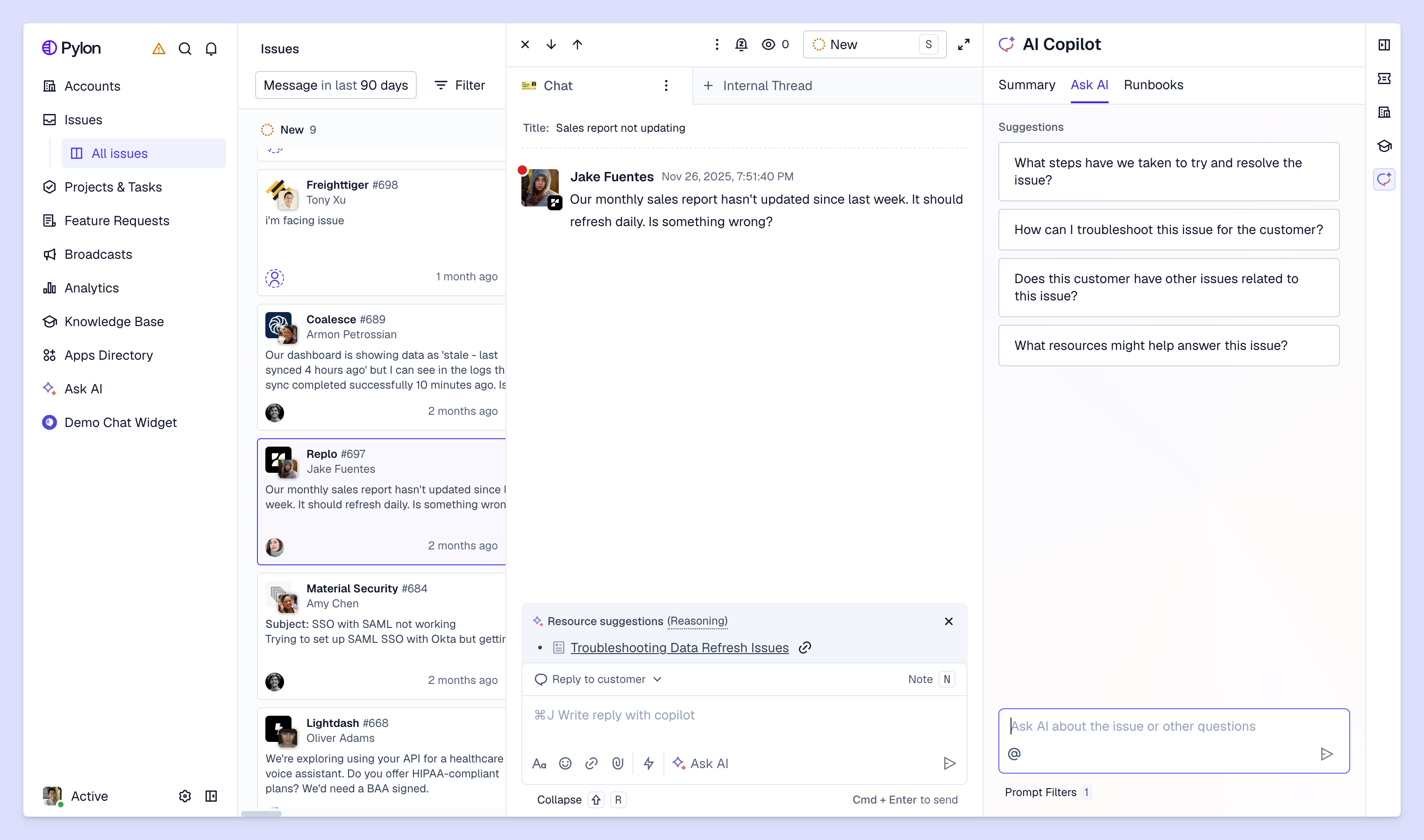
If you haven't implemented AI in your support operations yet, here are some examples of how other B2B support teams use AI. Each of these strategies targets a specific pain point that slows teams down or tends to frustrate customers.
AI agents can instantly answer common questions across Slack, email, in-app chat, or other omnichannel support systems.
A lot of growing teams use AI agents to provide around-the-clock support coverage. So if you're a North American team with European customers, those accounts can still open a support chat outside of your business hours. Your AI agent will deflect the ticket, suggest any knowledge base resources to help, or make sure the issue gets escalated to your team as soon as they're back.
AI agents can often handle basic troubleshooting, common product questions, or status checks on their own — though they typically still escalate complex tickets to a support team member. The goal is to resolve the simplest issues before they ever get to your team's plate.
AI analyzes each incoming ticket and assigns it to team members based on their expertise in different skills or product area, their current capacity, and the account's value. For example, a billing question goes to finance ops, a product bug goes to technical support, and anything from your highest-ARR customer jumps the queue.
This eliminates the need for manual triage, or unnecessary back and forth when a ticket gets assigned to someone who isn't best equipped to handle it.
Knowledge bases let customers find answers themselves through searchable articles, guides, and documentation. When someone has a question outside of your business hours or just prefers solving things independently, they can browse your help center instead of waiting for a response.
And if you implement AI-powered search in your KB, customers can easily describe what they're looking for. AI can analyze intent and surface relevant resources, even if they're not an exact keyword match for the customer's search.
With platforms like Pylon, you can create triggers for specific automated workflows — and describe when those workflows should kick off.
For example, you might have a trigger that detects when you've breached SLA, alerts your team in an internal Slack channel, and sends a message to let customers know you'll be with them soon.
Other common workflows include:
Send out automated surveys after every support interaction to measure satisfaction and gather feedback. And with AI, instead of manually sending CSAT surveys and compiling responses in spreadsheets, you can set up your support platform to summarize the feedback and flag concerning responses.
AI can also analyze surveys at scale to spot common trends — like a feature that's causing confusion for customers, or a team member who consistently gets great reviews. You get a good understanding of the customer experience without having to read hundreds of individual comments.
In platforms like Pylon, AI can automatically detect anomalies in your support operations — outages, security breaches, or other widespread problems — based on an influx in customer reports.
This helps you form a proactive support strategy, meaning you catch and inform customers about outages or delays before most even notice or have to report them.

For many teams, implementing AI in internal and customer-facing support interactions is helping them respond faster, handle more volume, and giving them more time to focus on meaningful customer work. Here's a quick breakdown of the key benefits.
When you have AI agents that can instantly deflect tickets, or AI assistants that help you route each issue to the best person for the job, you can move much faster to resolve customer issues. First response times often drop from hours to minutes because customers aren't waiting for a team member to open their ticket.
At the fastest growing companies, B2B support teams often see an sudden increase in volume that they can't always match in headcount. But with AI, you can easily scale your support operations to meet that demand without multiplying your team size — by implementing AI agents to handle simple and repetitive tickets, by using AI to triage and route issues, or by setting up AI workflows to automate escalations.
Faster responses, consistent answers, and proactive updates provide your customers with a better support experience overall. When you use AI tools and workflows to accelerate your support operations, you eliminate the frustration of long wait times, getting transferred between multiple teams, or receiving conflicting information from different team members.
Finally, AI is best for automating the busywork that burns people out: answering identical questions, manually categorizing tickets, copying information between systems, or searching for account context.
Instead, your team gets to solve problems that require judgment, expertise, and in-depth troubleshooting. And they can spend more time building strong relationships with customers and accounts.
Support work is more fulfilling when teams are trusted advisors for customers, not human FAQ databases.
Here's how to actually deploy AI and support automations that are actually efficient — without overwhelming your team or your customers.
Audit your current support operations and figure out where the biggest bottlenecks are. Does your team spend most of their time answering the same kinds of questions about the API? Or maybe the process for updating your knowledge base is extremely tedious and manual?
Quick wins prove value fast and build momentum. Save the complex, nuanced issues for later once you've shown that automation actually works.
You'll want to test your automated workflows in a small, low-stakes segment before you operate AI on high-risk, high-value support interactions.
Maybe to start, you only roll out AI assistants for back-office (non-customer-facing) workflows: drafting issue messages, generating knowledge articles you can edit, or flagging anomalies for your team to review.
Then, you might deploy your first AI agent to deflect L1 support tickets — with clear paths to escalate to your team. Gather feedback internally and from your customers before you progressively implement AI for more complex workflows.
Monitor response times, resolution rates, and satisfaction scores closely. Adjust based on what the data tells you.
Rely on analytics to see what's working and what needs to be fixed. If your AI agent accurately deflects 70% of API-related customer requests but only 20% of questions about a different product area, you know where to focus improvements.
AI and automation get better when you actively train them and feed them high-quality data. Refine response templates and guidelines, update routing rules, and adjust workflows based on real usage.
Once you've implemented support automations, you want to know whether they're actually producing results for your team. AI-native support platforms like Pylon will often help you automatically track key metrics, including:
Review monthly to spot improvement opportunities and demonstrate ROI to leadership.
Automating customer support with AI isn't about replacing your team — it's about helping them resolve issues faster and giving them the tools to provide higher quality support. The right platform handles repetitive work, provides instant answers across every channel, and unifies customer context so your team can build relationships and solve complex problems.
Pylon is the modern B2B support platform that offers true omnichannel support across Slack, Teams, email, chat, ticket forms, and more. Our AI Agents & Assistants automate busywork and reduce response times. Plus, with Account Intelligence that unifies scattered customer signals to calculate health scores and identify churn risk, we're built for customer success at scale.
Pricing varies based on features, team size, and channels — most platforms charge per user per month or based on ticket volume. Many offer free trials so you can test before committing.
Automated customer service includes any technology that handles tasks without humans, from simple email auto-responders to complex AI systems. AI customer service specifically uses machine learning and natural language processing to understand context and improve over time.
Most modern platforms integrate with popular CRMs, project management tools, and communication channels through APIs or native integrations. Check that your chosen platform connects with your critical systems before purchasing.
Most platforms are designed for non-technical users with intuitive interfaces and pre-built templates. Your team will need onboarding to learn the system, but you typically won't need coding skills to set up workflows and chatbots.
Escalate when customers explicitly ask for a human, when the issue is complex or requires judgment, when the customer is frustrated or emotional, or when AI can't understand the request after a few attempts. Always make escalation paths clear and easy.
Pylon Workforce Management is available now. See it in action with a live demo.



