


Updated December 16, 2025 | 16 min read
You keep hearing the same bug report across Slack channels, email threads, and support tickets. But when your customer success team asks about account health or your product team wants to know which features customers actually want, you can't connect the dots because every customer conversation lives in a different platform.
Customer support tools centralize your customer interactions, track issues, and unify context across channels — so your entire post-sales team can work with the same information.
This guide covers what these tools do, how to choose the right ones, and 12 specific platforms built for B2B teams in 2026.
Customer support tools are platforms that help your team manage conversations, resolve issues, and track every interaction with customers across channels like email, chat, Slack, and Teams. Instead of switching between five different inboxes and losing track of who said what, you have one place where all your customer context lives.
The best platforms combine issue resolution with analytics and automated workflows. You're not only organizing tickets, you're also building a complete picture of each account so your support and success teams can work from the same information.

Here's what happens when your customer data lives everywhere: A customer mentions a bug in Slack. Two days later, they email about a feature request. Next week, they submit a ticket asking about renewal terms. But nobody connects these as unified account context because each conversation lives in a different tool.
Modern support platforms solve this by creating one shared system for your entire post-sales org. You manage customer conversations from all channels in the same place. Support tickets inform how you track customer health and spot churn risk. Customer success calls inform how you provide personalized support to each account. When everything connects, you stop missing important customer signals.
Picking the right platform comes down to your team size, growth plans, and where your customers actually talk to you.
A 5-person team has different needs than a 50-person operation. Smaller teams benefit from platforms that you can set up in a day without training. Growing teams need platforms that won't break when you double headcount next year.
Think about where you'll be in 18 months. If you're planning to hire or expand into new segments, pick a platform that scales without forcing a painful migration later.
Your support platform works best when it connects to the tools you already use. That means your CRM, product management tools like Linear or Jira, and the communication channels your customers prefer.
Disconnected tools create data silos. If your support platform can't pull customer data from your CRM or link feature requests to product tickets, you're just building another island of information.
Monthly subscription cost is only part of the picture. Factor in time you'll save with automation, customers you'll retain because you spot churn early, and efficiency you'll gain from having all your context in one place.
Hidden costs can add up fast, between implementation time, training requirements, and ongoing maintenance. A cheap tool that requires constant manual work might end up costing you more than a platform with strong AI and automated workflows.
AI agents can handle repetitive work like routing tickets, suggesting responses based on past conversations, and summarizing long threads. This gives your support team time back for complex issues that actually need human judgment.
Look for platforms where AI learns from your specific customer conversations instead of generic models. The best automation tools run in the background while your team focuses on building relationships.
You don't need one platform that does everything. You need tools across a few key categories that work together.
Ticketing systems organize customer issues into trackable issues with clear owners, priority levels, and resolution status. Requests don't disappear into someone's inbox, and your team can prioritize work based on urgency and account value.
The best ticketing systems also surface patterns. You can spot recurring problems or identify which customers are having the most trouble with your product.
Omnichannel platforms let you support customers across email, chat, Slack, Teams, and other channels from one interface. Instead of switching between tools to check different threads, you see all conversations in the same place.
Knowledge bases give customers searchable documentation and help articles so they can find answers on their own. When customers solve common questions themselves, your team spends less time on repetitive issues.
The catch is keeping your knowledge base updated and easy to search. If customers can't find answers quickly, they'll submit a ticket anyway.
Analytics platforms track metrics like response time and resolution rate. Tools with account-level signals go further: They help you calculate custom health scores, identify at-risk accounts, and spot conversation patterns across your entire customer base.
For B2B teams, this connects individual support interactions to account-level insights. If a high-value customer suddenly submits more tickets or their tone shifts, you know before they churn.
Feedback tools collect and organize feature requests, bug reports, and customer sentiment from across all conversations. Instead of requests getting lost in ticket threads, you see which features your highest-value customers ask for and how often they come up.
The best feedback tools connect requests back to specific customers and revenue impact. Your product team can prioritize based on business value instead of whoever mentioned it most recently.
This list covers tools across all five categories, with options for different team sizes and budgets. We've focused on platforms built for B2B post-sales teams.
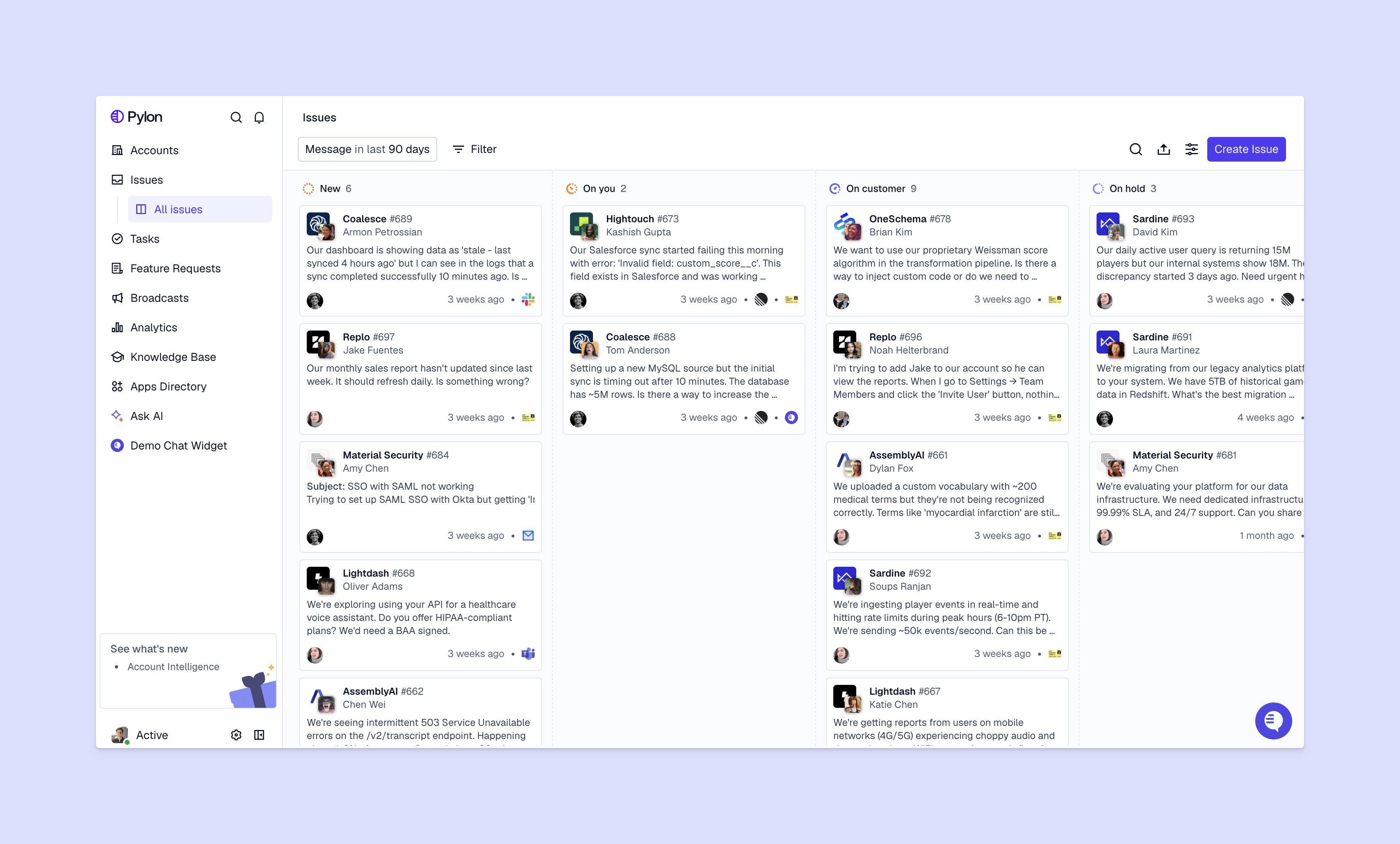
Pylon is the modern B2B support platform with true omnichannel support across Slack, Teams, email, chat, and ticket forms. AI Agents and Assistants automate busywork and reduce response times. Account Intelligence unifies scattered customer signals to calculate health scores and identify churn risk.
Best for: B2B post-sales teams that want support and customer success working from the same system.
Why it works: Your support tickets and customer conversations connect to inform your entire post-sales strategy. Support interactions automatically feed into customer health scores. Your success team's context informs how you provide personalized support. You're set up for retention and growth instead of just ticket resolution.
Zendesk is an established ticketing platform with an extensive integration marketplace. It handles complex support operations with customizable workflows and multi-brand support.
Best for: Larger or traditional teams that can invest in setup time and configuration.
Why it works: Zendesk's maturity means it can handle enterprise-grade features, though some teams find that its AI and reporting features are less robust than modern alternatives.
Intercom combines live chat, bots, and help desk functionality in a messaging-first platform. It includes product tours, onboarding messages, and customer segmentation.
Best for: Product-led or B2C teams where in-app messaging is the primary support channel.
Why it works: Intercom is great if your primary support use case is in-app chat. Otherwise, you might find that it has limited support for complex B2B workflows.
Freshdesk offers user-friendly ticketing with automation rules for routing and responses. It supports multiple channels including email, chat, and phone.
Best for: Growing teams that want solid ticketing functionality without enterprise complexity.
Why it works: Freshdesk balances functionality with ease of use, making it accessible for teams without dedicated support operations specialists.
Help Scout provides an email-focused support platform with a shared inbox that feels like email instead of a traditional ticketing system. It includes collision detection and a knowledge base builder.
Best for: Small to mid-size teams that primarily support customers over email.
Why it works: Help Scout's simplicity means your team can start using it immediately, though it's less robust for teams that want advanced automation.
Service Cloud is an enterprise-grade service platform deeply integrated with Salesforce CRM. It includes complete case management, omnichannel routing, and AI-powered insights through Einstein.
Best for: Large or traditional organizations already invested in the Salesforce ecosystem.
Why it works: Service Cloud connects support data directly to your sales and account data in Salesforce, but it requires significant investment in implementation and administration.
Front centralizes email and messages in a collaborative inbox. It includes internal comments, assignments, and rules for routing messages across support, sales, and other departments.
Best for: Teams where multiple departments handle email communication.
Why it works: Front works well if email is your primary support channel. But you might find it limiting if you support customers over other channels like Slack or Teams, or you need more robust AI and automated workflows.
Service Hub connects support to marketing and sales data as part of HubSpot's suite. It includes ticketing integrated with HubSpot CRM, knowledge base tools, and customer feedback surveys.
Best for: Companies already using HubSpot for marketing or sales.
Why it works: Service Hub makes sense if you're in the HubSpot ecosystem, so you can sales and marketing data to support. That said, HubSpot has limited support for account-level insights and context.
Aircall is a cloud-based phone system for support teams. It includes call routing, IVR, call recording, and integrations with help desk and CRM platforms.
Best for: Teams that handle significant phone support volume.
Why it works: Aircall integrates with your ticketing system to automatically log call data and create tickets, so phone conversations don't exist in a separate silo. But it's mainly built for B2C use cases, not complex B2B issues and omnichannel support beyond phone.
Document360 focuses specifically on knowledge base software for creating searchable help documentation. It includes version control, analytics on article views, and multi-language support.
Best for: Teams that want a robust self-service portal separate from their ticketing system.
Why it works: Document360 is more powerful for knowledge management than the basic help centers included in most ticketing systems. That said, it's not a full-fledged support system. You'll have to buy an additional platform to manage support.
Typeform creates conversational forms for collecting structured customer feedback and support requests. It includes conditional logic for dynamic questions and integrations with support and CRM platforms.
Best for: Teams that want to gather specific information before customers submit tickets.
Why it works: Typeform helps you collect the right information upfront, reducing back-and-forth on tickets and making it easier to route requests to the right team member. But just like Document360, it isn't a full support system.
Gong analyzes customer calls through conversation intelligence. It records and transcribes calls, analyzes conversation topics and sentiment, and provides coaching insights for team improvement.
Best for: Teams that want to surface insights from support and success calls.
Why it works: Gong helps you understand patterns across customer conversations that individual team members might miss, like recurring objections or feature requests that come up on calls. Like Document360 or Typeform, Gong is meant for a very specific post-sales use case (call intelligence) — so you'll have to connect it to your full support platform.
You don't need all 12 tools. Start with the essentials and add capabilities as your team grows.
Your ticketing system is the core of your support operations. Pick one that handles your primary communication channels and can scale as you grow.
Look for platforms that combine ticketing with communication channels instead of treating them as separate systems. The right foundation means you won't hit a ceiling in 18 months and need to migrate everything to a new platform.
Connect the channels where your customers actually are — email, Slack, Teams, in-app chat, or ticket forms. Meet customers where they already are instead of forcing them to adapt to channels that are convenient for you.
Omnichannel platforms that unify channels into one interface save your team from constantly having to context switch. When a customer messages you in Slack then follows up over email, your team sees one continuous conversation instead of two disconnected threads.
Once you're handling conversations consistently, you want visibility into patterns, customer health, and team performance. This moves you from reactive support to proactive customer success. You can spot churn risk before customers leave and identify expansion opportunities based on usage patterns.
Intelligence tools connect individual support interactions to account-level insights. A spike in tickets from a high-value customer becomes an early warning signal instead of just more work for your team.
Integration makes your support stack actually work. Connect your support tools with your CRM, product management platforms, and communication tools so data flows automatically.
For example when feature requests directly link to tickets in Linear or Jira, your product team gets context without needing support to manually compile evidence. This connected ecosystem creates the shared system that makes support data useful for your entire post-sales organization.
See how Pylon connects your support and success teams in one platform with true omnichannel support and Account Intelligence.
Basic setup typically takes a few days to a week: creating accounts, configuring channels, and importing customer data. Full implementation with integrations, custom workflows, and team training usually takes 2 – 4 weeks. Timeline varies based on your team size and how many systems you're connecting.
Most modern support platforms offer data migration tools or services to transfer ticket history, customer information, and conversation logs from your previous system. Check what migration support is included before you commit. Some vendors handle this as part of onboarding while others charge separately.
B2B tools focus on account-level context, longer customer relationships, and connecting support interactions to business metrics like churn risk and expansion opportunities. B2C tools prioritize high-volume ticket handling and quick resolutions for individual customers that aren't connected to broader account relationships.
Most teams use 3 – 5 core tools: a ticketing platform, communication channels, analytics, and a knowledge base. But all-in-one platforms in Pylon can reduce this number by combining multiple functions (like ticketing, omnichannel support, knowledge management, and account-level intelligence) into one system.
The right support stack for B2B connects scattered support interactions into a complete picture of account health, churn risk, and expansion opportunities. Support becomes strategic instead of just operational.
Pylon is the modern B2B support platform that offers true omnichannel support across Slack, Teams, email, chat, ticket forms, and more. Our AI Agents & Assistants automate busywork and reduce response times. Plus, with Account Intelligence that unifies scattered customer signals to calculate health scores and identify churn risk, we're built for customer success at scale.
Pylon Workforce Management is available now. See it in action with a live demo.



