Updated November 28, 2025 | 14 min read
Support team answer the same questions dozens of times each day, because no one is checking the docs. Meanwhile, customers wait hours for responses because they can’t find articles for the issues they’re having.
AI knowledge base software helps your team detect gaps in article content, automatically surfaces answers for issue responses and in support forms, and learns from customers interactions to get smarter over time.
We'll walk through what makes an AI knowledge base different from traditional documentation, which features actually matter for B2B support teams, and how six leading platforms compare for your specific needs.
In B2B support, AI knowledge management or AI knowledge bases help you find support topics you haven’t documented yet, draft articles, or suggest relevant resources to customers when they reach out for help.
When your support system has an AI knowledge base built in, it can learn from customer interactions to suggest articles that solve common issues and spot where you have gaps in your documentation.
In most B2B companies, information lives everywhere: Slack threads, email chains, product ticket, or someone's head. This creates real bottlenecks when your support team has to hunt for answers or resources to help customers.
AI knowledge management can suggest relevant support articles when your team is responding to a customer issue. That way team members don't have to manually dig through article collections to find links to resources.
Some support ticket forms can use AI to suggest knowledge base articles before customers press submit. Customers can get answers to common questions before they ever land in your support queue.
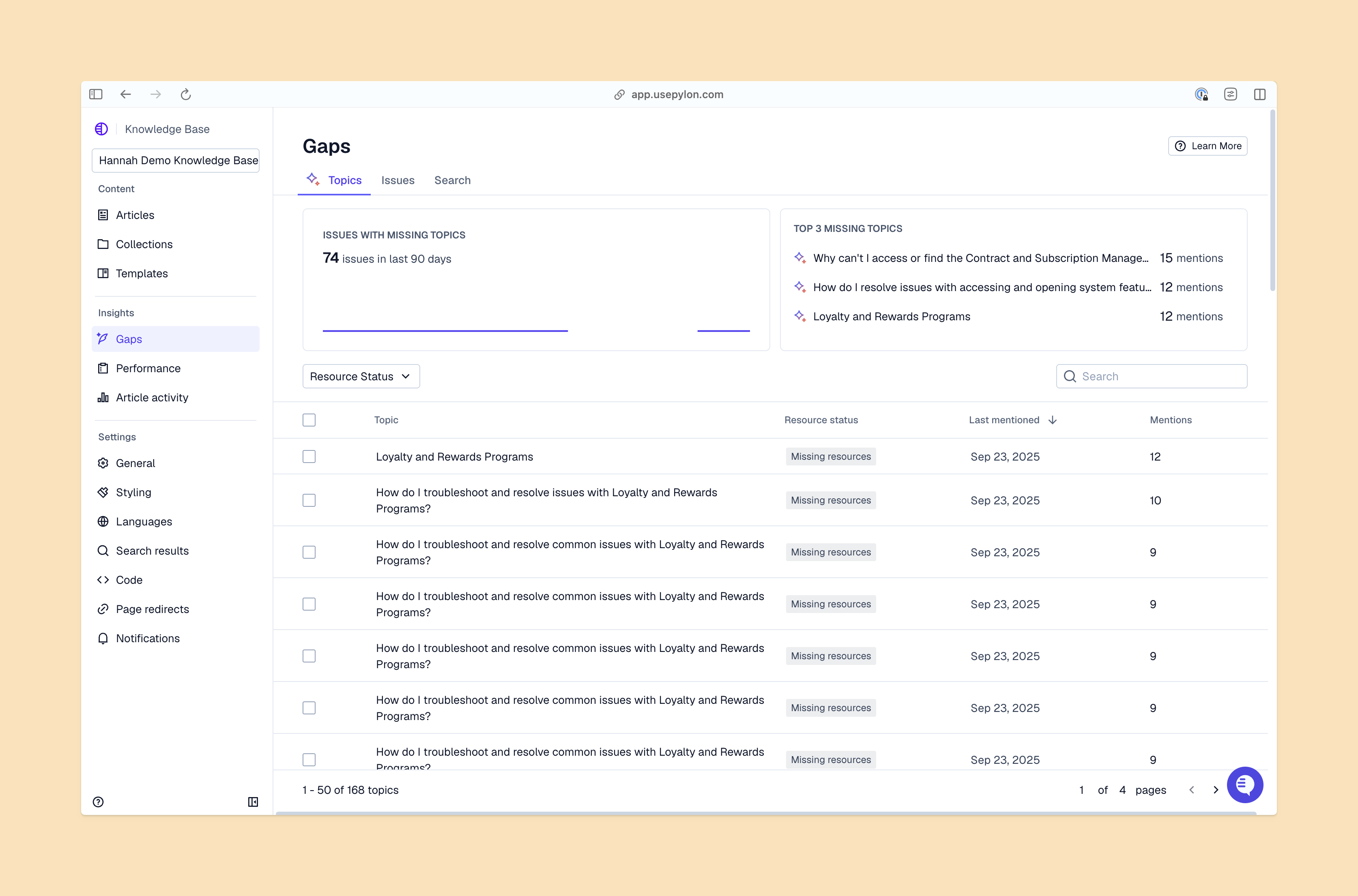
AI suggests updates when information becomes outdated, identifies gaps where documentation is missing, and flags duplicate content.
Instead of manual audits, your knowledge base maintains itself by analyzing support interactions. You'll see exactly which articles need attention and can quickly review AI-generated drafts.
As your customer base grows, AI knowledge management can help you handle increased support volume without needing to exponentially scale your headcount. Each support interaction trains the AI to suggest better resources next time.
Each platform takes a different approach to AI-powered knowledge management. Your choice depends on whether you prioritize comprehensive support features, documentation depth, or ecosystem integration.
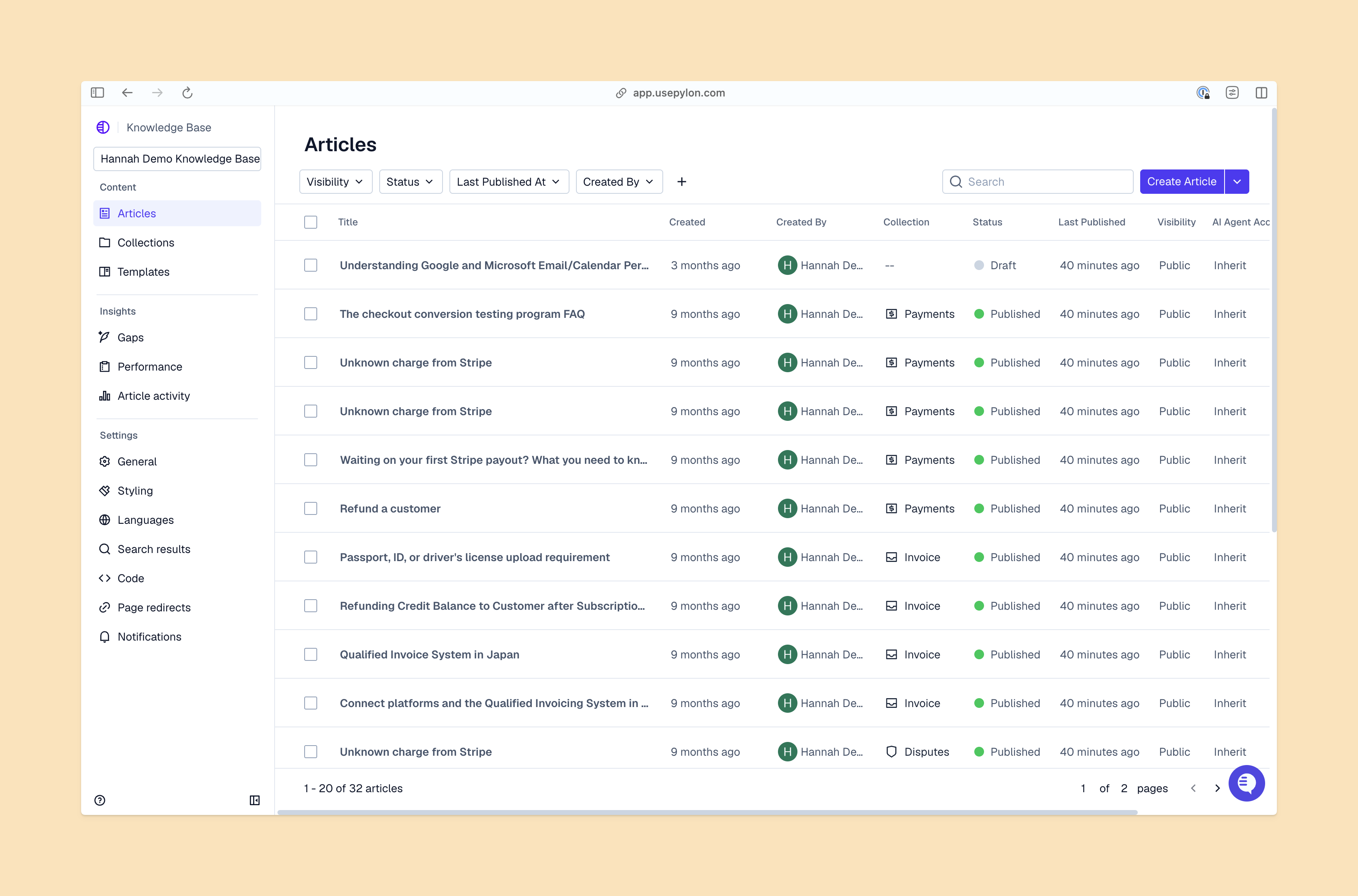
Pylon contains AI knowledge management within a complete B2B support platform. AI automatically detects knowledge gaps and similar content by analyzing support conversations, then drafts full articles from tickets and suggests edits to existing content.
When your team responds to customer issues, Pylon proactively suggests relevant knowledge base articles—and when customers fill out support requests through a form, AI can surface knowledge articles before they even submit the ticket.
Zendesk offers AI knowledge base features that integrate with established support ticketing workflows and give customers self-service options.
That said, Zendesk’s complexity can feel overwhelming for smaller teams.
Document360 focuses specifically on documentation with strong AI content creation and management tools.
The platform is great at organizing technical documentation, API references, and product guides with version control and approval workflows. It's particularly effective for teams managing large volumes of technical content that require regular updates and strict accuracy.
That said, Document360 isn’t built specifically for support teams. It doesn’t integrate as smoothly with your support data and workflows.
Confluence layers AI search capabilities onto its collaboration-first platform. It's designed for teams already using Atlassian products like Jira, so there’s deep integration with development workflows.
The knowledge base functionality works best when you're also using Confluence for project documentation and team collaboration, so you have a single source of truth across multiple use cases.
Like Document360, note that Confluence also isn’t build for support teams, data, and workflows.
Tettra provides a lightweight, simple approach to AI knowledge management without overwhelming complexity. It's designed for smaller teams who want AI benefits without enterprise-level features they won't use.
The platform emphasizes ease of use and quick implementation over comprehensive functionality, but isn’t specifically built for support workflows.
Intercom tightly integrates its knowledge base with customer messaging and support workflows. The AI powers their chatbot to automatically surface relevant articles during customer conversations.
But Intercom has fewer core AI knowledge management features, like knowledge gaps detection or robust article drafting.
Start by mapping out your current support workflow and identifying where knowledge bottlenecks happen.
If your team constantly finds outdated articles or missing content, you need knowledge gaps detection. If customers keep submitting tickets about issues that are already documented, you want better self-service with proactive article suggestions.
Consider where your bottlenecks actually happen:
Implementation success depends more on content strategy than technical setup. AI can only be as helpful as the knowledge you give it to work with.
Gather everything: help docs, FAQs, past support interactions, macros or responses you copy-paste regularly, and information that lives in certain team members' heads. Identify what's outdated, what contradicts other content, and what's missing entirely.
Define what success looks like before you start. Common metrics include ticket deflection rate (percentage of issues resolved without your team’s involvement) and time to resolution. Pick two or three metrics that align with your biggest pain points.
Import your existing content, then use AI to identify duplicates, gaps, and organizational issues. Restructure articles to be searchable by breaking long documents into focused, single-topic articles. AI works best with content that directly answers specific questions instead of comprehensive guides that cover multiple topics.
Show your support and success teams how the AI knowledge base makes their jobs easier. Focus on how much time and workload it can save them. Get early adopters who will champion the system and help others learn.
Most teams can launch an AI knowledge base in as little as week, depending on content volume and integrations.
Teams typically see ROI through reduced ticket volume, faster resolution times, and improved customer satisfaction scores. The exact return depends on your team size, support volume, and how much time you currently spend on repetitive questions.
Enterprise AI knowledge base platforms offer security features like role-based access control, encryption at rest and in transit, SSO integration, and compliance certifications. Always check that security standards match your company's requirements, especially if you're handling sensitive customer data.
An AI knowledge base is foundational for B2B support teams. The best platforms don't separate knowledge management from support operations. Instead, every support interaction improves and informs your knowledge content.
Pylon is the modern B2B support platform that offers true omnichannel support across Slack, Teams, email, chat, ticket forms, and more. Our AI Agents & Assistants automate busywork and reduce response times. Plus, with Account Intelligence that unifies scattered customer signals to calculate health scores and identify churn risk, we're built for customer success at scale.
Pylon Workforce Management is available now. See it in action with a live demo.