


Updated December 15, 2025 | 14 min read
Slack gets your support team and customers in the same workspace, which sounds simple until you're managing hundreds of customer channels with no clear process for who responds to what. The difference between chaotic Slack threads and an organized support system comes down to structure: getting the right integrations, workflows, and automation.
This guide walks through setting up Slack for customer support, from connecting your support platform and creating customer channels to building workflows that scale as your customer base grows.
B2B teams are increasingly supporting their customers over Slack. With Slack Connect, you invite external customers into dedicated channels where they can message your team directly instead of waiting on email responses.
The setup is straightforward. Your customers get real-time access to your support team, and your team gets to work in the same tool they already use for internal collaboration. Context stays intact when you loop in engineering or check with customer success because everyone is typically already working in Slack.
First, integrate Slack with a support platform where you can manage conversations across all your channels. This way your Slack messages are in the same place as your email, chat, and other support tickets.
Most support platforms connect to Slack through APIs or native integrations. Pylon, for example, has a native integration that pulls Slack conversations into a unified view, alongside tickets from Teams, in-app chat, or ticket forms. Your team then responds from one place instead of switching between tools—and messages sync bidirectionally between Slack and Pylon.
Set up a Slack Connect channel for each customer account. These external channels let customers post questions, report bugs, or request features without leaving Slack.
You'll use public channels for general customer communication and private channels for sensitive account discussions. Pick a naming pattern like "customer-companyname" and stick with it as you add more accounts.
Create internal channels where your support team can collaborate without customers seeing the conversation. A channel like #support-internal works for general coordination, #support-escalations can handle urgent issues, or #deal-companyname can help you bring in pre-sales context.
Cross-functional channels help too. Set up #support-engineering for technical escalations or #support-success for handoffs to your customer success team. Everyone stays aligned on customer issues without cluttering customer-facing channels.
In a platform like Pylon, you can create internal threads within customer issues that post and sync to these internal Slack channels. So if your engineering team doesn't live in Pylon, you can still loop them in on tickets and collaborate seamlessly across Pylon and Slack.
Configure notifications so your team stays responsive without drowning in alerts. Start with channel-specific preferences—maybe you want all messages from enterprise accounts but only mentions from smaller customers.
Slack lets you set keyword notifications for terms like "urgent," "down," or "bug." Critical issues get flagged immediately while routine questions don't interrupt deep work.
You can also set up triggers in a support system like Pylon, so you get alerted to any important issues from Slack.
Establish guidelines for who responds to what and how quickly. You might commit to acknowledging customer messages within two hours and providing full responses within four hours during business days.
Document the protocols in a shared space so everyone knows the expectations. Include coverage schedules if you're supporting customers across time zones, and define escalation paths for issues that need specialized expertise.
Use your support system to set up SLA tracking. For example in Pylon, you can use triggers to configure issue and team SLAs. Set up alerts ahead of an SLA breach so your team knows which issues to prioritize.
The right integrations transform Slack from a chat app into a complete support system. You'll want tools that handle ticketing, surface customer context, and track performance.
Slack messages need to become trackable tickets with assignments, status updates, and resolution workflows. Ticketing integrations create cases from Slack conversations so your team can manage them without switching tools.
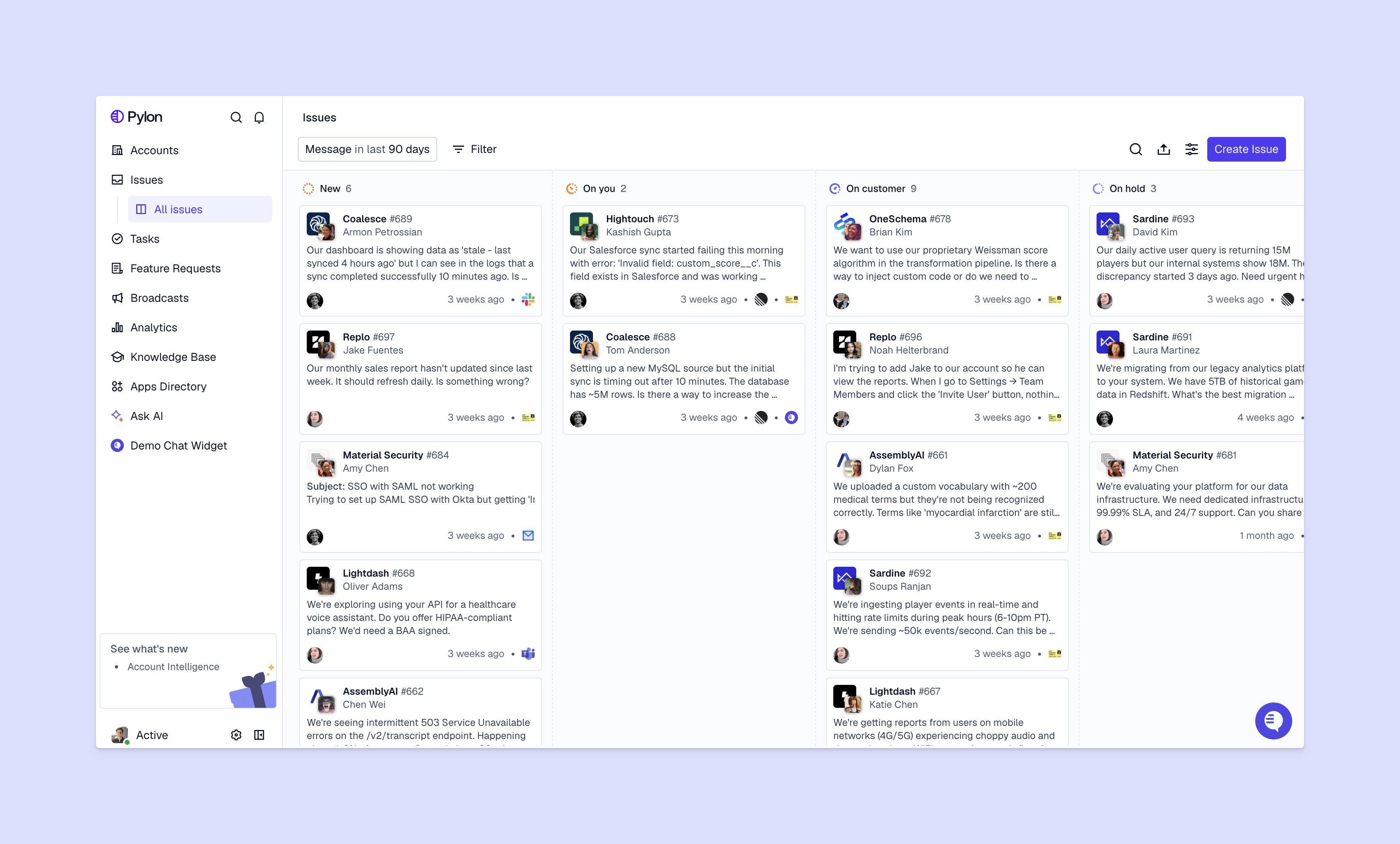
Pylon turns Slack messages into tickets automatically and gives you a unified view of issues across all support channels. Whether a customer reaches out via Slack, email, or chat, everything lands in one kanban board or list—and you can configure the same support workflows.
Customer context makes support conversations more effective. CRM integrations can help surface account details like contract value, health score, and past issues right alongside your customer Slack threads.
When a customer messages in Slack, your team can instantly see their account tier, recent product usage, and open issues right next to the thread in Pylon. You can prioritize responses and personalize your approach without digging through other systems.
Knowledge base integrations let your team search and share help articles without leaving the customer thread. Instead of copying links, you surface relevant documentation directly in the conversation.
Some tools also let customers search your knowledge base from within Slack channels. They can self-serve answers to common questions, which reduces repetitive inquiries.
Support systems like Pylon already include native knowledge management. And when you're using Pylon to respond to a customer conversation from Slack, our AI will automatically suggest relevant knowledge base articles, docs, and past issues to help you respond to customer faster.
Analytics integrations track metrics like response times, resolution rates, and customer satisfaction across your Slack conversations. You get visibility into team performance and can spot bottlenecks in your support process.
Look for platforms like Pylon that can automatically categorize Slack messages by issue type, customer segment, or urgency. This data shows where your team spends time and which customers need more support.
Plus, some support systems have native analytics dashboards and custom analytics capabilities. With Pylon, you can build your own dashboards to track support metrics that matter to you.
A structured workflow ensures consistent support even as message volume grows. The key is creating repeatable processes that work for both simple questions and complex issues.
Every incoming Slack message needs quick categorization so the right person can respond. Use emoji reactions as visual indicators—a 👀 means someone's reviewing it, a ✅ means it's resolved, and a 🔥 signals urgency.
Automated tagging based on keywords or customer tier helps prioritize messages. Messages from enterprise accounts or containing words like "outage" get flagged for immediate attention.
Define when and how to escalate issues beyond your frontline support team. Technical bugs go to engineering, billing questions to ops, and strategic requests to customer success.
Document the paths clearly so team members don't waste time figuring out who handles edge cases. Include expected response times for each escalation type so customers know when to expect updates.
Use private threads or internal channels to discuss customer issues without the customer seeing your conversation. Your team can brainstorm solutions, loop in experts, or coordinate complex responses.
When you need input, start a thread in your internal channel with context about the customer and their issue. Once you've aligned on the approach, one person responds in the customer-facing channel.
Handoffs between team members or shifts need clear protocols to maintain conversation context. When you're transitioning a customer conversation, summarize what's been discussed, what's been promised, and what still needs resolution.
Tag the person taking over and give them relevant background. Customers don't have to repeat themselves, and you look coordinated as a team.
Channel organization becomes critical once you're managing dozens of customer accounts. A clear system prevents chaos and helps your team find information quickly.
Consistent naming patterns make channels instantly recognizable and searchable. Pick a prefix like "customer-" or "support-" and follow it with the company name or account ID.
Stick to lowercase and use hyphens instead of spaces. This standardization makes it easy to find specific customer channels and automate workflows based on channel names.
Reply in threads instead of posting separate messages to keep channels organized. Each new customer issue or topic gets its own thread, so multiple conversations can happen simultaneously without confusion.
Threads also make it easier to search conversation history and track resolution. When you're looking for how you solved a similar issue last month, threaded conversations are much easier to navigate.
Set criteria for archiving customer channels when the customer relationship has ended. Archiving keeps your active channel list manageable while preserving conversation history.
Before archiving, check if there's any unresolved business with that account. You can always unarchive channels later, but keeping inactive channels visible creates unnecessary clutter.
Automation handles repetitive work so your team can focus on complex customer issues. The right automations speed up response times without sacrificing personalization.
Set up automatic acknowledgment messages when customers post in Slack during off-hours or when your team is at capacity. These messages confirm you've received their request and set expectations for response time.
Keep auto-responses brief and helpful—include your typical response time and alternative support options if they need immediate help.
Slack workflows automate common tasks like creating tickets, gathering information, or updating status. When a customer reports a bug, a workflow can automatically create a ticket, ask for reproduction steps, and notify your engineering team.
If you use a support system that integrates with Slack, you can build workflows there. For example in Pylon, you can use triggers for any custom routing, escalation, or automated tagging workflows. The goal is reducing manual data entry and ensuring consistent processes.
AI can suggest responses based on similar past conversations, summarize long threads, or answer routine questions automatically. Pylon's AI Assistants can draft responses for your team to review or handle common questions without human intervention.
AI handles repetitive questions about product documentation or implementation while your team focuses on strategic customer issues.
Automatically route Slack messages to the right team member based on issue type, customer tier, or expertise. If a customer mentions "API" or "integration," the message routes to your technical support specialists.
Smart routing reduces response time because messages land with the person best equipped to answer them. It also prevents the bottleneck of one person triaging every incoming message.
In support platforms like Pylon, you can set up skills-based routing to make sure AI routes your issues to team specialists.

Measuring performance helps you improve response quality and identify where your support process breaks down. Focus on metrics that directly impact customer experience.
Track first response time (how long until someone acknowledges the message) and average response time (how long customers wait between replies). B2B customers typically expect responses within a few hours during business days, though high-touch accounts might expect faster turnaround.
Collect feedback after resolving issues through quick surveys or emoji reactions. A simple "How did we do? 👍 👎" at the end of a conversation gives you immediate sentiment data.
More detailed CSAT surveys can go out periodically to understand overall satisfaction with your Slack support channel. Look for patterns in negative feedback to identify systemic issues.
Monitor conversations handled per team member, average resolution time, and workload distribution. This helps you spot when someone's overwhelmed or when you need to hire additional support staff.
Track metrics to optimize team performance, not to micromanage people. The goal is ensuring sustainable workload and consistent service quality.
Identify which customer channels are most active and which accounts rarely use Slack. High activity might indicate ongoing issues that need proactive attention, while low activity could mean customers prefer other support channels.
Security becomes critical when customer conversations contain sensitive information. Your Slack setup needs controls that protect customer data and meet compliance requirements.
Limit access to customer channels based on role and necessity. Not everyone on your team needs access to every customer conversation, especially for high-value or sensitive accounts.
Use Slack's guest accounts for contractors or temporary team members who need limited access. Set up single-channel guests for vendors who only need to participate in specific customer conversations.
Configure message retention settings to comply with your data governance requirements. Some industries require keeping support conversations for years, while others mandate deletion after a set period.
Slack lets you set different retention policies for different channels. You can keep customer conversations longer than internal chats.
If you're in a regulated industry, check that your Slack setup meets requirements like GDPR, HIPAA, or SOC 2. This might mean enabling encryption, setting up audit logs, or restricting data to specific geographic regions.
Train your team on handling sensitive information in Slack conversations. Customer payment details, passwords, or personal information shouldn't be shared in channels—even private ones.
Create guidelines for what information is safe to discuss in Slack and what needs to move to more secure channels. When in doubt, ask customers to share sensitive details through encrypted forms or secure portals instead.
As your customer base grows, your Slack support system needs to scale without compromising quality. This means optimizing processes, adding resources strategically, and sometimes restructuring your approach.
Some customers send dozens of messages daily across multiple issues. Create sub-channels or threads for different topics to keep conversations organized and prevent important messages from getting buried.
You might also set expectations around response times for high-volume accounts. If a customer sends 20 messages in an hour, clarify that you'll batch responses every few hours instead of replying to each message individually.
Create response templates for common scenarios, but train your team to personalize them. Templates ensure consistency while your team adds context specific to each customer's situation.
Regular quality reviews help you spot where support quality is slipping. Review a sample of Slack conversations weekly to identify coaching opportunities and recognize great customer interactions.
Some platforms like Pylon have AI-powered QA so you can create rubrics and monitor performance across the Slack issues your team handles.
Balance team capacity with customer demand by tracking message volume trends and response time metrics. If you're consistently missing SLAs, you either need to add team members or improve efficiency through better automation.
Consider tiered support models where your most experienced team members handle complex accounts while newer team members manage straightforward requests.
Think ahead about when your current Slack setup will break. If you're adding 10 new customer channels per month, at what point does manual channel management become unsustainable?
Build systems that scale before you need them:
Slack alone lacks essential ticketing features like SLA tracking, case management, and reporting. However, when you integrate Slack with a support platform like Pylon, it becomes part of a complete ticketing system that manages conversations across Slack, email, chat, and other channels with full case tracking and analytics.
Use an omnichannel platform like Pylon that brings email, Slack, and other channels into one unified view. Your team can respond to customers on their preferred channel without switching tools, and all conversations contribute to the same customer history and health scores.
Send a clear invitation explaining the benefits: faster responses and direct access to your team. Include a brief guide on using Slack Connect and emphasize that you still support their preferred channels if they're not comfortable with Slack.
Set clear boundaries with response time expectations, use automation for routine questions, and centralize conversations in a support platform. You can also consider offering Slack support as a premium feature for higher-tier customers to manage volume.
The best Slack support systems don't treat it as an isolated channel. Instead, they connect Slack to a unified platform that brings together all your customer conversations—whether they happen in Slack, email, Teams, chat, or elsewhere.
Pylon is the modern B2B support platform that offers true omnichannel support across Slack, Teams, email, chat, ticket forms, and more. Our AI Agents & Assistants automate busywork and reduce response times. Plus, with Account Intelligence that unifies scattered customer signals to calculate health scores and identify churn risk, we're built for customer success at scale.
Pylon Workforce Management is available now. See it in action with a live demo.





