Customer Feedback Loops: How to Turn Feedback into Actionable Growth
Build a strong customer feedback loop that uncovers valuable insights, improves customer experiences, and helps teams act on feedback faster.
Dan Guo
December 5, 2025
A strong customer feedback loop gives your team a steady stream of insights you can put to work in meaningful ways. And when feedback is used across the whole company, it’s much easier to improve your product/service, catch new opportunities early, and get ahead by staying close to your customers.
Keep reading to learn how to build a functional customer feedback system, including how to collect, categorize, and close the feedback loop. We’ll cover practical tips so getting and using customer feedback can become part of your day-to-day customer experience (CX) operations.
What’s a Feedback Loop?
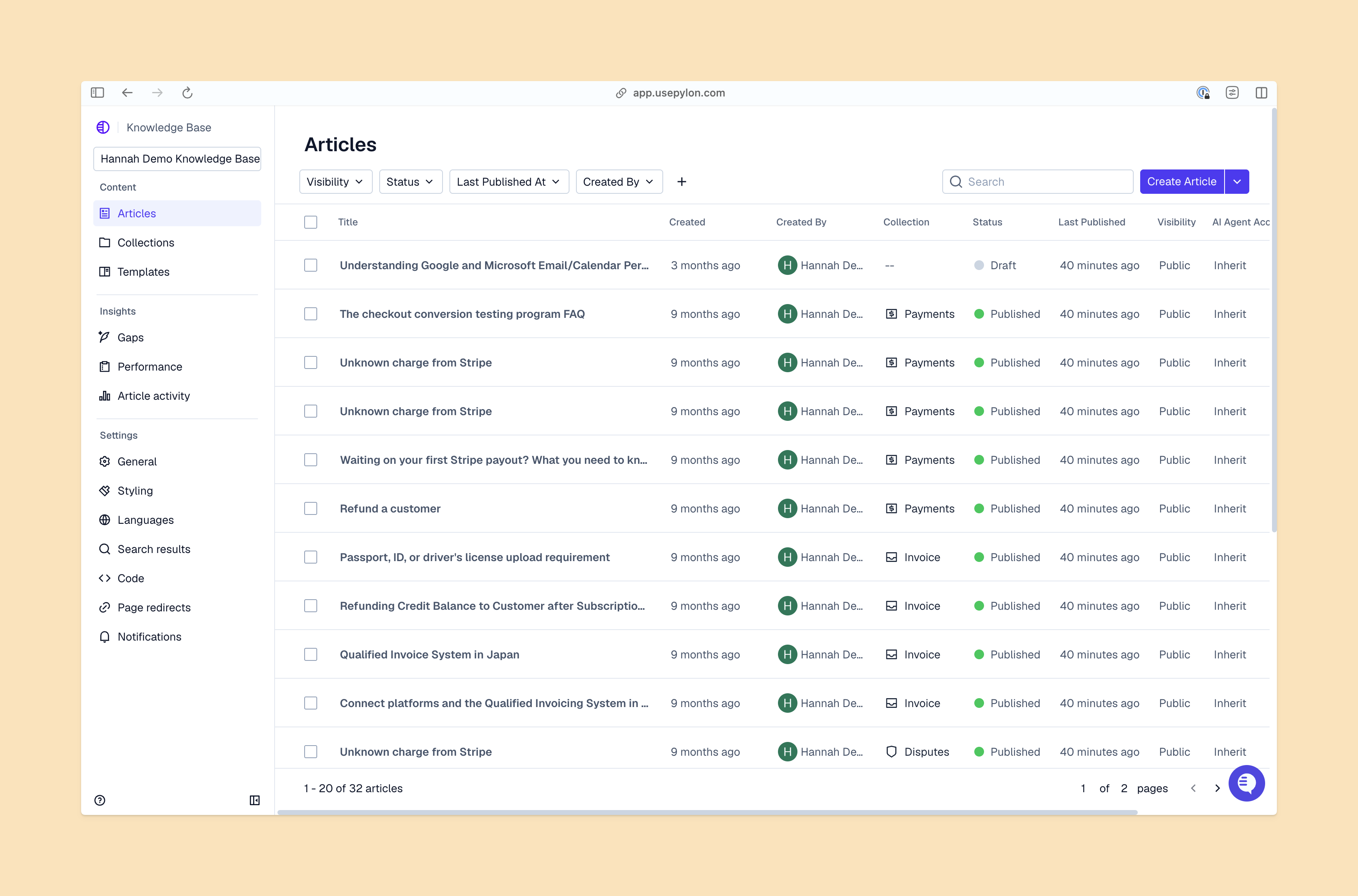
Knowledge Base Articles View From Pylon
A customer feedback loop is a CX strategy that uses customer sentiment to guide ongoing improvements. You’ll usually get this feedback via customer surveys, user reviews, support tickets, and one-on-one conversations. Positive feedback reinforces what works; negative feedback highlights improvement areas.
The goal is simple: collect customer feedback, analyze it, and close the loop with meaningful action. The result is a better fit between what customers need and what your team delivers.
Why Are Feedback Loops Important?
Customer feedback loops help keep your team responsive. And when customers share their input and see a response, the relationship feels like a real partnership, not just a one-off deal. Following up on feedback shows customers their comments matter and encourages them to keep sharing their experiences, which gives your team real — not just assumed or theoretical — ways to grow.
Closing the loop is where you can make the biggest difference. A clear response (even a simple acknowledgement or update) shows that your team pays attention.
Here’s what happens when companies close the loop:
They build trust. When customers know their feedback prompts action, the relationship feels more dependable and reciprocal.
They gain an advantage. Acting on feedback shows that your team takes what customers think and feel seriously, which can help you stand out from competitors.
They strengthen alignment. Each loop ties customer insights back to your roadmap, so your product/service stays connected to real customer needs instead of guesswork.
They improve customer satisfaction. Acting on feedback makes the customer experience feel more genuine. Over time, consistent responsiveness builds a sense of confidence that supports long-term satisfaction and customer retention.
Types of Feedback Loops
All feedback is valuable, but it highlights different aspects of the customer experience. These feedback loops help your team understand what customers are happy with, and what needs work:
Positive feedback loops point out the experiences, features, and interactions customers already love. This info helps your team identify strengths in your customer success playbook that are worth building on.
Negative feedback loops reveal frustrations and unmet expectations — great areas to target for improvement.
Internal feedback loops are insights from inside the company collected to strengthen internal processes.
External feedback loops cover any feedback from customers and other organizational outsiders.
The 4 Stages of a Customer Feedback Loop
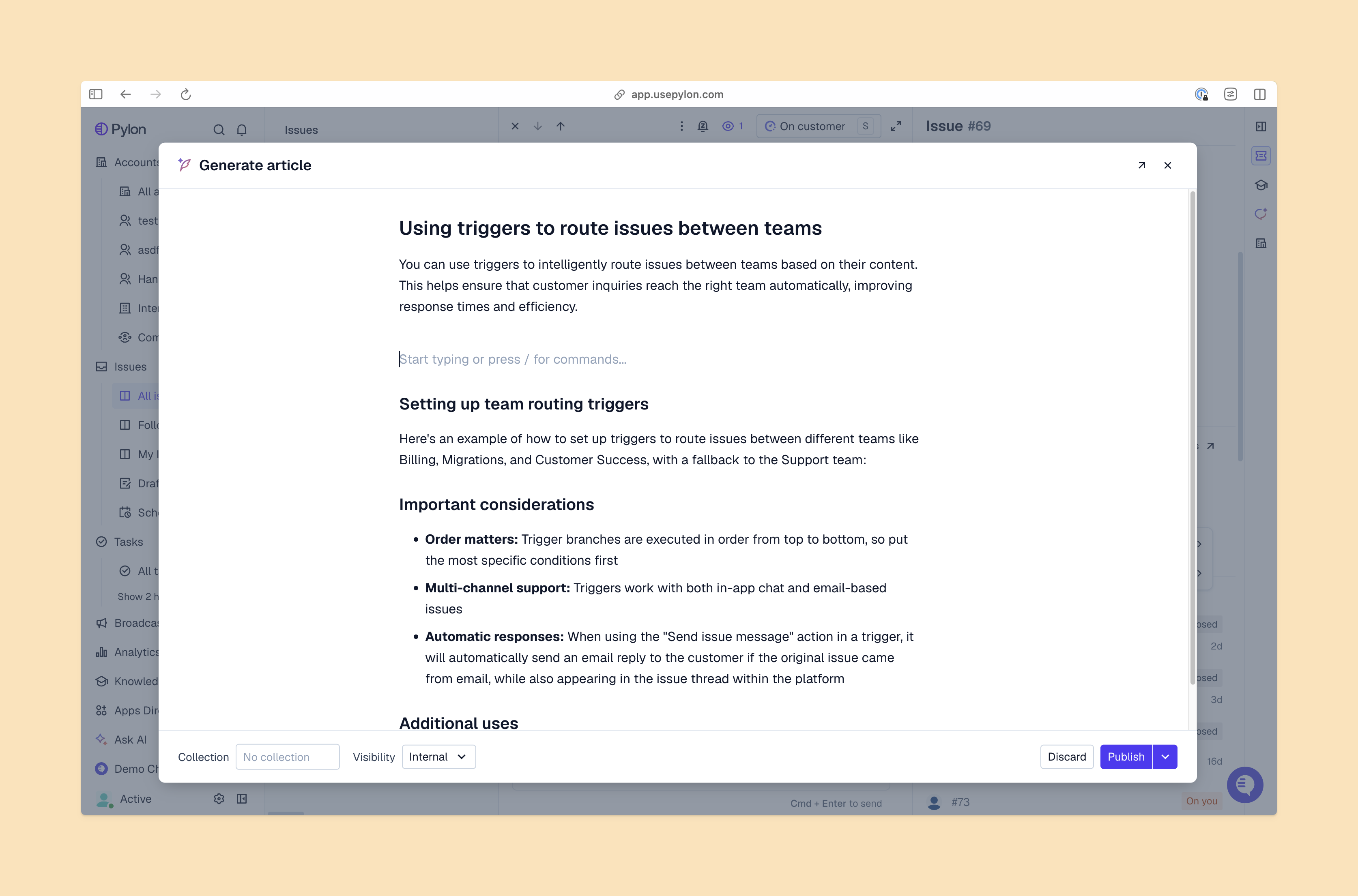
Generate Knowledge Base Article View From Pylon
Here’s how to transform feedback into meaningful action in four simple steps.
Stage 1: Collect Customer Feedback
Collect data via multiple methods, including:
Customer surveys
Online reviews and forums
Chat transcripts
Call recordings
If you go the survey route, you also have a few different options:
Net promoter score (NPS): A survey that asks customers how likely they are to recommend you, which gauges customer loyalty and enthusiasm for your brand.
Customer satisfaction score (CSAT): A survey that measures customer satisfaction. It can be general (overall satisfaction with your product/service) or more specific (satisfaction with a specific brand interaction).
Customer effort score (CES): A survey that calculates the effort required to interact with your brand, whether it’s solving a problem or getting a request fulfilled.
Stage 2: Categorize and Analyze Feedback
Sort your feedback into clear themes so that patterns and repeated comments are easier to spot. For instance, you might group common issues, feature requests, and positive feedback into separate categories.
From there, look for specific feedback that shows up over and over again. That might include a bug mentioned in several reviews or an onboarding step that drags out. Route feedback to the right teams to analyze problems more closely and brainstorm possible solutions.
Stage 3: Act on Insights
Once you understand what needs attention, put your solutions to the test. So if it’s a content issue in your help section, you might A/B test an updated page against the original. And if it’s a product development issue, you could release a variation and see if customers move through the experience with fewer hiccups. Testing improvements helps you confirm whether your solution actually solves the problem.
Once the update goes live, circle back with the customers who shared the original feedback. Write a quick note to show what changed and an invitation to review the new version and provide additional feedback.
Stage 4: Follow Up and Close the Loop
After testing and implementing the update, close the loop by sharing the final outcome with all customers. This can be a short note, a release update, or a message in the channel where feedback came in. Be clear about what changed and how the issue was resolved. Acknowledging the role customers played reinforces trust and keeps the feedback channel open.
Common Feedback Loop Examples
Let’s look at some common feedback examples to pay attention to.
Positive Feedback Loop Examples
Excellent customer support. When surveys and reviews highlight strong support interactions, teams can strengthen or prioritize those behaviors. Example: Customers consistently mention quick, helpful responses, prompting the team to standardize a set turnaround time.
Product features that solve key pain points. Strong engagement with a particular feature shows that you’re solving the right problems, so you can focus on improving and expanding it. Example: Customers use a scheduling tool on your dashboard a lot, so you decide to build on it.
Delightful customer experiences. When customers call out parts of the customer journey that are easy and intuitive, you might try to replicate the experience in other places. Example: Customers praise a simple checkout flow, so your team now has a model for simplifying other parts of the customer journey.
Negative Feedback Loop Examples:
Recurring product bugs or usability issues. Frequent negative customer sentiment around the same problem signals a major gap that needs to be prioritized. Example: Several customers mention that buttons get cut off in mobile view, so the layout needs immediate attention.
Long or complex return processes. When users get stuck at the same spot, it uncovers a speedbump in the customer journey. Example: Customers often ask about the same product integration, so your team updates the documentation with clearer language.
Poor support responsiveness. Feedback about long wait times or inconsistent responses shows where your team needs to adjust workflows. Example: Transcripts show customers repeating themselves across chat and email, prompting your team to unify conversation history with a B2B platform or omnichannel support.
Best Practices for Effective Customer Feedback Loops
Implementing customer feedback loops is a continuous process. These best practices help your team run the process smoothly so you can focus on improvements instead of putting out fires:
Acknowledge and thank customers for their input. A simple acknowledgement shows customers their feedback is valuable and encourages them to continue to share their thoughts.
Automate where possible — speed is key. Automating surveys and follow-up messages helps you gather feedback faster. Speed allows you to analyze patterns as they unfold and make improvements before negative customer sentiment balloons into churn.
Use the right feedback channels for your audience. Pay attention to the feedback formats customers engage most with. Meet them where they’re at, whether that’s in-product surveys, email prompts, or product forums.
Keep feedback accessible and integrated across teams. Centralize customer feedback in a shared system so product development, customer success, and support teams can work from the same source. Equal visibility to customer insights makes it easier to prioritize improvements and avoid duplicate or misaligned work.
Implement Customer Feedback Loops With Pylon
With Pylon, you can easily collect, categorize, and respond to account insights in real time. Pylon automatically captures signals from customer interactions and organizes them into clear, actionable intelligence.
Pylon is the modern B2B support platform that offers true omnichannel support across Slack, Teams, email, chat, ticket forms, and more. Our AI Agents and Assistants automate busywork and reduce response times. Plus, with Account Intelligence that unifies scattered customer signals to calculate health scores and identify churn risk, we're built for customer success at scale.