

Employees waste hours each week hunting for the information they need to do their jobs, whether it’s the latest onboarding checklist, a product update guide, or an internal policy. As companies scale, that friction only grows. Without a centralized system for storing and sharing knowledge, internal communication becomes chaotic and productivity suffers.
An internal knowledge base is a great solution to these problems. It acts as a centralized, searchable library where employees can find key documents, get answers to common questions, and stay aligned across teams. Unlike external help centers built for customers, internal knowledge bases are designed for employees and contain company-specific, sometimes confidential, resources.
When done well, an internal knowledge base reduces duplicate work, improves onboarding, and empowers employees to solve problems without waiting for a reply in Slack or Teams.
In this guide, we’ll explain what an internal knowledge base is, why it’s so valuable for B2B companies, how to create one, and the best practices that make it effective.
An internal knowledge base is a private, searchable library where employees can access the documentation, tools, and information they need to do their jobs. It acts as a single source of truth for everything from process docs to IT troubleshooting steps and makes it easier for teams to find the answers they need.
Here are some essential aspects of internal knowledge bases:
Setting up an internal knowledge base doesn’t just help employees find information faster; it reshapes how teams share knowledge, collaborate, and scale. In B2B environments where multiple departments rely on consistent information to support customers and manage complex workflows, an internal KB becomes a vital business asset.
Here are some of the top benefits B2B businesses see:
Creating an internal knowledge base might sound like a heavy lift, but with a straightforward process and the right tools, it’s very manageable. Whether you’re starting from scratch or consolidating scattered docs, the key is to approach the setup systematically so it’s easy to maintain and scale over time.
Here’s a straightforward plan to build your internal knowledge base and set it up for long-term success:
Start by identifying what your internal knowledge base is meant to accomplish. Are you trying to improve onboarding? Reduce repeat questions for IT and HR? Give your support team a place to document key workflows. Defining goals early will help you prioritize which content to create and how to structure it.
You’ll also want to determine the scope. Will it be company-wide, or are you building it for a specific department to start? A smaller scope can help you move faster and learn before rolling it out broadly. Align with leadership on what success looks like, whether that’s reduced support tickets, faster onboarding times, or better cross-functional collaboration.
An internal knowledge base won’t manage itself. Start by appointing a dedicated owner or small team to lead the project; this might include someone from operations, enablement, or IT, depending on your org structure. Their role is to oversee the rollout, define standards, and ensure long-term upkeep.
In addition to a core KB team, you’ll need champions from each department. These contributors can help identify the most helpful content, create or review knowledge base articles, and flag updates over time. It’s also essential to get buy-in from leadership early. When managers promote the knowledge base as a go-to resource, adoption spreads faster.
Responsibility should also be divided by function: who owns structure and taxonomy, who handles content creation, who approves updates, and who fields suggestions or flags outdated docs. Clear roles help maintain consistency and prevent the KB from becoming cluttered or outdated.
The platform you choose will shape the entire knowledge base experience for both contributors and readers. Look for knowledge base software (including paid and free options) that supports easy article creation, flexible organization, role-based permissions, and robust search. Bonus points if it integrates with your existing tools, like Slack, Teams, or your CRM.
If you’re building a KB for a B2B company, our software here at Pylon can be used for internal purposes. Pylon offers AI-powered search, a rich editor, version control, and seamless integration with communication channels, so teams can access knowledge without switching tabs. It also supports public, internal, and private knowledge sharing in the same system.
Other must-have features include customizable templates, analytics, and access control. Choose a platform your team will actually use; it should be intuitive, fast, and built for collaboration. If it takes five clicks to find one doc, adoption will drop quickly.
A well-organized knowledge base makes it easy for employees to find what they need, fast. Start by defining a high-level structure: will you group content by department, team function, document type, or workflow stage? There’s no one-size-fits-all system, but your categories should reflect how your employees naturally think about their work.
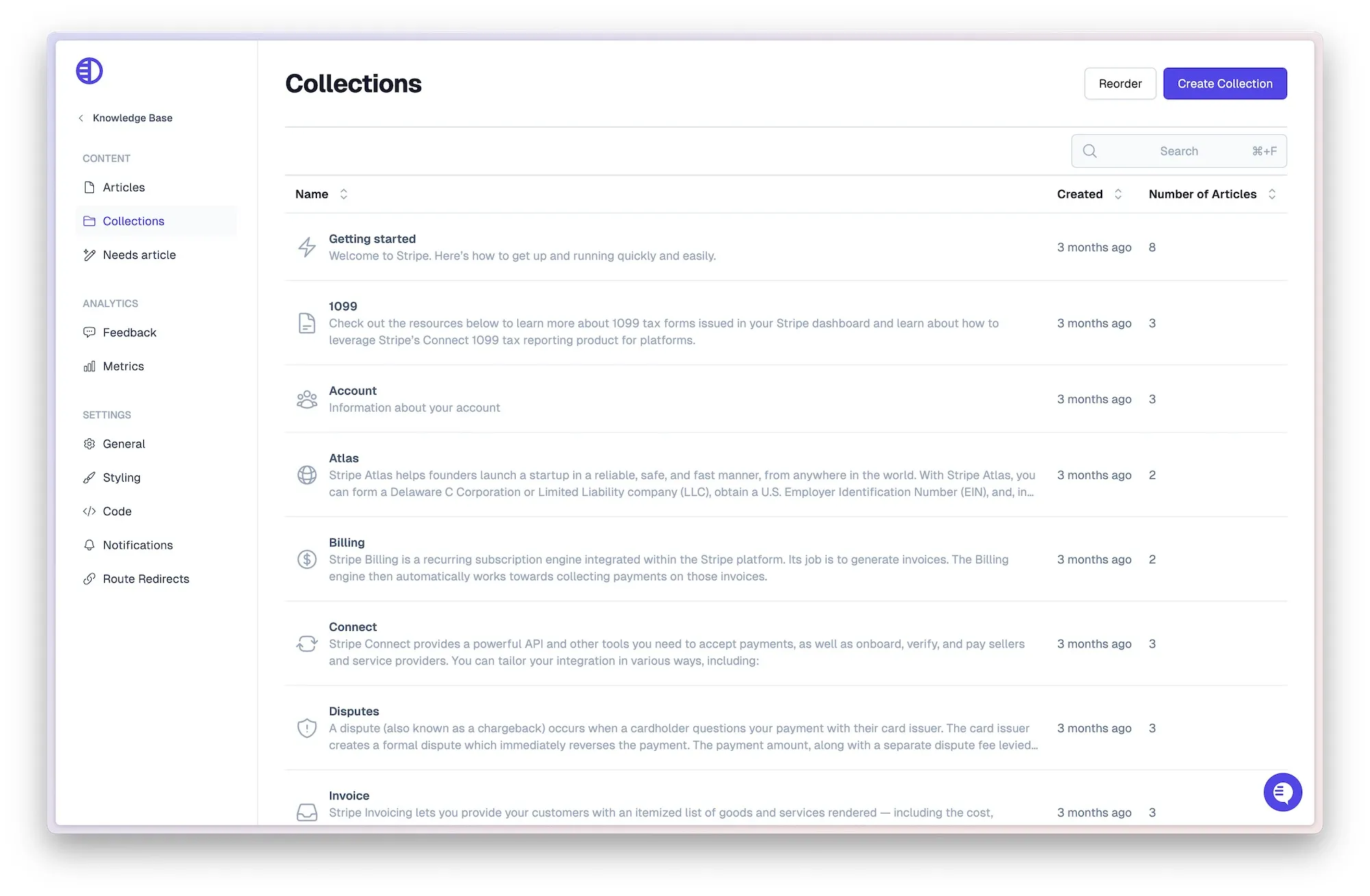
Once you’ve defined your top-level structure, build a hierarchy of sections, folders, and article titles that follow consistent naming conventions. For example, instead of “HR Docs,” opt for “HR → Benefits → Health Insurance Overview.” Descriptive, structured naming helps with both browsing and search.
You can sketch your layout in a spreadsheet or mind map before building it into your knowledge base tool. Pylon, for example, supports collections that allow you to nest folders, apply visibility rules, and mirror your org’s structure in a clean, scalable way.
Start by gathering documentation your team already uses, even if it’s scattered across Google Docs, PDFs, or internal wikis. Prioritize the most frequently requested resources, things like onboarding checklists, tool access instructions, meeting templates, or team-specific SOPs. You don’t have to upload everything at once; aim to launch with content that’s used often and provides immediate value.
Next, look for content gaps. Ask team leads what questions they answer over and over again. Use Slack message history or support tickets to identify repetitive requests. You can also use tools like Pylon’s Knowledge Gaps to flag issues that are not currently documented.
As you add content, tag and categorize each article to match your KB structure. This ensures new documents are easy to browse and show up in relevant searches. If you’re using a platform like Pylon, you’ll have an AI Copilot that can draft articles with AI-assisted suggestions, so your team spends less time formatting and more time sharing practical knowledge.
To maintain a clear, consistent, and easy-to-navigate internal knowledge base, establish content standards from the outset. These guidelines should define things like tone of voice, formatting rules, and how to write helpful article titles. For example, use sentence case for headers, always include a summary at the top, and keep paragraphs short for scannability.
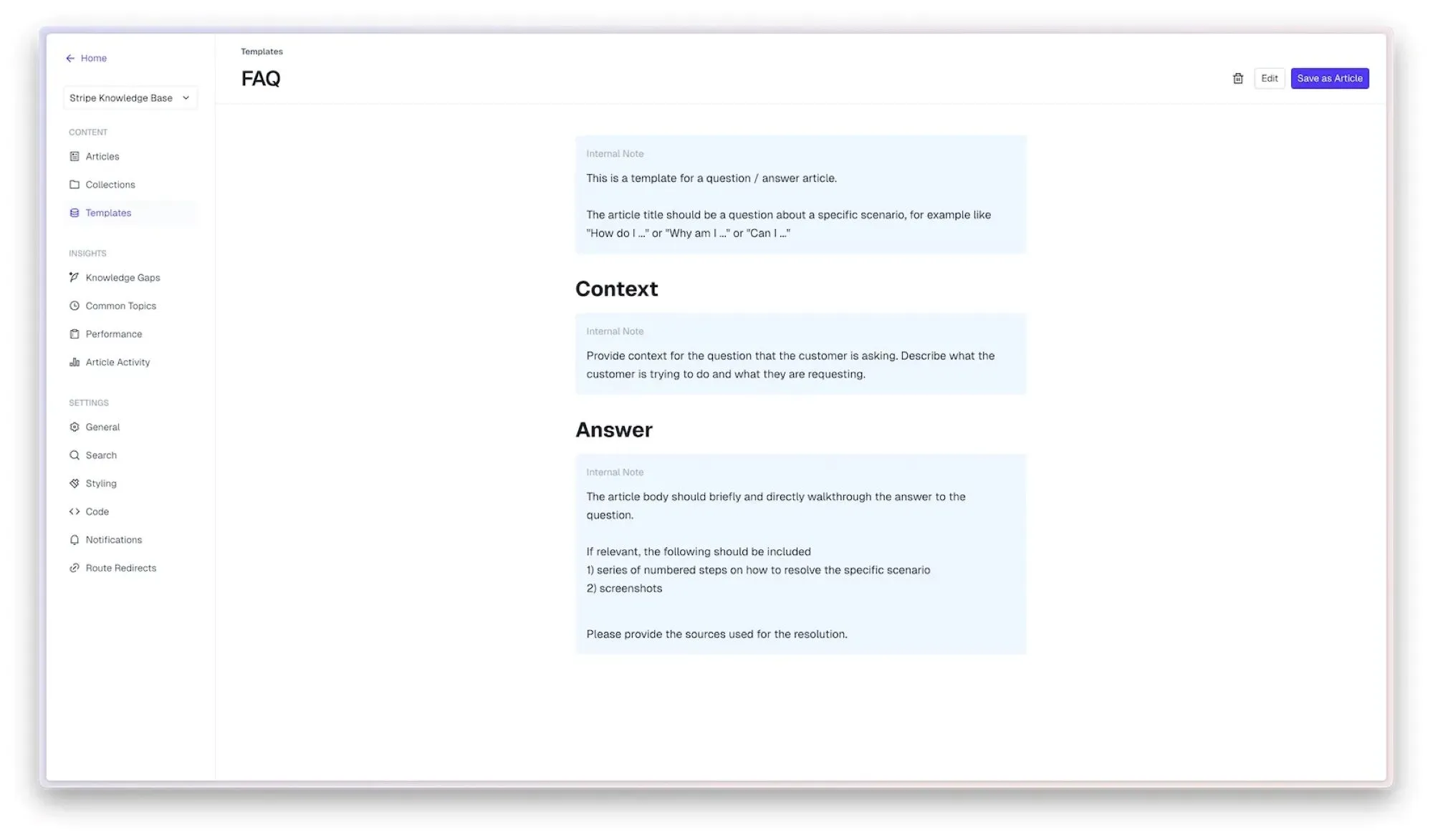
Knowledge base article templates are handy here. They ensure every article follows a familiar structure, whether it’s a how-to guide, an onboarding checklist, or an internal policy doc. Tools like Pylon’s article templates make it easy to standardize article types across teams.
Not every document should be visible to every employee. One of the key strengths of a modern internal knowledge base is its ability to support access control, so sensitive or team-specific content stays secure. Set permissions based on roles, departments, or user attributes to ensure people see what’s relevant to them.
With tools like Pylon, you can configure visibility at the article or collection level. That means you can host private documents for HR or finance, while keeping general onboarding guides open to the entire company. You can even set different access levels within a single article, such as internal notes visible only to team leads.
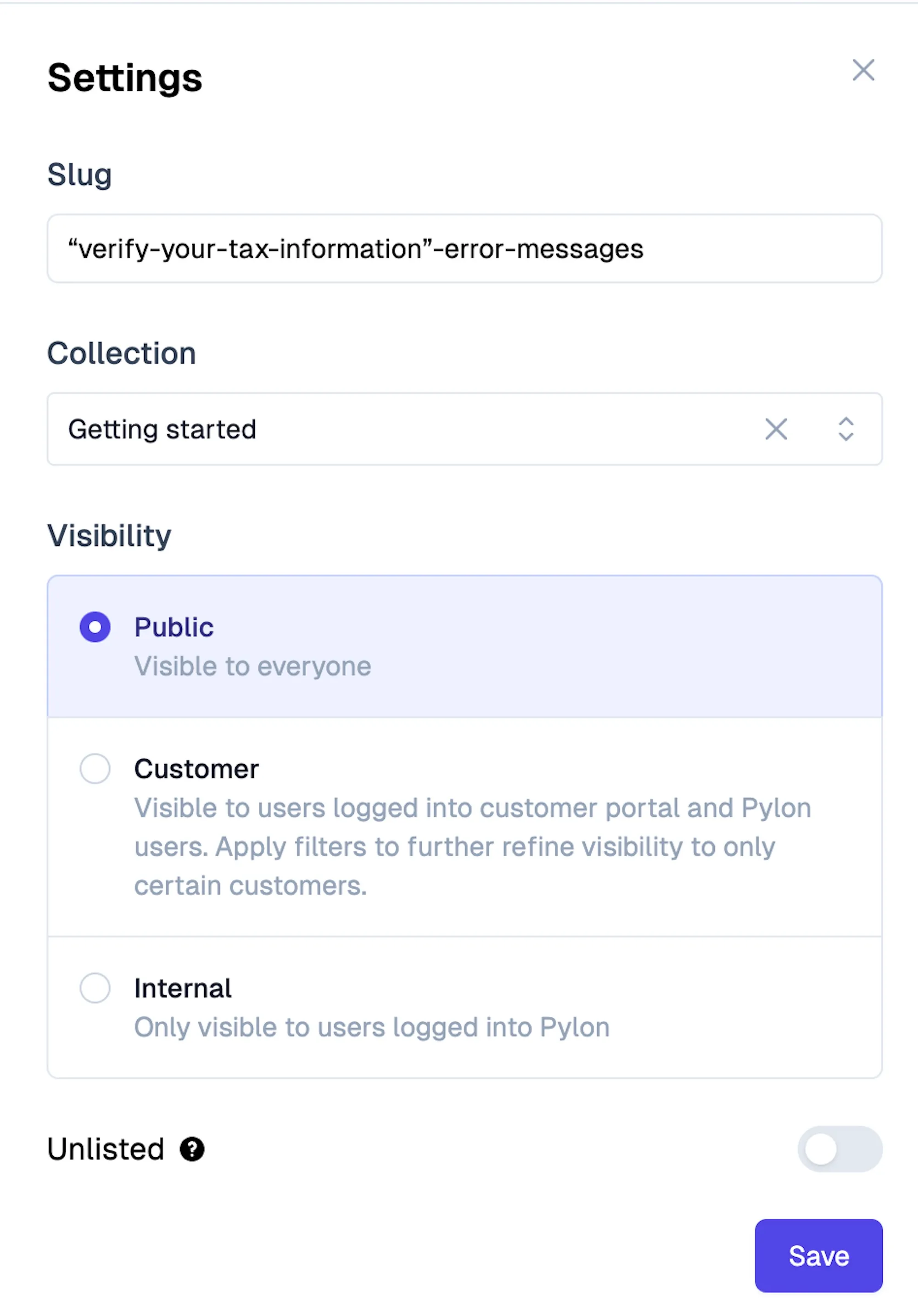
Well-configured permissions don’t just protect sensitive data; they also improve usability. When employees only see content that applies to them, the knowledge base becomes easier to navigate and less cluttered. It also helps foster trust in the KB as a secure and reliable source of information.
Even the best internal knowledge base won’t succeed if your team doesn’t know how or when to use it. Start by running a short training session or live demo showing employees how to search, browse, and suggest edits. Highlight real use cases they’ll encounter in daily work, such as finding the latest OKR process or checking the PTO policy.
Make the knowledge base part of every new employee’s onboarding checklist. Teach them to check the KB before pinging someone in Slack, and normalize that behavior across teams. You can even link relevant KB articles in your other internal tools to reinforce their role as a daily resource.
Encouraging adoption is an ongoing process. Celebrate teams who contribute to or use the KB well, and give shoutouts when someone updates an outdated doc. The more you position your KB as a helpful, living system, not a static archive, the more valuable it becomes over time.
Your internal knowledge base should be a collaborative resource, not something only a few people are allowed to update. Encourage team members to suggest edits, flag outdated information, or contribute new articles when they spot gaps. A knowledge base grows stronger when the people using it help shape it.
To keep contributions consistent, set up a simple process for submitting and reviewing new content. This might involve routing drafts through a content owner or assigning reviewers by department.
Recognition also goes a long way. Acknowledge contributors in company meetings, Slack, or newsletters. When employees see their knowledge shared and valued, they’re more likely to continue participating, and that keeps your KB healthy and up to date.
An internal knowledge base is never truly finished. To keep it functional, you need a plan for ongoing maintenance. Schedule regular reviews—quarterly is a good starting point—to identify outdated articles, fix broken links, and archive irrelevant content.
Treat your knowledge base as a living resource. The more accurate, current, and complete it is, the more your team will trust and rely on it. That trust drives engagement and turns your KB into an actual engine for productivity and alignment.
Creating a knowledge base is only part of the equation; ensuring it delivers long-term value requires consistent habits and thoughtful upkeep. Following best practices for creating a knowledge base will help you get the most from your internal KB, whether you're just launching or optimizing an existing system.
Here are some guidelines to keep in mind:
If you’re building or scaling an internal knowledge base, Pylon provides a purpose-built platform designed to support B2B workflows. It goes beyond static documentation, offering real-time access, deep integrations, and AI-powered tools that make knowledge easy to create, manage, and use.
Pylon gives teams a centralized workspace for all internal documentation. You can host internal-only articles, share documents via secure links, and even add internal notes to public content. This flexibility allows you to create a single source of truth for every department without sacrificing control or structure.
Pylon provides a number of tools to help any team member draft, edit, and publish content, no technical skills required. The AI Copilot generates drafts from resolved issues and alerts you if you are drafting something similar to an existing document. You can highlight any text and press Ask AI for help rewording, changing paragraph structure, or revising tone.

Built-in collaboration tools make it easy to co-author and request feedback. Drafts, version history, and commenting features ensure your documentation process is both agile and accountable.
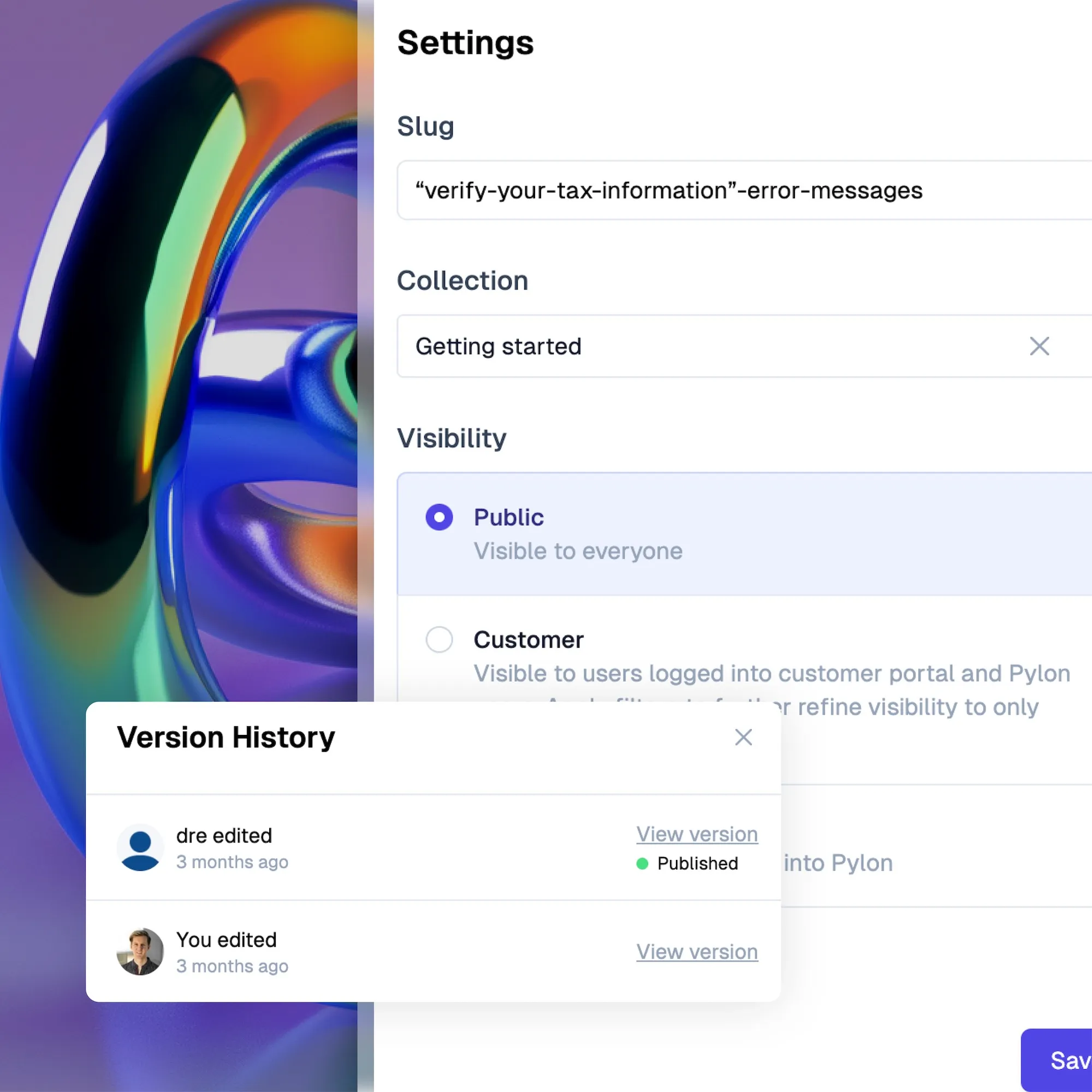
Pylon includes a rich text editor that supports everything from headers and code blocks to tables and image embeds. You can also create and reuse article templates to standardize content across teams. This helps maintain clarity and consistency as your knowledge base grows.
Granular permission settings allow you to manage who can view or edit each piece of content. Create internal-only collections for sensitive HR, finance, or legal content, or restrict article visibility by role or department. These access controls make it safe to store all kinds of internal knowledge in one place.
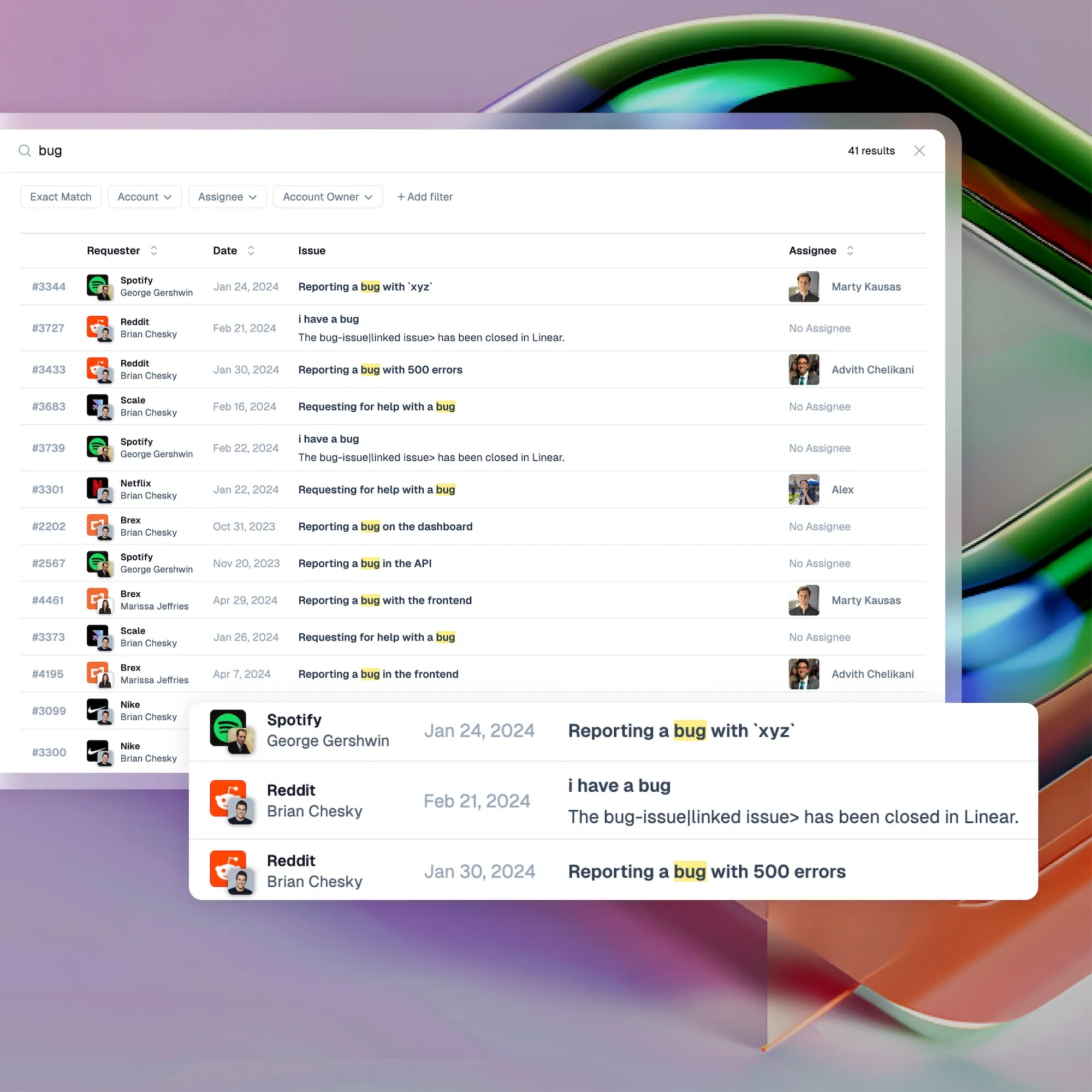
Pylon’s AI-powered search engine helps employees find the correct answers quickly, even when they don’t phrase questions perfectly. It can search across your knowledge base, Slack messages, and other connected tools. With features like federated search, users get comprehensive results from one place.
With Pylon's analytics dashboard, you can track search trends, article views, and feedback to identify gaps or outdated content. See what your team is actually looking for and use those insights to improve documentation. You can also monitor contributions and update frequency to keep your KB fresh and active.
Pylon Workforce Management is available now. See it in action with a live demo.