Updated January 10, 2026 | 13 min read
Good knowledge bases (KBs) help your customers find immediate answers to common support questions — and they give your team more time to handle complex issues. But knowledge bases are also notoriously difficult to maintain and update.
This is where customer service knowledge base software comes in. We'll walk through why B2B support teams need knowledge base software, how they help keep your KB up to date, and how to choose software that scales with your support operations.
Customer service knowledge base software is a centralized platform where you store and organize support documentation, FAQs, troubleshooting guides, and product information. It's a resource for both your internal support team (who reference it to resolve tickets accurately and consistently) and external customers (who search it for answer to common issues).
The platform acts as a single source of truth for all your support content. Instead of hunting through scattered Google Docs, Slack threads, or email chains, your team can access everything from one searchable place.
A good knowledge management platform helps teams support their customers faster and more accurately. Here are a few specific benefits for B2B support teams.
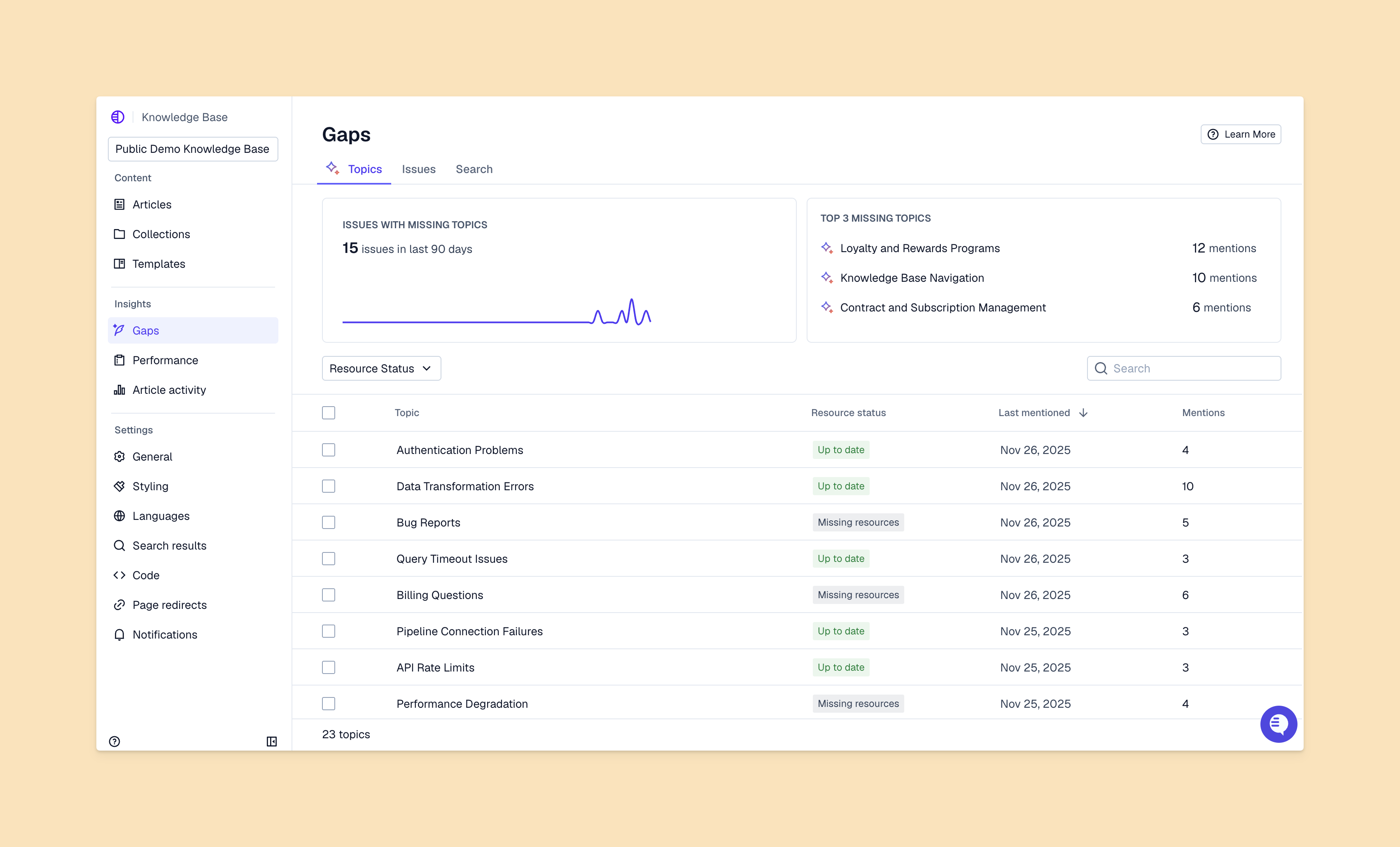
Different knowledge base tools will offer a range of features, from basic documentation capabilities to advanced content review workflows.
Here are a few features for B2B support teams to consider.
Many modern knowledge base tools now have AI features to make search, updating, and drafting workflows easier for support teams. For example:
Most B2B teams support customers over multiple different channels — Slack, email, in-app chat, Telegram, SMS, or others. Choosing a knowledge base solution with omnichannel integration means customers can search your help center directly in your chat widget, when they're talking to an AI agent in Slack, or or similar.
It also means your support team doesn't have to switch platforms to search through the knowledge base. They can respond to issues and reference support content in the same place.
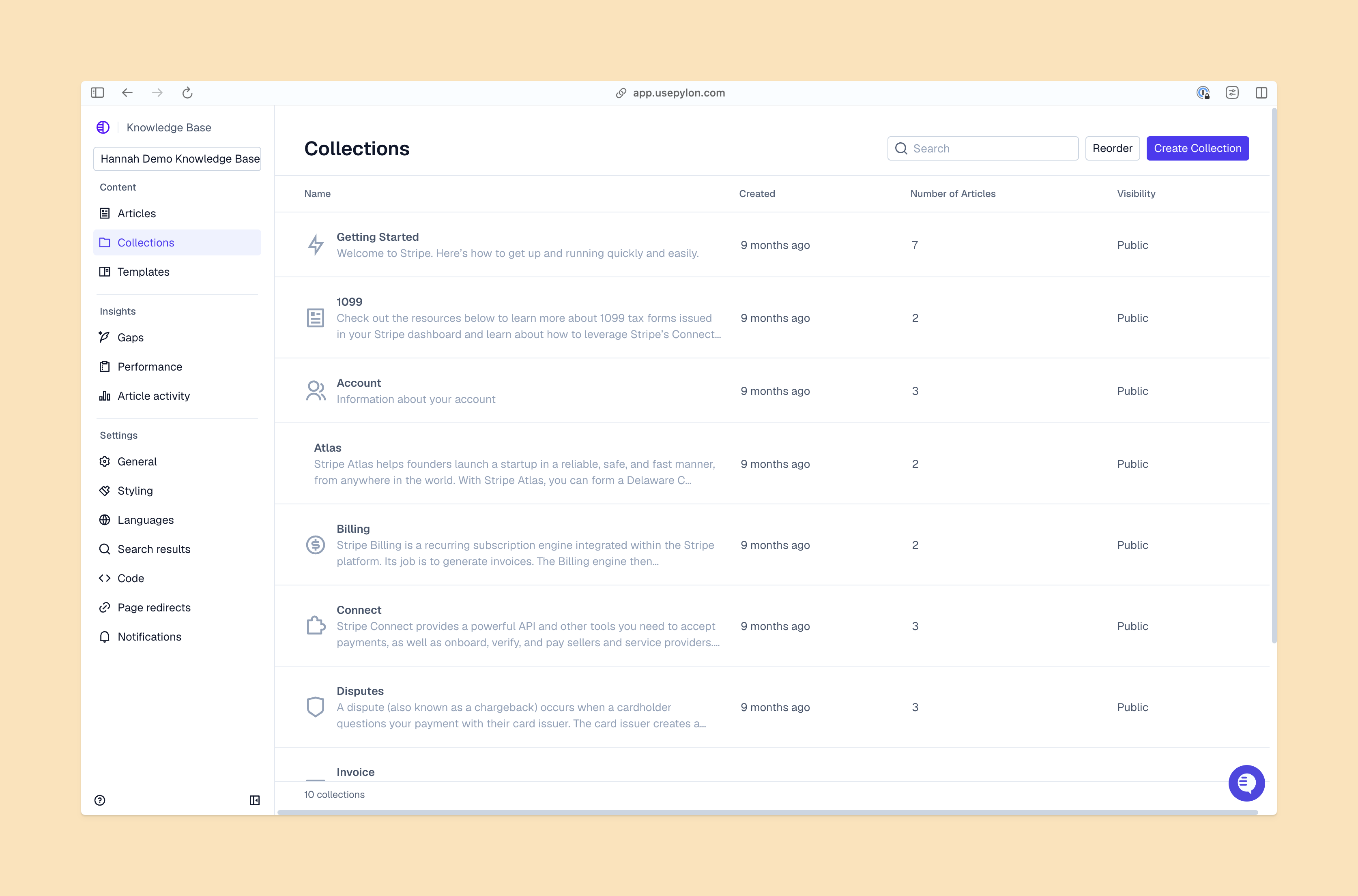
You need two types of content: customer-facing articles and internal documentation. Your customers don't need to see escalation procedures, internal SLAs, or how to handle edge cases with your API.
Platforms with internal knowledge base support make it easy for your team to control which content should be gated to customers, and which articles should be public to everyone.
This is the external-facing help center where customers search articles independently. You can customize it to match your company branding and organize content by product or topic.
The portal gives your customers 24/7 access to support answers. If a user is having an issue at 2 AM in your local time, they can search your knowledge base for answers first, instead of waiting for business hours.
Many knowledge base solutions will show you which articles are most frequently viewed, which searches aren't returning results, and which content is actually reducing ticket volume for your team. This data helps you identify where you should focus documentation efforts.
We've evaluated the top platforms based on features, integrations, and fit for B2B support teams.
Pylon is the support platform built for B2B. With ticketing, AI agents, account management, AI knowledge management, and more, it's built for you to run all your post-sales operations from one platform.
What differentiates Pylon's knowledge bases is the fact that they natively connect to the rest of your support operations. AI automatically surfaces relevant articles in issues from Slack, Teams, email, chat, and more — and you can train AI agents to deflect tickets based on specific areas of your knowledge base.
Plus, Pylon's AI proactively detects knowledge gaps, duplicate articles, and can translate content in your help center. It also automatically generates new articles and drafts edits to help keep your knowledge base updated.
Pylon is an ideal choice for teams that want to manage their knowledge base in the same place as their support operations and customer success motion — instead of stitching together yet another support tool. See how Pylon fits your workflow.
Zendesk offers robust help center features as part of its established support platform. You get detailed customization options, multilingual support, and extensive integrations.
But the main tradeoff with Zendesk is complexity. It's a legacy tool that typically takes much longer to set up for teams (sometimes requiring internal resources or consultants to help with implementation) and the interface can feel overwhelming for smaller teams.
Intercom integrates its knowledge base directly with its messaging platform. If your support strategy centers on in-app chat conversations, this tight integration makes sense.
Note that Intercom's knowledge base works well for simple use cases, but it lacks some advanced features that other platforms have — like detailed analytics, clear access control for different articles or collections, and complex content hierarchies.
Document360 focuses specifically on documentation, so most teams like it for technical product docs and API references. You get robust version control, multiple content formats, and detailed customization.
That said, Document360 is a standalone knowledge management tool. You'll have to integrate it with your support platform separately.
Freshdesk provides basic knowledge base capabilities at an affordable price point. You can create articles, organize them into categories, and embed them in your help center.
The features are straightforward without much sophistication. It works for teams just starting with knowledge management.
Help Scout offers a user-friendly knowledge base that's easy to set up and maintain. The interface feels intuitive, and most teams can start publishing content within a day.
It's designed for small to mid-size teams that want simplicity over advanced features.
Atlassian's Confluence is typically used as an internal knowledge base, instead of a customer-facing help center. But teams who already use Jira will often use Confluence because it's a native integration.
Since it's mostly an internal tool, Confluence is great for team collaboration and documentation workflows, but it lacks many features specifically for customer support.
To choose the right knowledge management platform for your team, you'll need to figure your specific needs and requirements. Here's a 5-step framework to follow.
List every channel that customers currently use for support: email, Slack, Teams, in-app chat, phone, ticket forms, and any others. Then check your monthly support volume and ticket types.
This tells you whether you need basic knowledge base capabilities or something more sophisticated. If you're handling 1,000+ tickets monthly across multiple channels, you'll want AI-powered features and omnichannel integration.
Write down the tools your team uses every day: your CRM, ticketing system, communication platforms, and product tools. You'll want a knowledge base platform that integrates with your existing stack — so you don't have to constant context switch.
When your knowledge base connects to your CRM, you can track which accounts use self-service most and correlate that with your retention metrics.
Consider how many people will create content, whether you need approval workflows, and if version control matters. Some platforms let anyone publish immediately while others require editorial review.
B2B teams often need multiple contributors across support, product, and engineering.
Check cost per user, content limits, and whether pricing grows linearly with your team. And remember to calculate the total cost of ownership beyond a base subscription: implementation fees, training costs, and integration expenses add up.
Some platforms charge based on articles published or searches performed instead of users.
During trials, specifically test AI-powered search, automated article suggestions, and content generation. Does the search understand natural language? Can it surface articles automatically during conversations? Does it learn from which articles actually resolve issues?
The answers reveal whether AI workflows will add real value to your knowledge content.
To make sure your team is getting real value from your knowledge base, you need a structured plan for implementation. Here are a few steps to kick off your planning.
Start by auditing your current documentation wherever it lives. Is it in Google Docs, Notion, wiki pages, or another help center? Decide what to migrate and what to recreate based on accuracy and relevance.
Most platforms offer import tools for bulk content migration. However, this is a good opportunity to retire outdated articles and reorganize information architecture.
Begin with your most-asked questions, common troubleshooting guides, and onboarding documentation. Check your support tickets from the past 90 days to identify topics that come up repeatedly.
You can use AI to draft initial articles, then have team members refine them with specific details and examples. This approach gets content published faster while maintaining quality.
Show your team how to search effectively, when to create new articles, and how to suggest updates when they spot outdated information. The goal is making the knowledge base part of daily workflow.
Encourage team members to link to articles in their responses instead of typing the same information repeatedly.
Track these metrics monthly:
Compare them to your baseline before implementing the knowledge base. Most B2B teams see positive ROI within 3 to 6 months once they've built a solid content library.
The right customer service knowledge base software centralizes information, scales your support operations, and improves customer experience with self-service options. For B2B teams, you need solutions that integrate with your existing support tools and let you control both internal and customer-facing content.
Platforms like Pylon go beyond basic knowledge management by connecting documentation to your actual support conversations and customer intelligence. Instead of maintaining separate systems for ticketing, knowledge management, and customer success, you have one platform that turns every customer interaction into actionable insights.
Pylon is the modern B2B support platform that offers true omnichannel support across Slack, Teams, email, chat, ticket forms, and more. Our AI Agents & Assistants automate busywork and reduce response times. Plus, with Account Intelligence that unifies scattered customer signals to calculate health scores and identify churn risk, we're built for customer success at scale.
Implementation typically takes 2 to 4 weeks including content migration and team training. Timeline depends on your existing documentation volume and how much customization you need.
Yes, knowledge base analytics show which topics generate the most searches and which queries return no results. This reveals where your product documentation or features are missing.
Knowledge base software stores and organizes documentation while help desk software manages support tickets and customer conversations. Many modern platforms like Pylon combine both capabilities in one system.
Track your ticket deflection rate, reduction in support costs, and time saved per resolved ticket. Compare these savings against your knowledge base platform subscription cost.
Yes, internal knowledge bases contain sensitive processes and escalation procedures while external knowledge bases provide customer-facing documentation. The best knowledge base solutions support both within one platform.
Pylon Workforce Management is available now. See it in action with a live demo.