


Updated December 19, 2025 | 13 min read
When your support team is focused on getting through the ticket queue, it's easy for your help center to get out of date.
AI knowledge base software can help you automate documentation work: drafting articles from support conversations, flagging topics that aren't yet covered, or surfacing answers to customers before they even submit a ticket.
We'll walk through different AI knowledge management features, which platforms actually work for B2B support teams, and how to pick the right one for your workflow.
AI knowledge base software is a platform that stores information about your product or service. It uses AI to automatically write articles, spot gaps in your documentation, and surface the most relevant content in search.
The difference from a traditional knowledge base (KB) is that AI does most of the maintenance for you. It can draft new content from ongoing support conversations, flag outdated articles, or detect duplicate content across your KB.
Think of it like having a documentation assistant that learns from every customer conversation. When your team answers a net new question, AI flags the topic and suggests turning it into an article. Or when customers search for something that doesn't exist in your docs, it can let you know about the gap.
Most support teams are regularly answering the same questions. Maybe it's about your API, a certain feature, or help with a product flow.
At the same time, a lot of support teams have trouble keeping their KBs up to date — especially when you're frequently launching new products or features. Customers often want instant answers, but your knowledge base might not have what they're looking for.
AI knowledge management solves this by automating a lot of the manual work.
You'll get fewer repetitive tickets and more time to work on complex problems and long-term customer relationships.
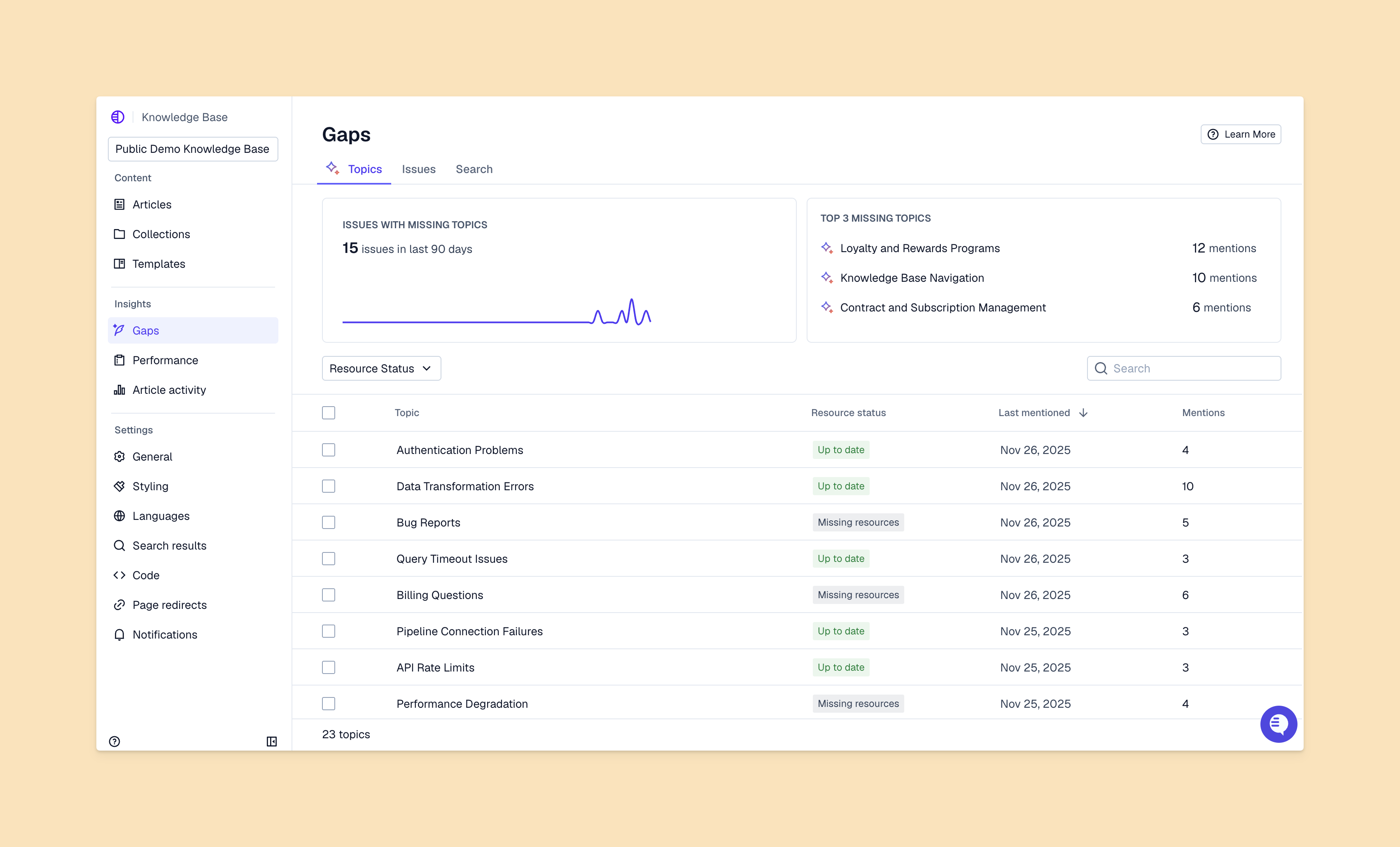
Here are some key features for look for when you're evaluating knowledge management tools.
AI drafts articles directly from your support conversations. When a support engineer explains a feature in a ticket, AI can turn that into a full knowledge base article. You don't have to manually draft from scratch every time.
It also catches duplicates in your knowledge content and flags topic gaps when customers ask a question that isn't documented yet.
Knowledge bases are more effective when they use semantic search. This means the system isn't just returning exact keyword matches when a user searches for an article.
The platform also suggests related content based on what other people with similar questions end up reading. So if someone's looking at a billing article, it might surface the article about updating payment methods next.
AI monitors your knowledge base for stale content. Instead of manually reviewing hundreds of articles every quarter, you can rely on the platform to identify articles that contradict recent support interactions or haven't been updated in months.
Ideally this happens automatically based on product documentation updates, customer issues, or how people interact with your help center.
You can see which articles get the most traffic, where customers give up and contact support, and what topics are missing from your docs. The best platforms connect this data to your support metrics so you can measure how good documentation affects ticket volume and resolution time.
We looked at platforms based on their AI capabilities, how easy they are for support teams to actually use, what they integrate with, and whether they work for B2B companies. Each one has different strengths depending on what your team cares about most.
| Platform | Best for | Key AI feature |
|---|---|---|
| Pylon | B2B support teams | Auto-generates articles from support conversations |
| Zendesk | Traditional support teams | AI-powered answer bot |
| Intercom | B2C messaging | Fin AI agent |
| Document360 | Technical documentation | AI content suggestions |
| Confluence | Internal wikis | AI search |
| Tettra | Simple internal knowledge | Slack knowledge base integration |
| Bloomfire | Enterprise knowledge sharing | AI-powered discovery |
Pylon is specifically built for B2B support teams, with knowledge management that's integrated with your core support platform.
AI can flag missing articles based on your support interactions, automatically draft content from your team's responses, and catch duplicate articles before they confuse anyone.
You can create multiple knowledge bases and control exactly who sees what, between customers, AI agents, and internal teams. This is important for B2B companies where different customer segments or internal teams might need access to different information.
A key differentiator is that Pylon's AI Knowledge Management is built on top of a full support platform. It uses data from your actual support conversations to auto-update content, and suggests relevant resources when you're responding to customer questions from Slack, Teams, email, or chat.
Key features:

Zendesk is a legacy option with knowledge base features through Zendesk Guide. Connected with Zendesk's ticketing platform, it offers AI-powered answer suggestions and content recommendations.
It works well for traditional teams with complex requirements and budget for enterprise software. But B2B teams often find that the trade-off is implementation time and effort. Setting up Zendesk can require admin or consultant resources, and for some companies, it takes months longer than newer platforms do.
Intercom combines chat messaging with a built-in knowledge base. You can create documentation to specifically train Intercom's Fin AI agent.
This option could make sense if you're already using Intercom and primarily focused on chat-based support. That said, the knowledge management features are more basic than other platforms in this list and mainly meant for training Fin AI.
Document360 specializes in technical documentation with strong AI search and content suggestions. It's purpose-built for knowledge management with features like version control, content templates, and formatting for code and API docs.
Teams choose Document360 when documentation quality and organization are the main priority, especially for technical or developer-focused content. Keep in mind that Document360 isn't a full support platform; if you choose to use it for part of your support operations, you'll need to buy a separate ticketing system.
Confluence is Atlassian's internal wiki that integrates with Jira and other Atlassian products. Atlassian Intelligence adds AI-powered search and content suggestions.
It works well for teams already using Jira who want internal knowledge sharing. That said, it's designed for internal collaboration instead of customer-facing support, so it doesn't have features like self-service portals or customer analytics.
Tettra is a lightweight option for internal knowledge sharing. It integrates with Slack and focuses on straightforward company documentation without overwhelming features.
It works for smaller teams that want a simple company knowledge base instead of complex support operations. The selling point is simplicity: quick setup and minimal learning curve. But just like Document360, Tettra can't serve as your primary support platform. You'll need to buy another ticketing system to use alongside it.
Bloomfire is an enterprise knowledge sharing platform with AI-powered search. It handles different content types including videos, documents, and presentations.
It's built for large organizations with varied content needs, but focuses on internal knowledge management instead of customer support. This means it doesn't have features like ticket deflection tracking, and it can't serve as your standalone support platform.
The right platform depends on your workflow and the pain points you're trying to address. Here's how to figure out what actually matters for your support team.
Start by looking at your current documentation to see what's missing, outdated, or buried. Check your most common support questions and see which ones don't have associated articles. Look at search queries that don't return anything and tickets that take multiple messages to resolve.
These gaps will show you where AI knowledge management can make the biggest difference.
Pick clear goals like fewer tickets, faster resolution times, or better customer satisfaction scores. Measure your baseline now so you can track what changes after implementation.
You can connect knowledge base usage to business outcomes. How many more customers solve their issues without contacting support? How is your support volume changing?
Your knowledge base works better when it connects to your support tools, CRM, and communication platforms. Check how each platform integrates with what you already use.
This way your knowledge content lives in the same place as the rest of your customer data and context.
Estimate the time you'll save from self-service and reduced support costs. If your team spends 10 hours a week answering very repetitive questions, and a knowledge base could deflect half of those, that's already 5 hours saved. Multiply that across your team and calculate how much you gain from redirecting that time to high-impact work.
Rolling out new knowledge management software takes some planning. Here's a general framework you can follow.
Take inventory of your existing documentation and decide what to migrate, what to create fresh, and what to retire. Organize everything by topic and priority. You can start with your frequently asked questions and most critical product areas.
This audit also shows you how much content you're starting with, which will affect your implementation timeline.
Move content into your new platform and improve it as you go. Use AI to spot gaps and suggest improvements during migration.
This is your chance to consolidate duplicate articles, update outdated information, and establish consistent structure before customers see it.
Onboard support team members with hands-on practice instead of just documentation. Have them search for articles, create test content, and use the platform in realistic scenarios.
Establish clear ownership so everyone knows who maintains which articles and how to request updates.
Roll out to customers and track early performance closely. Gather feedback from customers and your support team about what's working and what's confusing.
Make adjustments based on usage patterns. If certain articles are getting high traffic but low satisfaction ratings, those are your first targets for improvement.
Track metrics to see whether your AI knowledge base software is actually working. You can monitor self-service resolution rate (how often customers find answers without contacting support), time to find answers, article usage, and ticket deflection.
Connect the metrics to business outcomes like reduced support costs and improved customer satisfaction. For example, if your knowledge base deflects 200 tickets per month and each ticket costs $15 in support time, that's $3,000 in monthly savings.
Focus on actionable metrics:
The best platforms will surface these metrics automatically, so you can directly track the impact of your new knowledge base.
Small teams can launch in 2 weeks or less with basic content migration. Larger teams with extensive documentation typically take 4 to 8 weeks for full implementation, including content optimization and team training.
Yes, many modern AI knowledge base platforms can handle technical content like code snippets, API documentation, and product specifications. Look for platforms with syntax highlighting, version control, and developer-friendly formatting.
Traditional knowledge bases require manual content creation, organization, and updates. AI knowledge base software automates content generation from support conversations, detects gaps and outdated information, and surfaces relevant answers using semantic search instead of keyword matching.
Well-implemented knowledge bases typically reduce ticket volume by helping customers find answers independently. But the exact number will depend on your content quality, search effectiveness, and how easily customers can access your knowledge base.
AI knowledge base software can change how your support team operates. You'll go from reactive ticket handling and knowledge content updates to proactive self-service and automatic refreshes. The best platforms integrate knowledge management with the rest of your support operations, instead of treating it as a separate tool.
When your knowledge management and core support system live in the same place, AI can automatically draft articles from real customer interactions, suggest relevant content while you're responding to tickets, and spot gaps based on what customers are actually asking about.
Pylon is the modern B2B support platform that offers true omnichannel support across Slack, Teams, email, chat, ticket forms, and more. Our AI Agents & Assistants automate busywork and reduce response times. Plus, with Account Intelligence that unifies scattered customer signals to calculate health scores and identify churn risk, we're built for customer success at scale.
Pylon Workforce Management is available now. See it in action with a live demo.





