


Updated February 19, 2026 | 14 min read
A customer knowledge base (KB) is a searchable library of support resources, troubleshooting guides, and setup docs that your customers can access anytime. They're a self-service option for times when users need support outside of your business hours, or customers just want quick answers to simple product questions.
This guide covers what knowledge bases are, why they work, how to build one, and how to keep it effective as your company grows.
A customer knowledge base is a centralized, searchable online library where your customers can find answers to common product questions, troubleshooting steps, and how-to guides.
It's available as a resource for customers when your support team is offline and typically includes content like FAQs, user guides, tutorials, video demonstrations, and step-by-step instructions. These articles help customers solve product issues on their own.
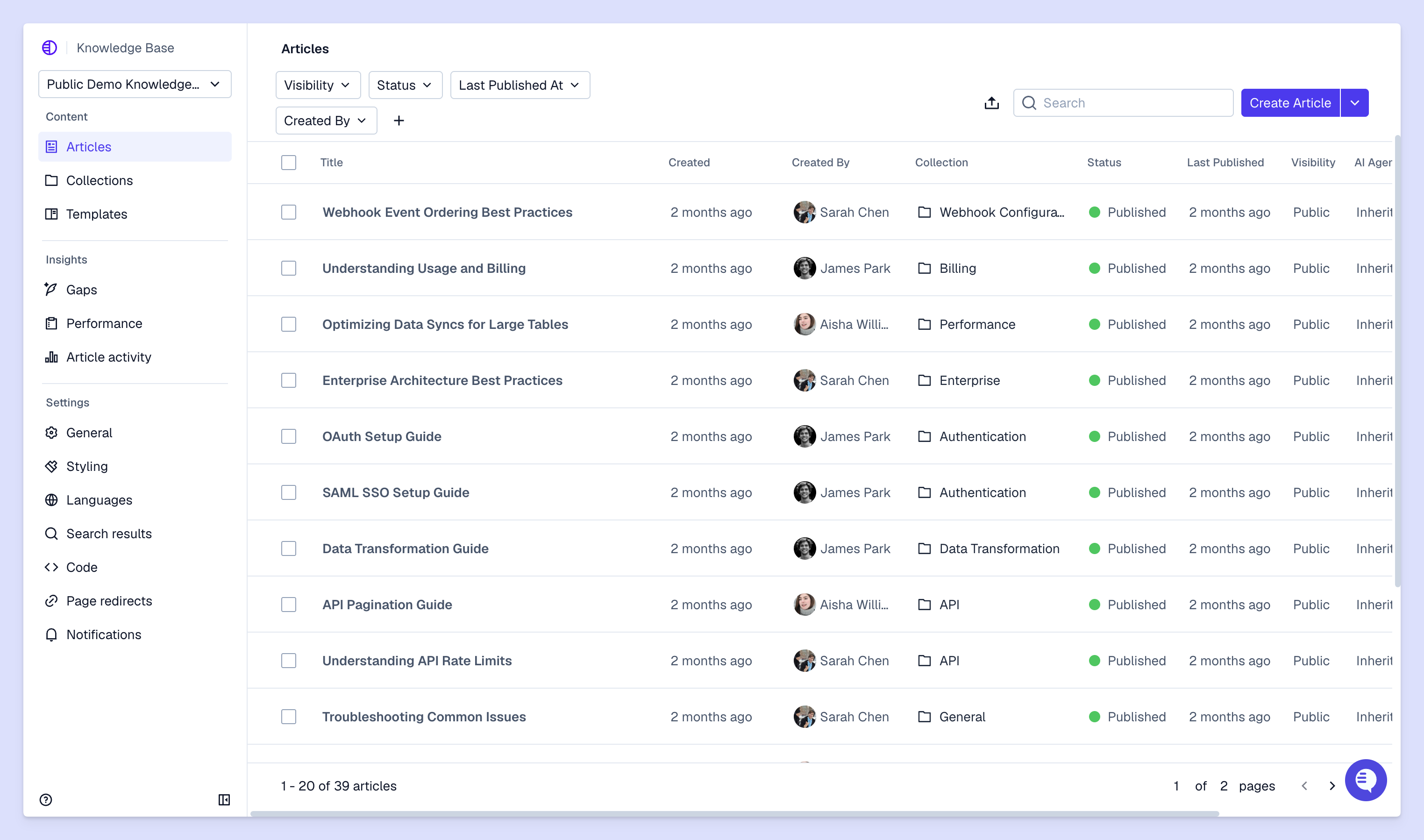
Knowledge bases need to be organized and searchable for customers to find the support resources they're looking for. Here's a breakdown of how most KBs are structured.
Every knowledge base includes a few building blocks:
Most support teams will organize KB content into logical categories and subcategories (also called "collections," sometimes). A clear hierarchy helps customers browse quickly through topics or jump directly to what they need.
You want your architecture to match how customers use or navigate product workflows, so it's easy for them to navigate through the KB — you shouldn't necessarily organize content the way your product is internally structured or documented.
These days, many modern KBs don't just do keyword matching. They use AI-powered search to actually understand natural language queries, so customers can just type questions the way they'd ask a support team member.
Many support teams actually maintain multiple different knowledge bases to serve different audiences — it depends on what your team, customers, and cross-functional partners need.
Here are three categories of KBs, broken down by their typical audience and goals.
Internal KBs are resources for your support team and other cross-functional partners only. They document internal processes for support or other customer-facing teams, troubleshooting scripts, escalation procedures, and company information that users don't need access to.
This knowledge content should help your team stay aligned on how to handle specific support cases and find resources when they're helping customers.
These are the types of KBs we're mainly talking about in this guide. Customer-facing knowledge bases are public help centers for customers to access self-service support.
They're typically embedded on your company website or directly in your product — or they're easily accessible at a separate branded domain, like support.company.com. Usually maintained by support teams, KBs include content that addresses common customer questions, product tutorials, and troubleshooting guides that help users solve problems or set up features on their own.
Some knowledge base platforms like Pylon allow you to set different access permissions for different parts of your KB. For example:
This way you can maintain content tailored to different customer segments or use cases. For example, say you only offer access to a certain feature for select enterprise customers. You might still want to write an article about how to set it up, but only make it accessible to customers who get a direct link from your team.
A knowledge base creates value in three directions: customers get faster answers, your support team handles fewer repetitive questions, and your business reduces costs while improving satisfaction.
Your customers get instant answers without waiting in the support queue. They can find solutions to simple issues outside of your business hours or across time zones. And they can solve problems independently, at their own pace, without needing to explain their issue to your team.
Your team handles fewer repetitive questions since common issues get deflected to self-service. But even when support team members are working on tickets, they can share knowledge base resources for straightforward questions.
Plus, with a well-maintained KB, everyone on your team can reference the same source of truth on your product. And they can focus their energy on complex problems that actually require human expertise instead of constantly answering basic questions.
Knowledge bases are one way you can handle more customers without growing your team proportionally, since self-service scales infinitely. You can keep growing your customer base without overwhelming your team or sacrificing response quality. And you can see what customers search for to identify product gaps, confusing features, or documentation needs.
Building your first knowledge base doesn't require starting with comprehensive coverage. You can launch with answers to your most common questions and expand from there.
Review support tickets and conversations from the past three to six months to identify patterns. Look for questions that come up repeatedly, issues that cause the most customer friction, and topics where you're explaining the same thing over and over. This audit tells you exactly what content to prioritize instead of guessing what customers might want to know.
Start thinking about a logical category system before you start writing. Map out main topics and subtopics based on how your customers think about product issues or setup workflows, not just how your product is internally structured.
For example, instead of organizing by product features, you might organize by customer goals like "Getting started," "Managing your account," or "Best practices."
Start with your top 10 to 20 most common questions. Write in plain language, avoid jargon, and use clear step-by-step instructions when walking customers through a process.
Include screenshots that show exactly what customers will see, and add examples to make abstract concepts concrete. You don't need comprehensive coverage on day one. Launching with solid answers to frequent questions is better than waiting until you've documented everything.
Set up search functionality that works with natural language queries, not just exact keyword matches. Make sure your category structure is easy to browse for customers who prefer clicking through topics.
Your knowledge base works best when it's accessible from multiple places: embedded in your product, linked from your website, and easy for your support team to reference in responses.
Introduce the knowledge base to your customers through email, in-product notifications, or wherever you broadcast updates to them. Train your support team to reference articles in their responses, which reinforces that the knowledge base is a reliable resource.
Some support platforms like Pylon use AI to automatically suggest relevant KB articles when you're team is responding to a ticket.
Monitor which articles get viewed most, what customers search for but don't find, or survey feedback after they view an article. This data identifies content gaps and shows which existing articles need improvement.
With platforms like Pylon, AI can also help you identify knowledge gaps and outdated content based on ongoing support interactions.
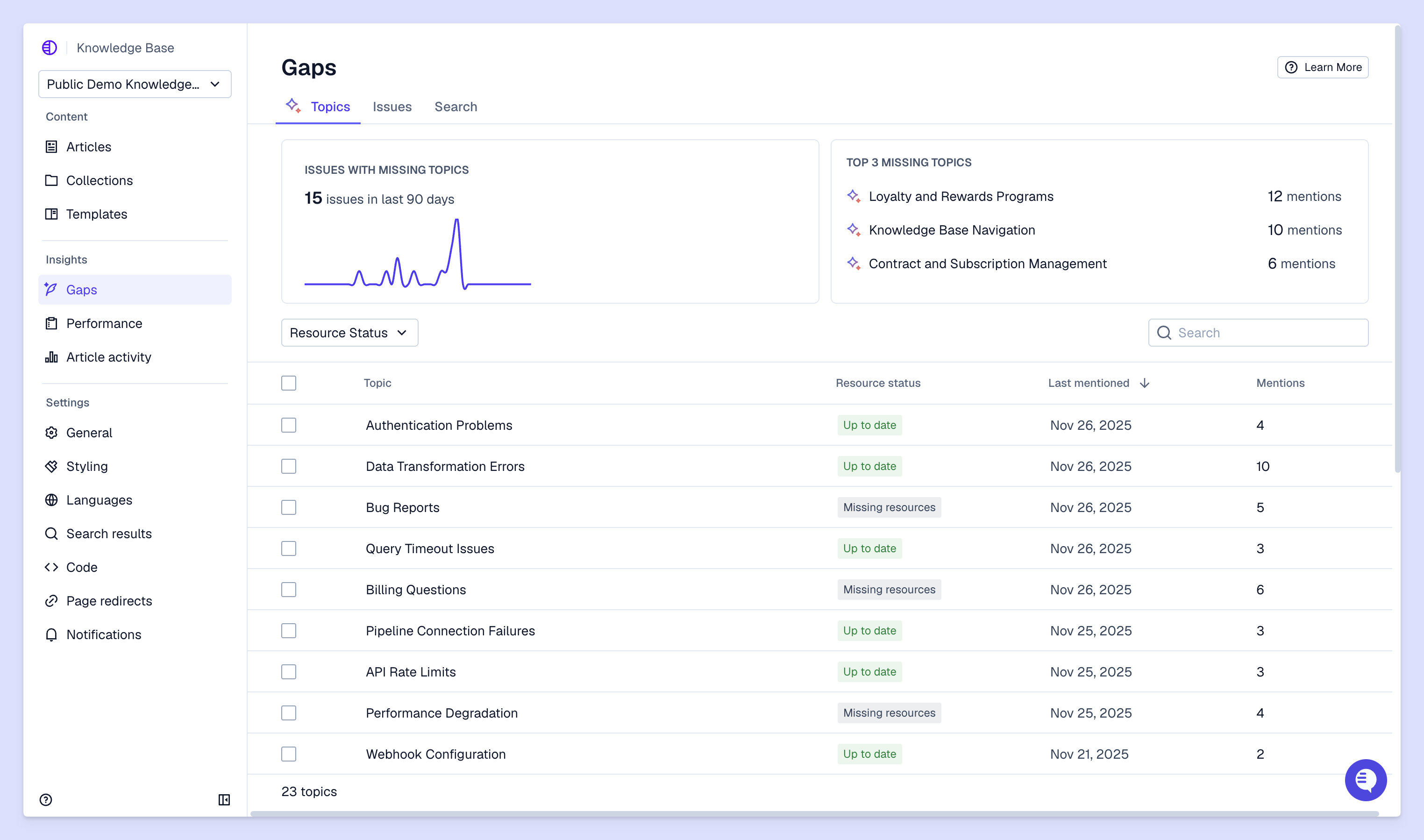
Launching your knowledge base is just the beginning. Here's how to keep it effective as your product evolves and your customer base grows.
Avoid technical jargon, use short sentences, and write at an accessible reading level. When you do introduce technical terms, define them the first time they appear. Your goal is clarity. Customers come to your knowledge base to solve problems quickly, not to decode complex explanations.
Set up a review schedule to keep articles current as your product changes. Features get updated, interfaces change, and old workarounds become obsolete. Archive outdated content instead of leaving it live where it might confuse customers, and flag articles that need updates when you ship product changes.
Use AI knowledge management platforms like Pylon to flag outdated content, support topics you haven't covered yet, or duplicate articles.
Visual elements help customers understand complex processes faster than text alone. Show them exactly what they'll see in your interface instead of describing it. Keep visuals up to date when your interface changes, since outdated screenshots create confusion and erode trust in your documentation.
Add "Was this helpful?" buttons or CSAT survey modules at the end of each article so customers can flag unclear or outdated content. This direct feedback helps you prioritize which articles to improve first. Even negative feedback is valuable: it tells you exactly where your documentation isn't working.
Track search queries to see what customers are looking for, article views to understand what's most useful, and deflection rates to measure how often customers find answers without contacting support. Look for patterns in failed searches, which indicate content gaps you haven't filled yet. Analytics turn your knowledge base into a continuous feedback loop that improves over time.
Knowledge base software helps you create, organize, publish, and update your help center content. The right tool makes it easy for your team to maintain articles and for customers to find answers.
Here's what to look for:
Platforms like Pylon integrate knowledge content directly into your support workflow, with AI that surfaces relevant articles as your team responds to tickets and suggests resources in real-time as customers fill out a ticket form.
Plus, Pylon AI automatically helps you detect knowledge gaps, outdated articles, and duplicate content based on support interactions.
Your knowledge base becomes the foundation for scalable B2B support as your company grows. When it connects to your broader support system and operations instead of existing in isolation, it's even more powerful: Your support conversations inform the knowledge content you create, and your articles automatically get surfaced to help your team support customers.
Pylon is the modern B2B support platform that offers true omnichannel support across Slack, Teams, email, chat, ticket forms, and more. Our AI Agents & Assistants automate busywork and reduce response times. Plus, with Account Intelligence that unifies scattered customer signals to calculate health scores and identify churn risk, we're built for customer success at scale.
Most knowledge base platforms offer integrations with support software through APIs or native integrations, so your team can search and share articles directly from their support interface. Support platforms like Pylon actually include native knowledge base products, so you can create, maintain, and leverage your KB right where you manage day-to-day support.
A well-maintained knowledge base reduces support ticket volume by deflecting common questions to self-service, which lowers support costs and frees your team to focus on complex customer issues.
Make your knowledge base easily discoverable by embedding it in your product, linking to relevant articles in support responses, and surfacing suggested articles based on what customers are doing in your application.
Review your most-viewed articles monthly and update them whenever your product changes, while monitoring search analytics weekly to identify new content gaps.
A help center is the customer-facing portal that houses your knowledge base along with other support resources like contact forms, community forums, and support ticket submission.
Your knowledge base serves as the primary training data for AI agents, giving them accurate, up-to-date information to answer customer questions automatically.
Pylon Workforce Management is available now. See it in action with a live demo.





