


Updated January 29, 2026 | 15 min read
A customer knowledge base is a library of support content with FAQs, how-to guides, troubleshooting articles, and product documentation. It works as a 24/7 self-service resource for customers that helps you scale support operations as your customer base grows.
This guide covers what makes knowledge bases effective, how to build one that customers actually use, and how to measure the impact on your support operations.
A customer knowledge base is a centralized library of support content, where your customers can find answers to simple questions on their own. It typically includes FAQs, setup guides, troubleshooting articles, product documentation, or walkthrough videos — all organized so customers can resolve issues without contacting your team.
Think of it as a 24/7 help resource that works alongside your support team. When a customer hits a snag at midnight, they can search for a solution instead of waiting until your support hours for someone to respond.
You may come across two types of knowledge bases, though they serve different audiences:
This article focuses on customer-facing knowledge bases for support.
These terms get mixed up constantly, but they're each slightly different. A knowledge base is a full library with multiple content types organized by topic. A help center is broader: it might include your knowledge base, contact forms, and in-app chat to reach your team. An FAQ page is usually just a single page that lists common questions without the structure or depth of a complete knowledge base.
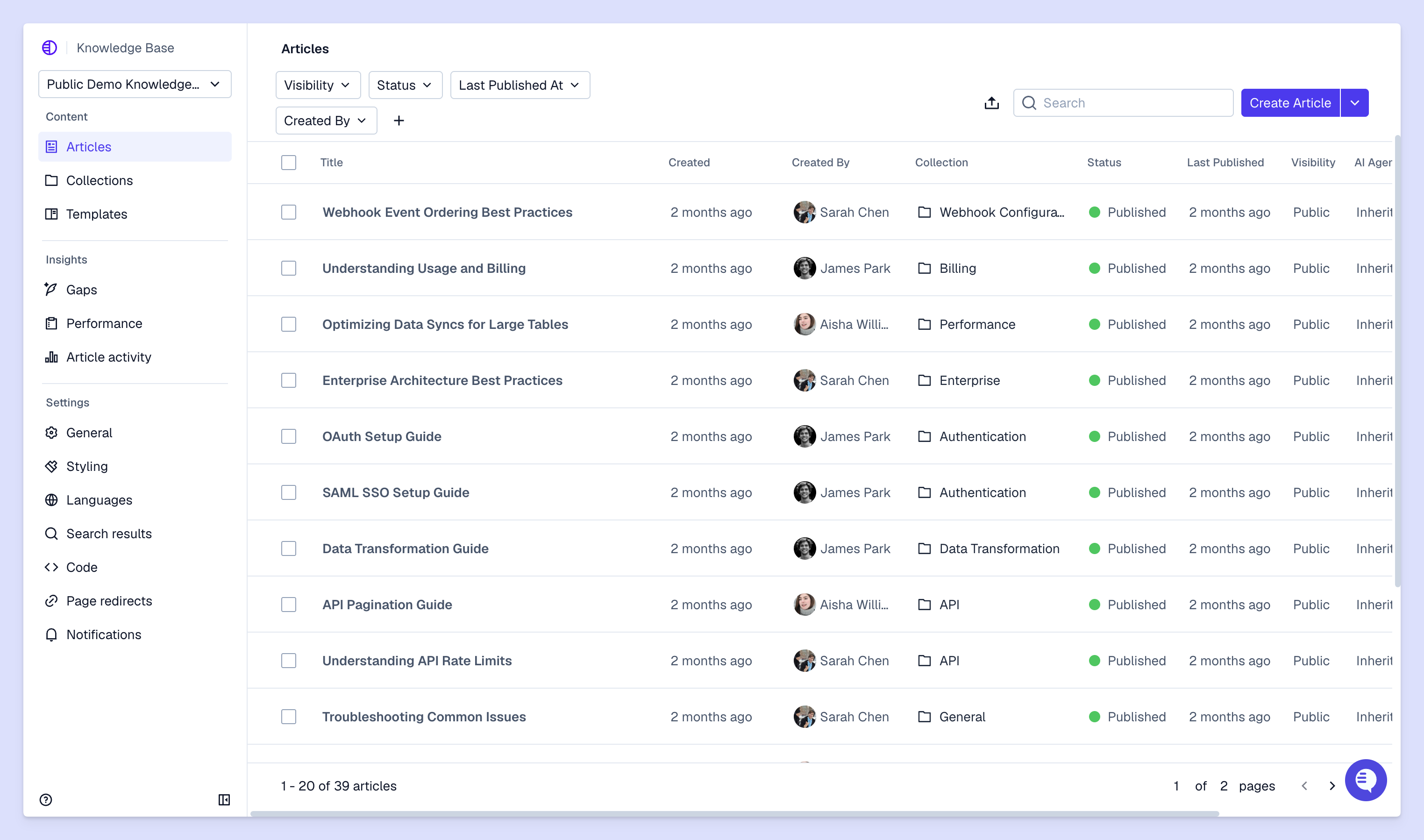
Many support teams experience the same scaling pains: As your customer base expands, you can't always bring on new support team members at the same rate. A knowledge base is one solution that can help, letting customers troubleshoot simple issues independently while your team focuses on complex problems and relationship building.
A lot of teams find that the majority of support tickets cover the same product questions. But if you have a well-documented knowledge base, customers can solve those common problems without ever opening a ticket. Your team spends less time on repetitive issues and more time on nuanced customer issues.
Once you start supporting a global customer base, your customers will span different time zones, but you may not have the staffing capacity to support them around the clock yet. A knowledge base helps fill that gap by offering a 24/7 self-service option for simple issues.
When you need to scale but have headcount constraints, knowledge bases can help you support more customers with the same team. The same article can answer feature setup or product questions for an infinite amount of new customers — and as you continue to update knowledge content, it helps you maintain quality support while your company grows.
Sometimes, product and support knowledge end up living in individual team members' heads. But this means your support can be inconsistent depending on who responds. A knowledge base standardizes support information so every customer gets accurate answers — and your team has a source of truth to refer back to.
To have a functional customer knowledge base, you need more than just a few articles. You have build the right infrastructure for customers to find high-quality information — and a clear process, or tools, to show you where there are gaps.
Customers should have to browse through every categories to find what they need. Choose a knowledge base tool with search that can interpret natural language queries. AI-powered search should understand intent, instead of purely matching exact keywords.
Organize content based on how customers think about your product and issues, not by your internal or technical structure. If you sell project management software, for example, group articles by workflow stages like "Setting up your board" and "Managing tasks" instead of going by backend features.
Implement quick CSAT surveys or other rating systems, so customers can show you which articles actually helped. This helps you understand what's missing from your knowledge content and highlights articles that need rewrites.
Track which articles get the most views, which search terms come up empty, and where customers drop off. This data shows what your customers are struggling with most in the knowledge base and where to focus your content efforts.
Building a knowledge base from scratch can be overwhelming. But you don't need to document everything before launching it — start with the basics and expand based on what your customers need.
Pull reports from your support tickets and customer conversations over the past 6 months. Look for questions that appear repeatedly and take up significant time for your team — simple, but high-volume content. Write these down first because they'll have an immediate impact on reducing tickets.
Map out your main categories based on customer needs, not internal teams. Ask yourself: How do customers actually describe their issues? What are they trying to accomplish? Create a structure that mirrors how they think so navigation feels intuitive.
Templates keep your help center consistent and make it much easier to generate new articles. A troubleshooting article needs different sections than a how-to guide:
It's better to have 20 excellent, targeted knowledge base articles than 100 ones that cover topics your customers don't actually ask about. Focus on the problems that generate the most support tickets and write comprehensive guides.
Test your knowledge base tool by searching actual customer queries — reproduce the exact phrases customers use in support tickets. Make sure your article collections or categories appear prominently on the homepage for customers who prefer browsing.
Before rolling it out to everyone, share your knowledge base with a small group of customers or run it internally with your team. Gather feedback on what's confusing, what's missing, and what works well.
How you write knowledge content matters as much as what you write. The best knowledge bases present information in a way customers can quickly scan, understand, and apply.
Article titles are especially important for navigation — they determine whether customers quickly click and find what they need, or decide to keep searching. Mirror the exact language customers use when they're describing their problems.
Text alone often isn't enough for multi-step processes. Screenshots with annotations help customers confirm they're in the right place. Short videos work well to demonstrate complex workflows.
Especially on web content and articles, customers typically scan instead of reading word-by-word. Use short paragraphs, bullet points for lists, numbered steps for sequences, and bold text to highlight key information. Break up long blocks of text so customers can jump to the sections they need.
Connect articles on similar topics so customers can explore without starting a new search. If someone's reading about exporting data, link to articles about data formats and backup options. Someone might just discover information they didn't know they needed.
Launching your knowledge base is just the beginning. Help centers become outdated very quickly without regular maintenance, and outdated content can be more frustrating than no content at all. Here are some B2B knowledge base best practices to help you maintain your support content.
Set weekly, monthly, or quarterly audits of your knowledge base. Check for outdated screenshots, deprecated features, broken links, and processes that have changed. Assign ownership so someone's responsible for reviewing each section.
Views alone don't tell the full story. An article with high views but low satisfaction ratings means customers are finding it but not getting their questions answered. Rewrite it, add more detail, or include better examples.
Your support team spots knowledge gaps every day. When they answer the same question multiple times, that's a signal you need a new article. Build a process for team members to flag missing content or suggest updates.
Sync your knowledge base updates with product releases. When you ship new features or change existing workflows, update relevant articles immediately. Outdated articles create more tickets because customers follow instructions that no longer work.
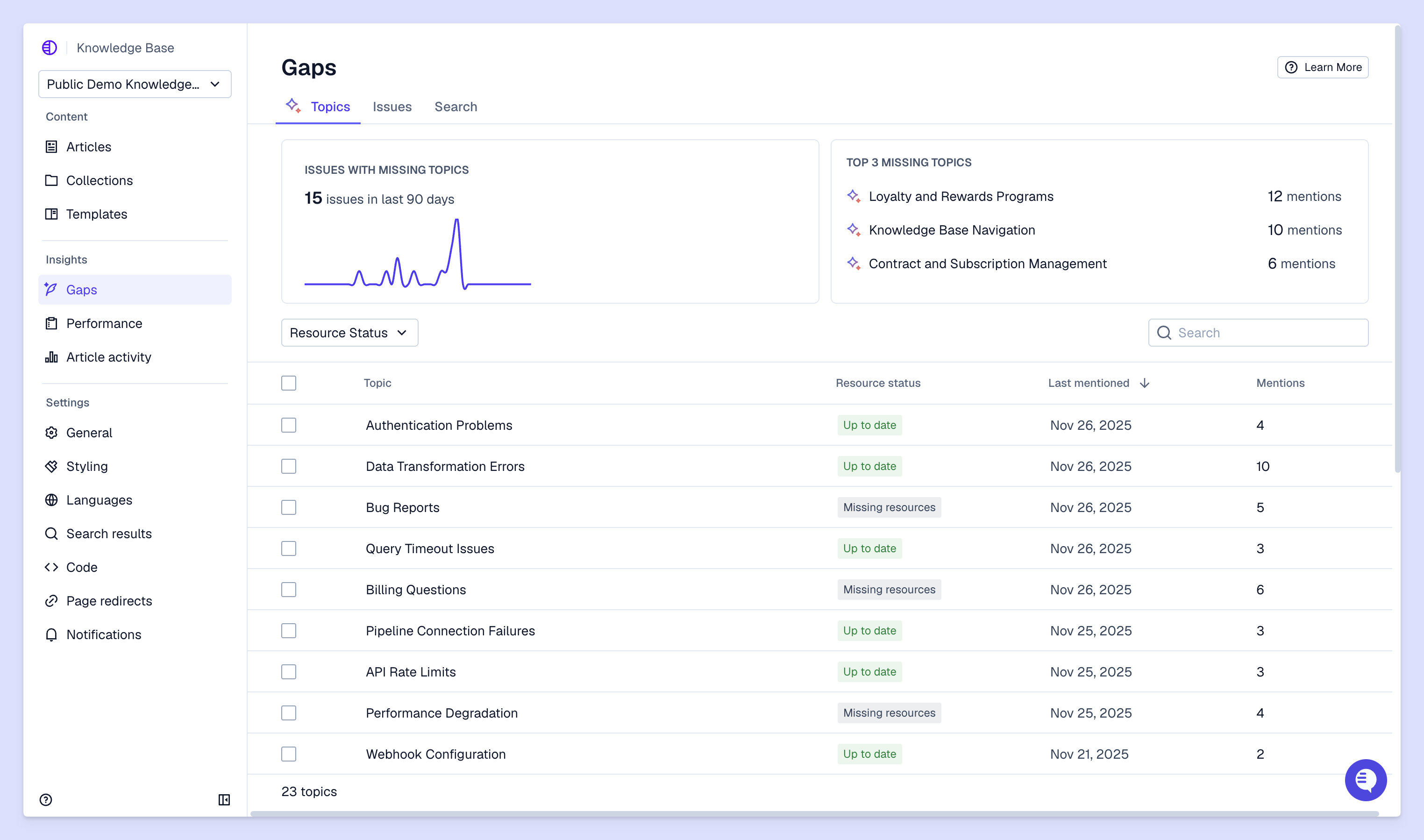
Where you choose to host your knowledge base has a direct impact on how easily you can create, maintain, and scale your help center. Enterprise B2B teams have different requirements for knowledge base platforms than consumer-facing companies — here are key features to look for.
Enterprise knowledge base software handles complexity that basic tools can't:
When your knowledge base is integrated with your support platform, AI can suggest relevant articles to your team while they answer issues, auto-generate article drafts or updates from existing support conversations, and identify knowledge gaps directly from new support tickets.
These automated support workflows reduce the manual work of maintaining your knowledge base and help you spot content opportunities you might otherwise miss.
Enterprise customers care about data security and compliance. Look for single sign-on (SSO), data encryption, and relevant compliance certifications. Some articles might contain sensitive information that only certain customer segments should able to access, so you may need granular permissions and access controls.
Leadership wants to see results, not just activity. Connect your knowledge base metrics to customer support KPIs and business outcomes.
Measure how many customers find the answers they need without contacting support — this is ticket deflection. Compare your support volume before and after launching the knowledge base, accounting for customer growth. If you're adding 50 new customers each month but your support volume isn't growing proportionally and help center usage is strong, that's an initial sign that your knowledge base is helping.
Track whether customers are actually finding what they searched for. High search volume with no article clicks means you're missing content on a certain topic. Low click-through ratios suggest your article titles don't match how customers are describing their issues.
Article ratings and feedback comments are clear indicators of which content is actually helping. Consistently high ratings across multiple articles indicate you're addressing customer needs. Consistently low ratings signal it's time for a content refresh.
A strong customer knowledge base helps you deflect ticket volume and scale your support operations as your customer base grows. And when your knowledge base is integrated with your support platform, you can leverage tools like AI knowledge gap detection or AI drafting to actively update it based on ongoing support interactions.
Pylon is the modern B2B support platform that offers true omnichannel support across Slack, Teams, email, chat, ticket forms, and more. Our AI Agents & Assistants automate busywork and reduce response times. Plus, with Account Intelligence that unifies scattered customer signals to calculate health scores and identify churn risk, we're built for customer success at scale.
Most teams launch their first functional knowledge base in 4 to 8 weeks, starting with your top 20 support questions and expanding based on customer feedback.
Start with 15 to 25 high-quality articles covering your most frequent support questions instead of trying to document everything at once.
Yes, most enterprise knowledge base software includes migration tools or services to transfer content from your current system while preserving formatting and links.
Make your knowledge base visible by linking it in product interfaces, email signatures, and chat widgets, and train your support team to share relevant articles in every conversation.
Pylon Workforce Management is available now. See it in action with a live demo.





