


Updated December 9, 2025 | 13 min read
A customer knowledge base is a self-service library where customers can find answers to common questions about your product without contacting support. It's a centralized collection of articles, guides, and documentation that deflects routine tickets and scales your support operations.
This guide walks you through building one that actually reduces your team's workload, from choosing the right platform to writing articles customers will actually read to tracking what's working.
A customer knowledge base is a centralized collection of articles, guides, FAQs, and documentation that explain how to use certain parts of your product or service. In many B2B knowledge base examples from leading support teams, it usually lives on a support website or somewhere within your product.
Your knowledge base serves both your external customers and internal support teams. Team members can share links to articles when customers have common questions—instead of typing out the same response for the hundredth time.
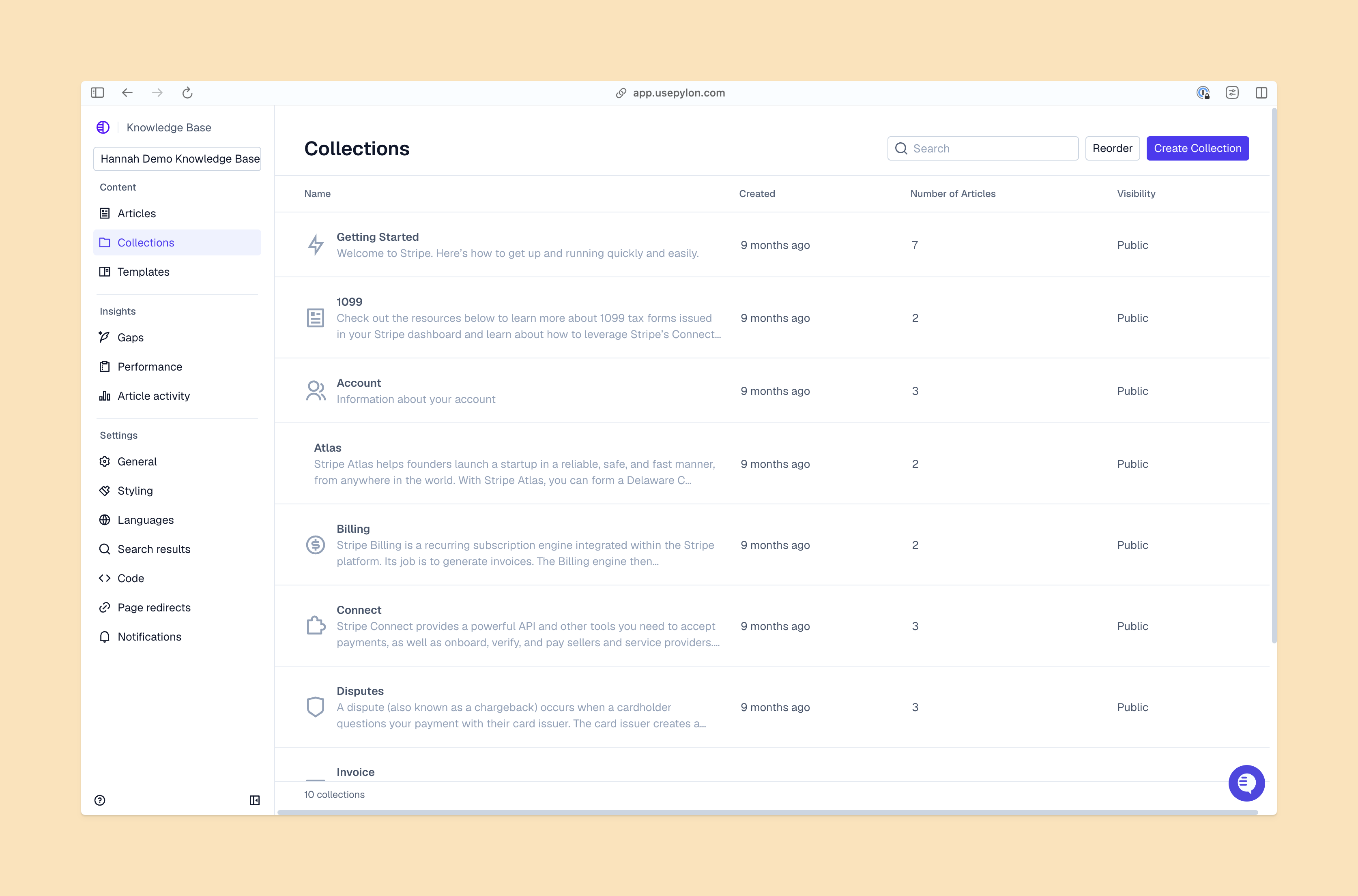
Building a knowledge base changes how your support operation scales. Most B2B companies hit a wall where adding more support team members becomes the only way to handle growth, but knowledge bases open up another way to scale.
Self-service deflects repetitive questions (like "Where do I find my API key?") before they reach your team's ticket queue. That means the questions that do make it to your team are more complex and interesting: edge cases, unique configurations, and strategic guidance.
Many customers actually prefer finding answers themselves. For simpler issues, they'll try your knowledge base first so they won't have to wait for your team to respond.
Knowledge bases are an example of a scalable support model that lets you grow your support operations without always needing to proportionally expand your team. If you're supporting 100 customers today with a team of three, you can often support 300 customers with that same team once your knowledge base starts to deflect routine questions.
Documented answers also provide your customers with some level of support around the clock. Customers in different time zones can still search through knowledge articles outside of regular business hours, when your support team is offline.
Choosing the right platform is your first practical step. The options range from simple hosted solutions to enterprise platforms with AI capabilities. Different tools also serve different team sizes.
Start by evaluating platforms against four essential capabilities:
AI-powered search understands natural language questions and surfaces relevant articles even when customers don't use exact terminology.
In platforms like Pylon, AI can also suggest articles to your support team while they're resolving issues or automatically draft new content based on past customer conversations. This means your documentation becomes part of your active support workflow and it's easier to keep your content up to date.
Organization matters more than most teams realize when they're starting out. A knowledge base with great content but poor structure is frustrating for customers to use.
Organize content around how customers actually use your product, not how your internal teams think about it. Most B2B knowledge bases work well with journey-based categories like "Getting Started," "Account Management," "Integrations," and "Troubleshooting." A new customer can find onboarding content right away and your experienced users can quickly find advanced configuration guides.
Review your support tickets from the past three to six months and identify the most common questions. Look for issues that come up weekly or daily: common API issues, error messages, or feature explanations. Writing articles for your top ten issues will have the biggest immediate impact on ticket deflection.
Create a simple hierarchy with broad categories and specific subcategories underneath. Keep your structure to three levels maximum: Category > Subcategory > Article. Going deeper than that makes navigation confusing.
| Good Category Structure | Confusing Category Structure |
|---|---|
| Getting Started > Create Your Account > Set Up SSO | Account Settings > Security > Authentication > Single Sign-On > SAML Configuration > Identity Providers |
| Integrations > Slack > Connect Your Workspace | Technical Documentation > APIs > Third-Party > Communication Tools > Slack > Setup |
Good articles fully answer one specific question and don't wander into tangential topics. The writing phase is where many knowledge bases fall apart because teams either write too much or too little, use internal jargon, or skip the details customers are actually looking for.
Write at an eighth-grade reading level, even if you're serving technical users. That doesn't necessarily mean simplifying your content—it means using clear, direct language. When you do use technical terms, define them the first time they appear.
Reading articles aloud can also help you catch confusing phrases. If you stumble while reading or have to re-read a sentence, your customers will too.
Visual assets make it easier for customers to follow multi-step processes, especially when you're showing a workflow. Annotate your screenshots with arrows, highlights, or numbered callouts to draw attention to specific buttons or fields.
Videos work well for workflows that involve multiple screens or complex sequences, but try to keep them under two minutes. Longer videos rarely get watched all the way through.
A consistent structure across your articles helps customers know what to expect and makes writing faster for your team:
Great content doesn't help if customers can't find it. Here are a few tips for making your knowledge base navigation intuitive.
Implement search that handles typos, understands synonyms, and shows relevant results even when customers use different terms than your documentation. If your product calls something a "workspace" but customers search for "project," your search should still surface the right articles. Many modern knowledge base platforms include this functionality out of the box.
Categories are broad groupings that create your main navigation structure, like "Getting Started" or "Billing." Tags are flexible keywords that connect related articles across categories, like "SSO" or "API." Labels are internal markers for content management that customers don't see, like "needs-review" or "product-team-owned."
Use categories as your primary navigation and tags to surface related content. An article about Slack integration might live in the "Integrations" category but have tags for "notifications," "team-collaboration," and "setup."
Add "See also" or "Related articles" sections at the end of each article that point to logical next steps. If someone just learned how to create an account, they probably want to know how to invite team members next. Internal links keep customers moving through your knowledge base instead of bouncing back to search or contacting support.
Look at the data to understand which articles genuinely help customers, and which ones are confusing them or missing the mark entirely. This is important for teams to continuing improving their knowledge content.
Focus on four key metrics instead of vanity numbers like total page views:
Measure tickets deflected by comparing support volume before and after launching articles on specific topics. If you were getting 50 common API questions per week and now get 15 after publishing a related article, that's 35 deflected tickets weekly.
Track how often your team shares knowledge base links in responses. When your teams is sharing articles in customer conversations, you're likely resolving tickets faster because answers are already documented.
Review low-rated articles monthly and update them based on customer feedback. If an article has high views but low satisfaction, it's not answering their question well.
Tie your content review cycle to your company's product release schedule, so your knowledge base stays up to date. Pylon's AI uses context from support tickets to automatically identify outdated knowledge content—so you can quickly draft and review updates.
Maintenance is ongoing work, not a one-time project. Outdated content erodes customer trust in your documentation.
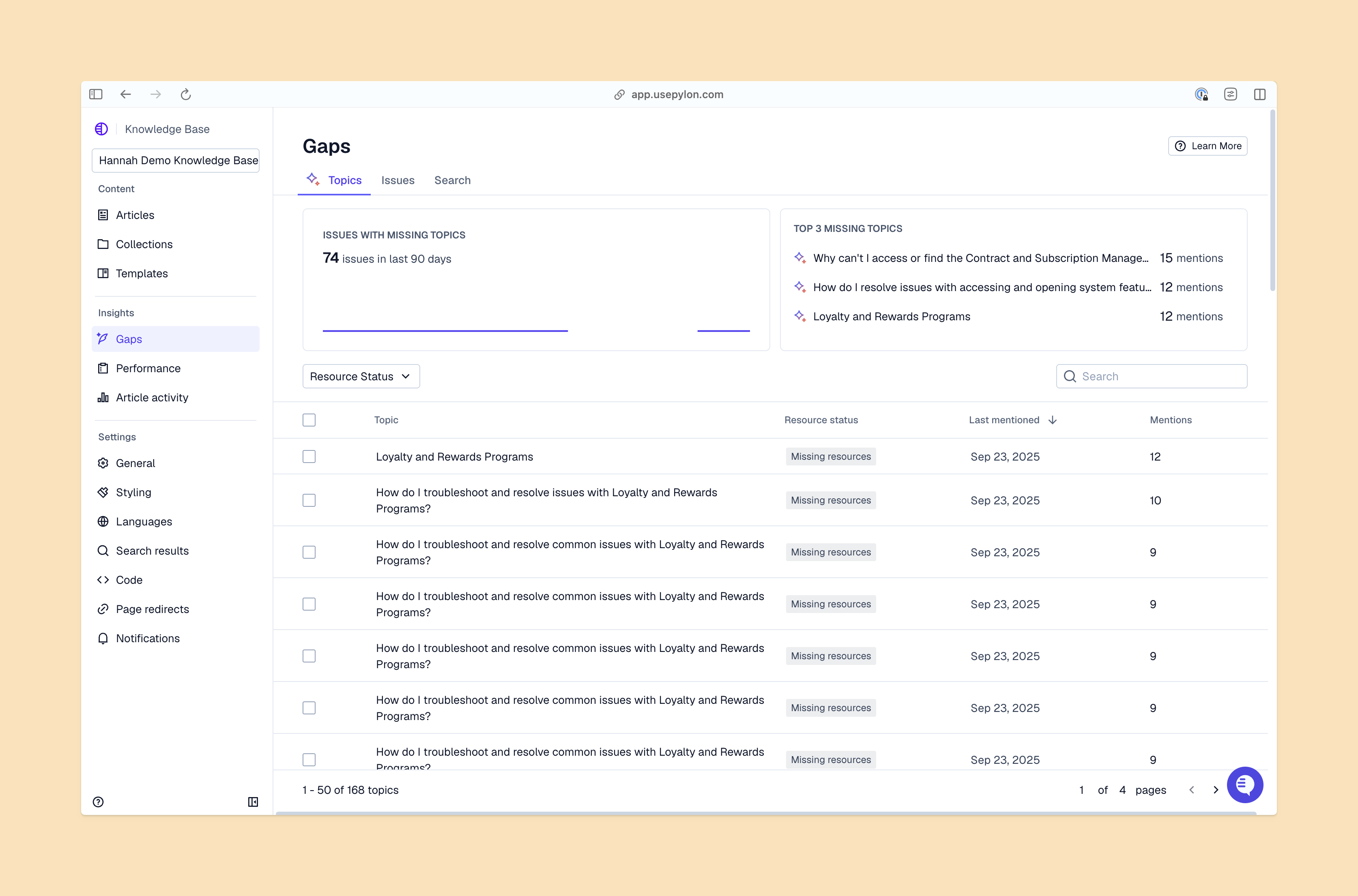
Establish a regular review cycle. Maybe that's weekly for high-traffic articles, monthly for moderate traffic, quarterly for everything else. Assign content owners for different sections so someone is explicitly responsible for keeping each area current. Without clear ownership, articles drift out of date because everyone assumes someone else is handling it.
New patterns in your support volume often signal missing or unclear articles. If you start getting multiple tickets about a topic that already has an article, that content either isn't discoverable or isn't comprehensive enough. Your support team can flag content that needs updates as they work through conversations.
AI can help here too. Some platforms like Pylon automatically draft article updates as your team continues to resolve new issues. It doesn't replace human review, but it speeds up the process of keeping content current.
Remove outdated articles instead of leaving them visible for customers. If you've deprecated a feature or changed how something works, archive the old article and redirect its URL to the updated content. Broken links and outdated information damage your credibility more than having fewer total articles.
You can launch a basic knowledge base in two to four weeks by documenting your top 10 support issues first, then expanding over time. Starting small and iterating based on usage data works better than trying to document everything before launch.
Start with customer-facing content because it serves both audiences. Your support team will reference the same articles when helping customers. Internal-only documentation makes sense for processes and policies, but product documentation benefits everyone.
No. Knowledge bases handle common questions efficiently, but they can't help customers with their most specific use cases or edge cases. The goal is to deflect routine questions so your team can focus on complex issues that require human judgment and expertise.
Launch with 10 to 20 articles covering your most frequent support questions, then add more based on what customers search for. Starting with fewer high-quality articles beats launching with hundreds of mediocre ones that never get updated.
A knowledge base is the content library itself—the articles and documentation. A help center is the customer-facing website that houses your knowledge base along with contact options, community forums, and other support resources.
Knowledge bases do more than reduce support costs. They improve customer experience and retention in ways that directly impact your bottom line. Self-service empowers customers to solve problems independently and builds confidence in your product.
Pylon is the modern B2B support platform that offers true omnichannel support across Slack, Teams, email, chat, ticket forms, and more. Our AI Agents & Assistants automate busywork and reduce response times. Plus, with Account Intelligence that unifies scattered customer signals to calculate health scores and identify churn risk, we're built for customer success at scale.
Pylon Workforce Management is available now. See it in action with a live demo.



