


Updated December 29, 2025 | 9 min read
A support copilot is AI that works alongside your team to automate busywork, surface customer context, and draft responses — so your team can move faster and focus on personalizing the customer experience.
This guide covers exactly what support copilots do, how to implement them, and how to measure whether it's actually making your team more effective.
A support copilot is AI for customer support that works alongside your support team to handle repetitive tasks and surface customer context. It sits within your team's workflows, monitoring support conversations, drafting issue responses, and consolidating the information you need to answer customer questions.
You might have heard of Microsoft Copilot (an AI assistant you can use for everyday tasks), but support copilots are slightly different. They're built specifically for B2B customer service workflows like ticket management, customer health tracking, and handling conversations across multiple channels.
Support copilots are also different from chatbots. An AI copilot helps your team members respond more efficiently and accurately to customers, but it doesn't respond directly to issues. It handles the pre-work so your team members focus on refining and personalizing support.
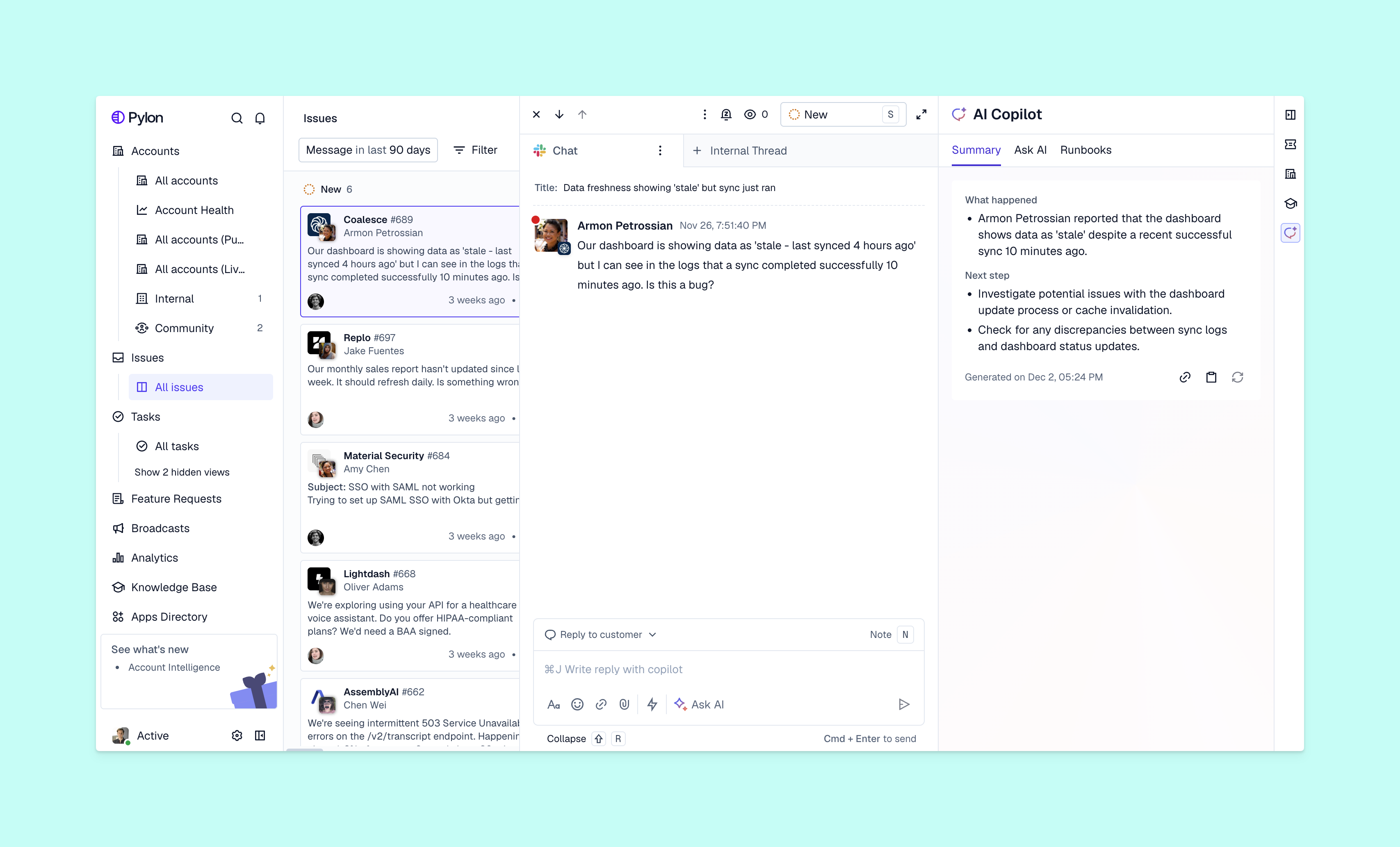
Many teams find that they're spending too much time on tasks like:
AI copilots leverage customer support automation to take over this manual work. So instead of picking through past tickets, AI can summarize relevant account context for you — or instead of manually searching knowledge articles, AI already surfaces related content while you respond.
Not only can you respond faster to every issue, you also get more time to double down on the most important customer conversations.
Here are some of the capabilities to look for when you're evaluating AI copilots for your support team.
The copilot drafts replies by pulling from your knowledge base, past support interactions, customer data, or other external documentation you've connected as training data. So when support engineers open an issue, the copilot can instantly analyze the customer's request and generate a suggested message in the response editor.
And before sending anything out, teams can ask the AI copilot to improve the tone or edit specific sections to refine the response.
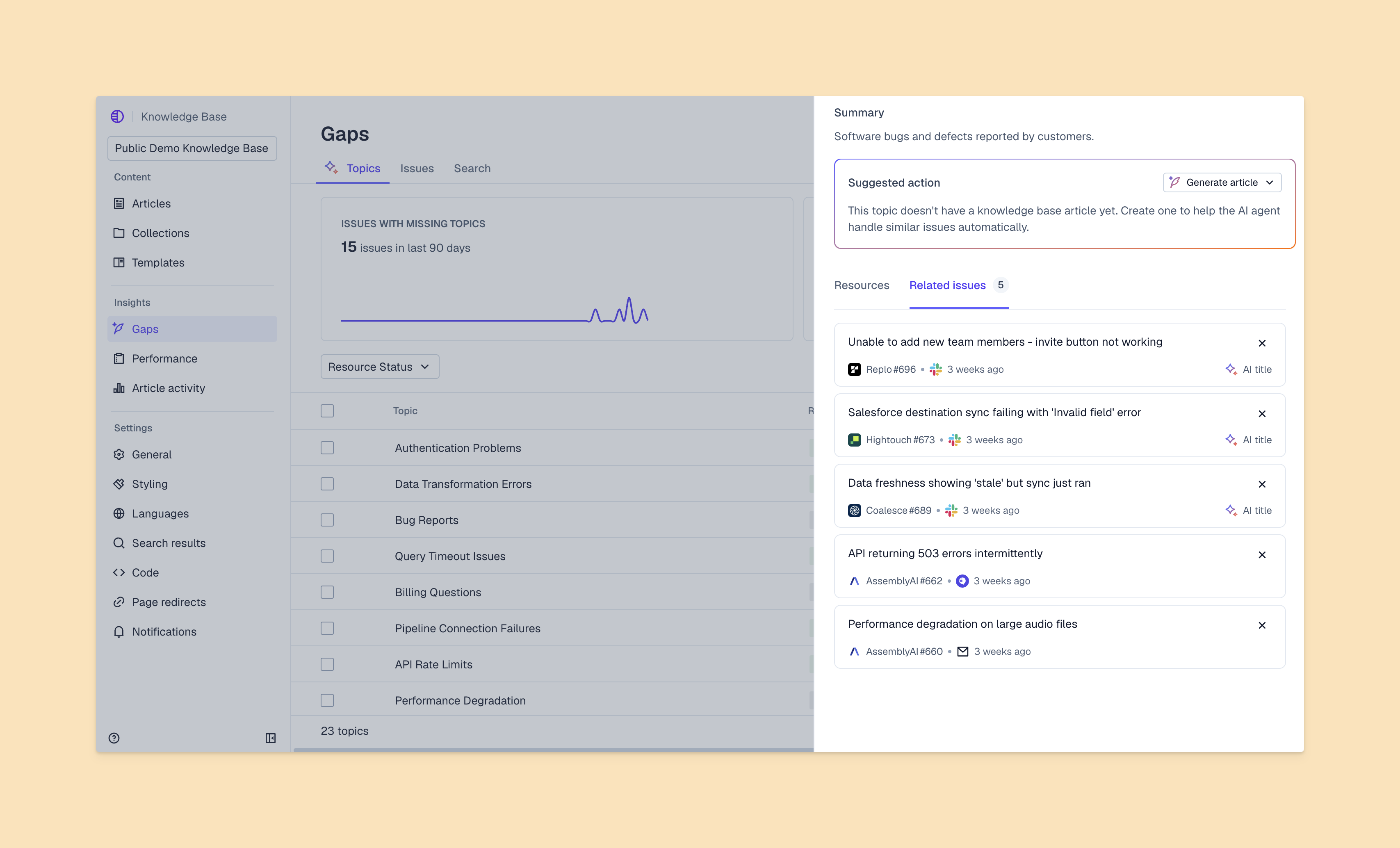
Beyond just helping you with issue responses, AI copilots for your knowledge base can automatically generate new knowledge articles from resolved issues. So after your team closes out an issue, you can ask the copilot to convert that conversation into a draft article with the right structure and formatting.
Plus, some knowledge management copilots can detect when you have duplicate content in your knowledge base, or gaps where a support topic hasn't been documented yet. This makes it much easier to keep your content up to date and helps your team expand the knowledge base based on actual customer needs.
Long conversation threads can be hard to parse quickly, especially when you're jumping into an ongoing conversation or handing off to a new team member. Look for copilots that can summarize issues and help your team get up to speed fast.
Summarization is especially valuable for complex B2B issues, where support conversations can sometimes take days or weeks to fully resolve.
Look for copilots that surface relevant resources — like other related issues or documentation — directly within the issue response editor. So as soon as your team starts on a new ticket, they have the information they need to respond accurately.
Some support copilots also include conversational AI features. For example, AI can help troubleshoot complex issues, gather context on the customer, or bring up similar past tickets to help teams respond accurately to an issue.
You don't need to overhaul all your workflows overnight to start using AI copilots. Here's a framework to approach implementation.
Start by identifying the bottlenecks in your support operations. You might discover that your team spends hours hunting for customer context across tools, or digging through your knowledge base for resources. Both are things an AI copilot can automate.
Look for B2B customer support platforms that offer AI copilots, but also have native integrations for the channels you use. A lot of B2B customers like to communicate on Slack, Microsoft Teams, or email — not just web chat.
Link your existing support channels to the copilot platform. This typically involves OAuth connections for Slack and Teams, connecting a support email inbox, and embedding code in your product to install chat widgets. Most platforms walk you through the setup step by step.
Sync past conversations and customer information so the AI copilot can learn from your team's previous support interactions. The copilot uses that context to suggest accurate responses and understand your customers context from day one.
Start with a small team or single channel to test the copilot and gather feedback before rolling it out company-wide. This gives you space to refine the AI's suggestions and build confidence with your team.
Here's how to get the most value once you've implemented an AI copilot.
Have your team try copilots for one specific use case first, like drafting responses for simpler issues. Then, expand as everyone starts to get more comfortable. Trying to automate everything at once usually leads to confusion and pushback.
Establish when team members should use AI suggestions as is, and when they should craft custom responses. Sensitive issues, particularly complex technical problems, or emotionally charged conversations typically need a human touch from start to finish.
Regularly check AI-generated drafts and provide feedback to improve accuracy over time. Most platforms learn from corrections, so the more your team refines the suggestions, the better they become.
Copilots handle busywork so support teams can spend more time on personalized, empathetic interactions. Remember that the goal is to free up your team members for the most complex and valuable customer conversations.
Support copilots process sensitive customer information, so security matters. Look for platforms that offer end-to-end encryption, SOC 2 compliance, and granular privacy controls that let you define the data AI can access.
Enterprise-grade platforms give you options to keep certain conversations or customer fields out of AI processing entirely. This is especially important if you work in regulated industries or handle particularly sensitive customer data.
You'll want to track specific metrics to understand whether your copilot delivers real value.
Compare how quickly your team replies to customers before and after implementing AI copilots. Most teams see response times drop significantly once copilots handle initial drafts and surface relevant context automatically.
Monitor whether more issues get resolved in the first interaction. When your team has better context and faster access to information, they can often solve problems without multiple back-and-forth exchanges.
Track changes in satisfaction scores and feedback quality as your team uses copilot features. You're looking for improvements in both speed and personalization — customers notice when your team has the right context and responds thoughtfully.
Observe how much time team members save on repetitive tasks and where they redirect that time. The best outcomes happen when saved time goes toward strategic work like proactive outreach, relationship building, or collaborating with product teams on customer feedback.
Support copilots help B2B teams deliver faster, more personalized support while reducing manual work. The right tool takes over pre-work (like drafting issue responses or knowledge base articles) and gives your team the context they need for every customer interaction.
Pylon is the modern B2B support platform that offers true omnichannel support across Slack, Teams, email, chat, ticket forms, and more. Our AI Agents & Assistants automate busywork and reduce response times. Plus, with Account Intelligence that unifies scattered customer signals to calculate health scores and identify churn risk, we're built for customer success at scale.
Pricing varies based on team size and features. Most B2B platforms offer tiered plans that scale with your needs. Expect to pay more for increased AI usage or enterprise security requirements.
AI copilots help with routine questions and take a first pass at drafting responses, but many teams still handle the most complex technical problems. The copilot surfaces relevant documentation and past solutions to help your team work faster, but it doesn't replace their technical knowledge.
Chatbots interact directly with customers to answer questions automatically, often on your website or in self-service portals. Support copilots work behind the scenes to help your team members respond faster and more effectively. A human is still in the loop to review and edit AI-suggested responses.
Most teams can connect their channels and start using basic copilot features within days. Full implementation with custom workflows may take several weeks. The timeline depends on how many channels you're connecting, how much historical data you're importing, and whether you need custom integrations with your existing tools.
Pylon Workforce Management is available now. See it in action with a live demo.




