


Updated October 29, 2025 | 18 min read
B2B customers increasingly expect support where they already work—and Slack has over 2,400 apps available on its platform. For modern support teams, meeting customers in Slack isn't just convenient, it's essential for retention and satisfaction.
But Slack alone isn't enough. Without the right integrations, customer conversations become scattered across channels, tickets get lost, and your resolution times suffer. The solution? Best-in-class Slack integrations that transform your messaging workspace into a complete customer support engine.
This guide covers the top support platforms with Slack integration, helping you choose the best Slack add-ons for support teams based on your specific needs.
Before evaluating specific tools, you should understand what separates great Slack integrations from basic ones:
Essential Features:
According to research on customer support software, teams using integrated platforms see up to 40% faster resolution times compared to those managing multiple separate systems.
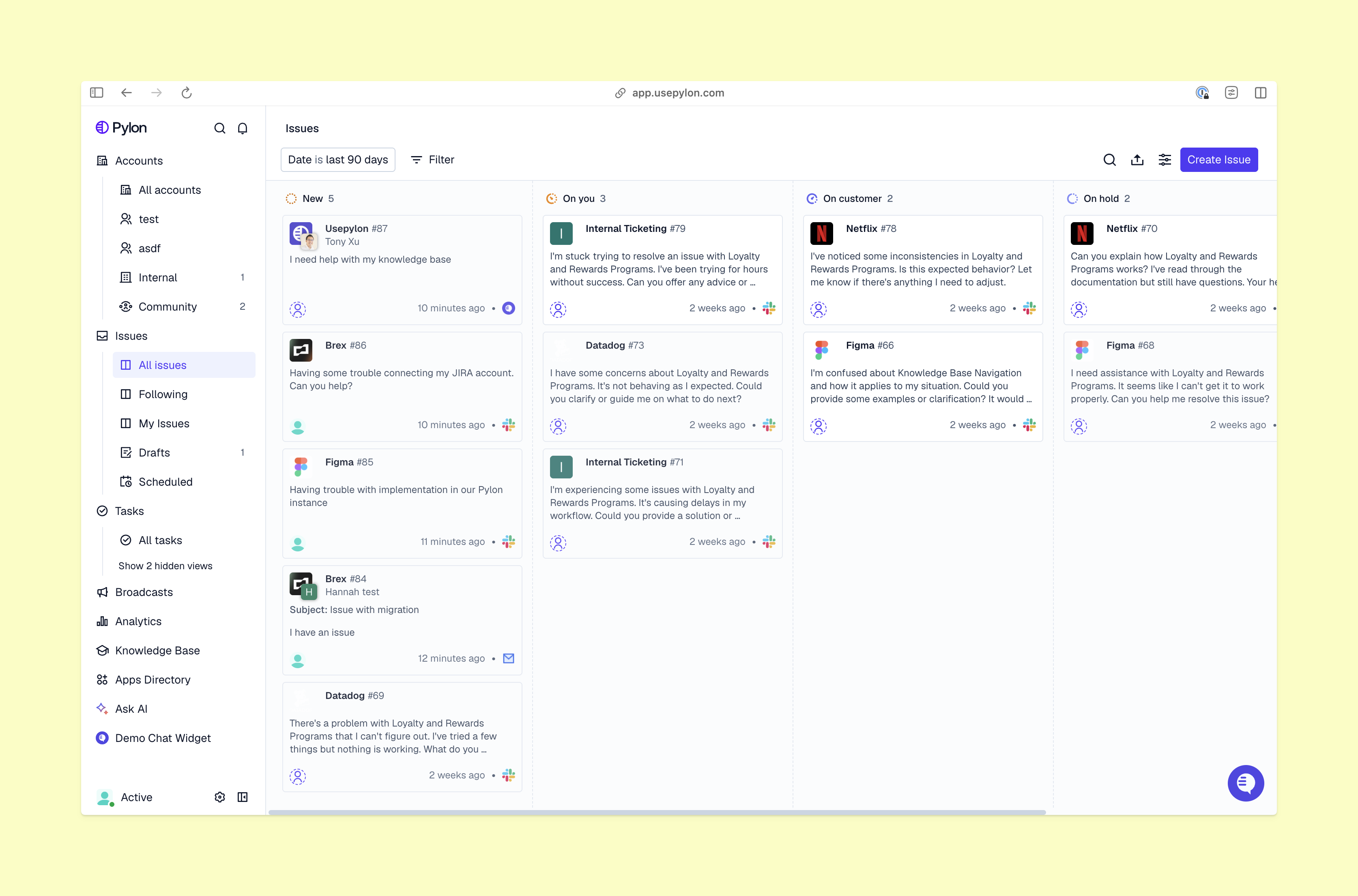
Ideal for: B2B companies that prioritize a seamless omnichannel experience
Pylon is purpose-built for B2B customer support teams that need to manage Slack alongside email, in-app chat, and community channels. Unlike basic integrations that only push notifications, Pylon enables a true omnichannel support experience where all customer conversations are unified in one platform.
Key features:
Why it stands out:
Pylon doesn't just integrate natively with Slack, it unifies your customer support across every single channel. The platform's AI Agents and AI Assistants automatically categorize issues, suggest relevant knowledge base articles, and route tickets to the right team members.
Teams using Pylon report significantly faster first response times and less context-switching between tools. The platform's Slack-as-a-ticketing-system approach makes Slack support natural for teams and their customers.
Pricing: Contact for custom pricing based on team size and features
Learn more: Pylon Docs | Knowledge Base
Ideal for: Traditional organizations with multi-department needs
Zendesk is an established customer service software platform with comprehensive ticketing across email, phone, chat, and social channels.
Key features:
Limitations:
Zendesk's Slack app offers basic functionality but doesn’t have true bi-directional, conversational ticketing. Teams have to supplement with additional tools or consider Zendesk alternatives that offer native Slack integration.
Pricing: From $19/seat/month to $169/seat/month
Ideal for: SaaS companies that prioritize real-time chat
Intercom specializes in chat support, blending AI automation with human customer service across chat, email, and social media.
Key features:
Limitations:
Each customer request creates a separate Slack channel, which becomes difficult to manage at scale. Conversations don't always link smoothly to customer history.
Pricing: From $29/seat/month to $132/seat/month, plus usage-based charges
Ideal for: Marketing-led SMBs already using HubSpot's ecosystem
HubSpot Service Hub integrates customer service tools with its popular CRM, providing ticketing, knowledge base, and feedback management.
Key features:
Limitations:
HubSpot Service Hub’s Slack integration is limited compared to their web interface. The jump from $9/month to $90/month pricing can also be steep for growing teams.
Pricing: From $9/seat/month to $150/seat/month per seat
Ideal for: Lean support teams who need affordable multi-channel ticketing
Freshdesk provides straightforward support management across email, chat, phone, and social channels.
Key features:
Limitations:
The Slack integration can be noisy and less intuitive than competitors in this list. Its basic functionality means you might need supplemental tools if you want to configure advanced workflows.
Pricing: From $15/seat/month to $79/seat/month
Ideal for: Traditional enterprises deeply embedded in Salesforce CRM
Salesforce Service Cloud provides comprehensive case management with deep CRM integration for teams already using Salesforce.
Key features:
Limitations:
Setup complexity can be challenging for smaller teams. The Slack integration is often criticized for being clunky and requiring significant configuration.
Pricing: From $25/user/month to $500/user/month
| Platform | Best For | Starting Price | Free Trial | Key Strength |
|---|---|---|---|---|
| Pylon | B2B omnichannel support | Custom pricing | ✅ Yes | True omnichannel + AI-powered |
| Zendesk | Enterprise operations | $19/seat/mo | ✅ Yes | Comprehensive multi-channel suite |
| Intercom | Conversational support | $29/seat/mo | ✅ Yes | AI chatbots and real-time messaging |
| HubSpot Service Hub | HubSpot CRM users | $9/seat/mo | ✅ Yes | Deep CRM integration |
| Freshdesk | Small-mid teams | $15/seat/mo | ✅ Yes | Easy setup and affordability |
| Salesforce Service Cloud | CRM-first enterprises | $25/seat/mo | ✅ Yes | Complete Salesforce ecosystem |
Small teams (1-10 members):
Mid-sized teams (10-50 members):
Large teams (50+ members):
B2B SaaS Companies:Prioritize platforms that offer omnichannel B2B support like Pylon, which unifies Slack with email and in-app chat for a seamless customer experience.
Technical Product Companies:Consider tools with strong developer workflows, like connections to Jira or Linear, or platforms with robust knowledge base software capabilities.
High-Touch Customer Success:Look for solutions emphasizing relationship management and proactive support, like Pylon’s Account Intelligence.
Omnichannel Needs:If you're helping customers across Discord, Microsoft Teams, and Slack, choose a platform designed for true omnichannel support.
Avoid the single-channel trap. Structure your Slack workspace strategically:
Tools like Pylon can automatically route conversations to the appropriate channels based on keywords, urgency, and customer attributes.
Alert fatigue is real. Configure notifications strategically:
Automate repetitive tasks to free up your team’s time:
According to research on Slack customer support tools, teams using automation resolve 60% more tickets without increasing headcount.
Modern platforms offer AI capabilities that go beyond basic automation:
Define when and how to escalate issues:
Monitor KPIs that drive continuous improvement:
Learn more about tracking key metrics in our guide to 13 customer support KPIs B2B businesses need to track.
.png)
While this guide covers multiple options, we’re spotlight Pylon for teams who are serious about modernizing B2B customer support.
1. True Omnichannel ArchitectureUnlike other solutions that just bolt onto Slack, Pylon was built from the ground up as an omnichannel platform. Customer conversations from Slack, email, in-app chat, and community forums all flow into a unified inbox where your team has complete conversational context.
2. Native Slack ExperiencePylon's Slack integration is native, which means support teams and customers can seamlessly manage ticket creation, status updates, and resolution in-thread. Conversations in Slack also sync bi-directionally to Pylon, so you can do less context-switching.
3. AI-Powered IntelligencePylon's AI doesn't just automate responses—it understands context, detects sentiment, and proactively surfaces relevant insights about your accounts. The platform learns from your team's support interactions to give you the most complete customer context.
4. Designed for B2B ComplexityB2B support differs significantly from B2C. Pylon handles multi-stakeholder conversations, account hierarchies, and complex SLAs that typical consumer-focused tools struggle with.
Companies like AssemblyAI, Hightouch, and Coalesce have transformed their support operations with Pylon:
Read their case studies to see how leading B2B companies leverage Pylon to scale support.
Problem: Too many Slack notifications create noise and missed important messages.
Solution: Use intelligent filtering and custom notification rules. Configure your integration to alert only on high-priority items like SLA breaches, VIP customer requests, or @mentions.
Problem: Conversations happen across multiple Slack channels and threads, losing valuable history.
Solution: Choose platforms like Pylon that automatically unify customer interactions across channels, maintaining complete conversation history with relevant account data.
Problem: Teams spend time manually converting Slack messages into tickets in separate systems.
Solution: Implement AI-powered auto-detection that identifies customer requests and creates tickets automatically. Platforms like Pylon can detect issues even when customers don't explicitly file a ticket.
Problem: Support, engineering, and success teams work in separate Slack channels without visibility into customer issues.
Solution: Use integrations that enable cross-functional collaboration while maintaining security and privacy. Create shared channels for escalations with proper permissions and context.
Problem: Slack's native analytics don't provide support-specific metrics like SLA compliance or resolution rates.
Solution: Integrate with platforms like Pylon that have robust reporting dashboards. Track metrics in real-time and generate custom reports for stakeholders.
The landscape of customer support continues evolving rapidly. Here are trends shaping Slack integrations in 2025 and beyond:
Artificial intelligence is moving from nice-to-have to essential. Next-generation Slack integrations use AI for:
The line between "messaging app" and "support platform" continues blurring. Modern solutions treat Slack as a first-class channel alongside email and chat, not an afterthought integration.
Teams demand flexibility without engineering resources. Leading platforms now offer visual workflow builders, custom field creation, and automation setup accessible to non-technical users.
Reactive ticket management is giving way to proactive engagement. Platforms now monitor customer behavior, product usage, and health scores to trigger outreach before problems escalate.
Support teams need complete customer context. The best integrations pull data from CRMs, billing systems, and data warehouses into a single view.
Learn more about these trends in our article on how B2B support teams are moving faster with AI.
Yes and no. With the right integration, Slack can serve as your primary support interface for customers who prefer it. But you'll still need supporting infrastructure for email, knowledge base, analytics, and customer data management. Platforms like Pylon combine Slack-native support with traditional helpdesk functionality in one system.
Enterprise-grade Slack integrations maintain SOC 2 compliance, encrypt data in transit and at rest, and offer granular permission controls. When you’re evaluating options, ask about GDPR compliance, data residency options, and audit logging capabilities. Check each vendor's security page for specific certifications.
Slack Connect enables direct channels between your organization and external customers, while internal support happens within your workspace. Good integrations handle both scenarios, allowing you to manage customer-facing Slack Connect channels alongside internal requests from employees or other teams.
Probably yes. Most Slack integrations don't replace your existing ticketing system—they extend it. Bi-directional sync means tickets created in Slack automatically sync to platforms like Pylon, and messages from Pylon sync to the Slack thread with customers. This creates a unified experience without forcing tool changes.
Implementation varies by platform complexity. Simple integrations take 15-30 minutes. More comprehensive platforms typically require 1-2 weeks for full setup, customization, and team training—though basic functionality can be operational within hours.
Yes, all enterprise Slack integrations support team members working at the same time. Features like round-robin ticket assignment, workload balancing, and collision detection prevent multiple team members from working the same issue. Most platforms charge per seat or offer unlimited seats above certain tiers.
Quality integrations preserve full conversation history, storing messages within both Slack and the support platform. This ensures customer context remains available even if Slack messages are deleted or archived. Look for platforms that offer long-term retention and searchable archives.
Most platforms offer flexible scheduling, SLA rules that account for business hours across time zones, and round-robin routing to global teams. Features like after-hours automation, follow-the-sun routing, and timezone-aware escalations ensure continuous coverage without manual intervention.
Advanced platforms offer multi-language support, including AI translation, language detection, and automatic routing to team members with language skills. However, capabilities vary significantly—make sure vendors can meet your language or translation requirements with before your commit.
Most teams see positive ROI within 30-90 days through faster response times, reduced tool switching, and improved customer satisfaction. Quantifiable benefits include decreased resolution time (25-40%), reduced agent overhead (15-30%), and improved CSAT scores (10-25 points). Calculate your specific ROI by estimating time savings per ticket multiplied by daily volume.
Ready to transform your customer support experience? Here's your step-by-step implementation plan:
The right Slack integration transforms chaotic customer conversations into structured, measurable support experiences. Your choice depends on several factors:
For B2B teams prioritizing omnichannel excellence, Pylon offers unmatched capability, unifying Slack, email, in-app chat, and more with AI-powered customer intelligence. The platform scales from startups to enterprises without compromising speed or flexibility.
Regardless of which platform you choose, the most important decision is moving from reactive, scattered support to proactive, unified customer experiences. The companies winning in B2B don't just answer questions—they anticipate needs, provide context-rich assistance, and build relationships that drive retention.
Ready to elevate your Slack customer support? Pylon is the modern B2B support platform that offers true omnichannel support across Slack, Teams, email, chat, ticket forms, and more. Our AI Agents & Assistants automate busywork and reduce response times. Plus, with Account Intelligence that unifies scattered customer signals to calculate health scores and identify churn risk, we're built for customer success at scale.
Pylon Workforce Management is available now. See it in action with a live demo.



