


User engagement metrics show teams how customers interact with their products or services and platforms. For customer success (CS) and customer support teams, these signals can show you pain points, highlight churn risk, and help you prioritize proactive outreach before the account creates their first ticket.
In this guide, you’ll learn how to find those user engagement metrics, which ones are most important, and why every post-sales team needs to use them to build a better customer experience.
User engagement metrics provide information about how customers use your offering. Support and CS teams look at those signals to understand whether issues are isolated or systemic, identify pain points, and determine if anything needs to change for better long-term results.
Say a customer has messaged twice in a week about issues with a particular integration. Your support team would look at all the relevant user engagement metrics. In this case, let’s say these are the first tickets you’ve ever gotten about this problem across all accounts. That means this is likely an isolated bug rather than a systemic problem. With that information, your support team can help the customer troubleshoot the issue, then create a knowledge base article to side-step the same problem in the future.
Here are four engagement metrics your post-sales teams can track to understand exactly how to support your customers.
The most important metrics are the ones that show who’s actually using your offering. Daily, weekly, and monthly active users (DAU, WAU, and MAU, respectively) tell you how many individual customers are using your product within a given time frame. Retention rate measures the percentage of customers that stick around, while churn rate measures the percentage that leave.
A customer who logged in daily for six months and suddenly drops to weekly usage is sending a signal that something’s going wrong. Considering 56% of customers won’t complain before churning, it’s important to stay on top of these signals.
Say you hear that three mid-market companies in your industry have seen their WAU drop 30% over two weeks. Maybe there’s a broad industry trend shifting away from that segment’s style, or maybe a competitor launched something more useful (so you can anticipate a higher churn rate next quarter). Either way, you have a reason to reach out before those accounts go dark.
Average session length, session frequency, and number of screens per session show how deeply customers engage with your product or service. Short sessions or declining frequency can signal friction or disengagement: If customers are spending less time with your product, they’re either not finding value or hitting roadblocks.
Session data helps your team identify patterns (like customers who consistently abandon a specific workflow) so you can create a plan to address the friction.
For example, a project management tool might see an average session length of 12 minutes. Customers who complete their first project within the first three sessions are twice as likely to stay on board as those who don’t. That data tells you exactly where to focus onboarding support: getting customers to complete their first project fast.
Conversion rate tracks how many accounts move from one stage to the next, like prospects starting trials or signed companies becoming active users. Abandonment rate shows how many drop off during those processes.
For example, if 40% of your customers abandon onboarding before inviting team members, your support team needs to improve documentation and training to help them get to a useful adoption point. They might step in with a targeted message: “I noticed you connected Slack but haven’t invited your team yet. Want me to walk you through how to set up their workspace?” Customers who don’t complete onboarding rarely become long-term accounts.
Feature adoption rate, feature retention rate, and time to value show what parts of your product or service customers use and how quickly they find value in it. Low feature adoption often signals more support tickets and, eventually, churn.
Tailor your approach to push feature use for each account. For example, in-app prompts or targeted emails could introduce customers to a “hidden” feature they’re not using (even if you covered it during onboarding).
Engagement metrics are most valuable when you map them to team goals. Here are a few more types of metrics to help you solve specific problems.
Journey metrics track how customers move through the customer lifecycle, from signup to advocacy. Funnel completion rates, time to complete key steps like onboarding, and drop-off points all show where customers get stuck. And customers who stay stuck are more likely to churn.
For example, high drop-off at a specific point in your customers’ workflow means your team should create targeted self-service knowledge base articles to help customers address their problems. You should also proactively reach out to see how you can help when you notice their engagement drops off. If there are any bugs or product problems your customers run into, talk to the dev team about putting out a fix.
Journey metrics also provide context for support conversations because knowing where someone is changes how you respond to a ticket. A customer stuck on day two of onboarding needs a different kind of help than a customer who’s idling after six months of activity.
Sentiment metrics add a personal layer to raw engagement data. Customer satisfaction score (CSAT), net promoter score (NPS), and customer effort score (CES) connect what customers do with how they feel about it. And user engagement analysis from support conversations can add even more insight.
For instance, a customer might use your product daily but still be frustrated with a specific workflow. Engagement data alone would look strong, but sentiment data will be lower than you might expect.
.png)
Engagement data’s real value comes from how teams segment, interpret, and act on that information together. That means using tools that help and following best practices for customer success.
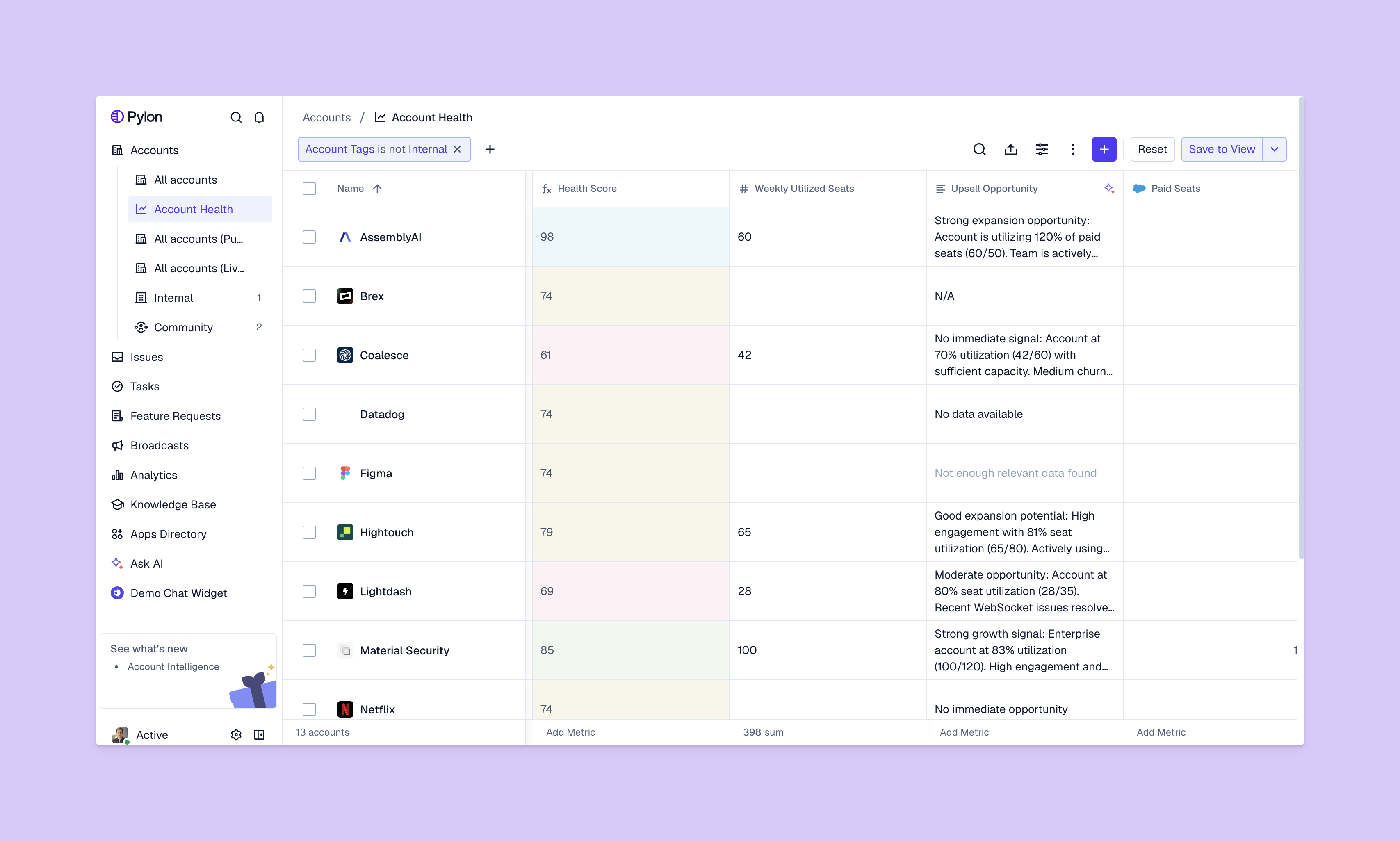
For B2B support and CS teams, the right tools need to track and unify metrics. Pylon’s Account Intelligence pulls engagement data from every channel — support tickets, product usage patterns, and communication frequency — into a single view. So instead of switching between dashboards to piece together customer health, teams can see the full picture in one place.
A customer success manager might know an account is a churn risk based on product usage, but if the support team can’t see that context, they won’t know how to respond in a way that might improve that adoption rate. Pylon’s omnichannel approach ensures that every team member, no matter their role, works with all the information.
When it’s time to review engagement metrics, segmenting the data by account type and lifecycle stage makes a difference. Enterprise accounts behave differently from startups, and a customer in their first 30 days needs different attention than one approaching renewal. So, build segments that reflect how their team actually works to get the most useful information.
A single data point tells you where a customer is right now, but a trend tells you where they’re headed. If weekly engagement drops over three consecutive weeks, you’ll know there’s something you need to address more actively than a single low-activity day. Set up alerts for sustained changes so your team can act before the trend becomes a churn conversation.
The companies that get the most out of engagement metrics are the ones that treat them as shared intelligence. When your support team sees a spike in tickets from a specific segment, your engineering team needs to know. Or if your CS team knows a few accounts are using less, your support team should have that context to help them answer tickets appropriately. Regular cross-team meetings (even if they’re just check-ins with team leads over Slack) can show you patterns that no single team would catch alone.
Engagement metrics help post-sales teams move from reactive to proactive. When you can see which accounts are disengaging, which features are underused, and which customers are at risk, you can intervene before issues escalate. And having one place to store all this information keeps everyone on the same page.
Pylon is the modern B2B support platform that offers true omnichannel support across Slack, Teams, email, chat, ticket forms, and more. Our AI Agents and Assistants automate busywork and reduce response times. Plus, with Account Intelligence that unifies scattered customer signals to calculate health scores and identify churn risk, we're built for customer success at scale.
In B2B customer support, a "good" engagement rate is measured by how quickly you meet your customers where they work. For strategic or enterprise accounts in Slack, the industry benchmark for a first response is under 15 minutes. For general commercial accounts, responding within one hour is considered high engagement. Achieving these speeds leads to higher retention, as B2B customers equate "fast response" with "partnership reliability."
In B2B support, engagement is measured by channel adoption and SLA compliance. For companies using Slack-first support, a healthy engagement rate means 100% of strategic accounts are active in their dedicated channels, with a first response time under 15 minutes. High engagement in these channels is a leading indicator of customer trust; conversely, a drop in conversation volume is often the first red flag for potential churn.
Yes, but it’s measured as an operational efficiency and account health metric. Unlike marketing, which tracks likes and clicks, support teams track KPIs like customer effort score (CES) and median resolution time. According to industry standards, the goal of support engagement is to reduce friction; for example, resolving 80% of issues in a "single touch" is considered a high-performance engagement benchmark for modern B2B teams.
Pylon Workforce Management is available now. See it in action with a live demo.



